Page 24 | Stellar
®
Heavy-Duty Telescopic Crane Owner’s Manual
Radio Transmitter/Receiver Pair Procedure
Start with both Transmitter and Receiver turned off.
To activate pairing the Transmitter, release RED Stop
button, then press Boom Up and Winch Down and hold
for at least 6 seconds.
Do not release either
during this period. The
feedback screen will in-
dicate it is searching for
a Receiver to pair with.
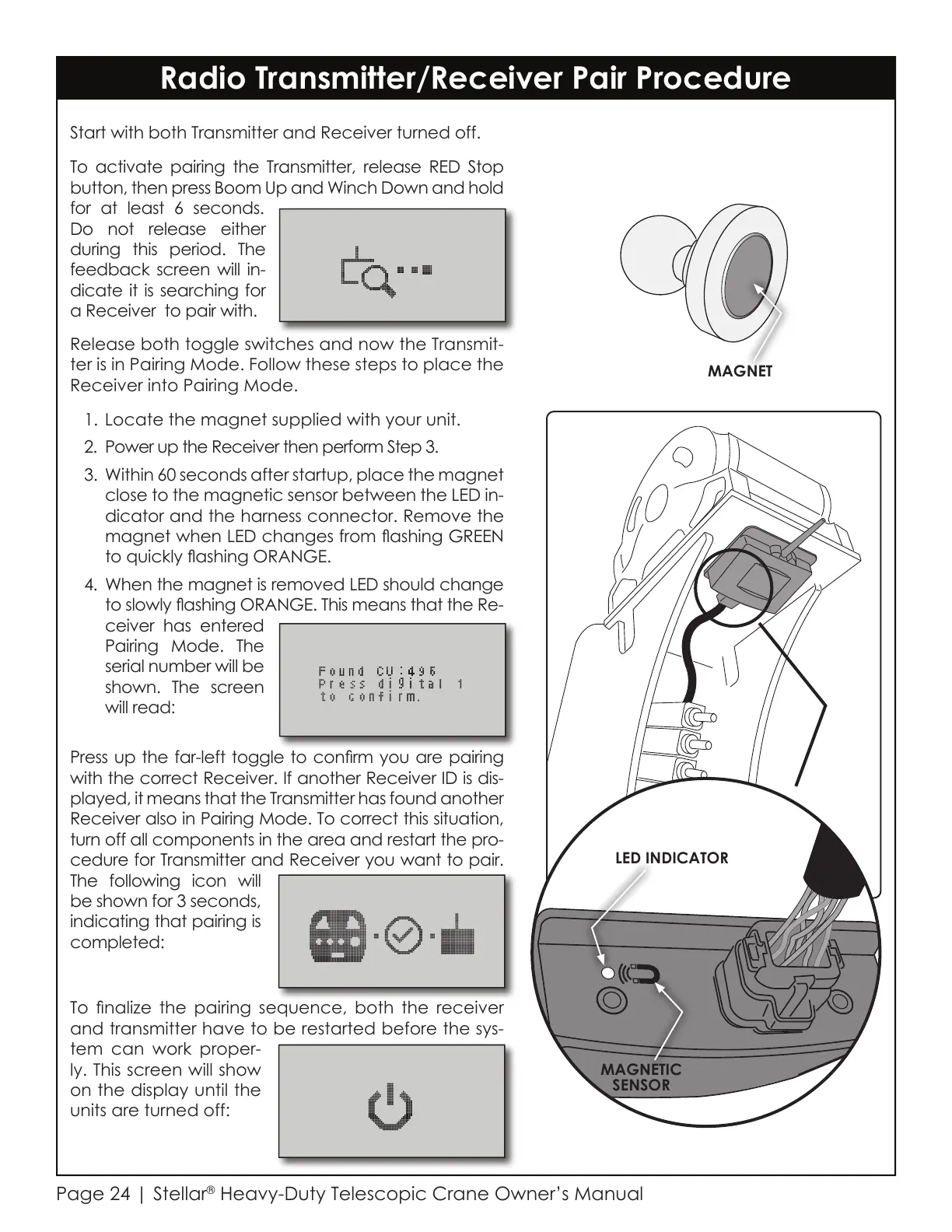
LED INDICATOR
MAGNETIC
SENSOR
Release both toggle switches and now the Transmit-
ter is in Pairing Mode. Follow these steps to place the
Receiver into Pairing Mode.
1. Locate the magnet supplied with your unit.
2. Power up the Receiver then perform Step 3.
3. Within 60 seconds after startup, place the magnet
close to the magnetic sensor between the LED in-
dicator and the harness connector. Remove the
magnet when LED changes from ashing GREEN
to quickly ashing ORANGE.
4. When the magnet is removed LED should change
to slowly ashing ORANGE. This means that the Re-
ceiver has entered
Pairing Mode. The
serial number will be
shown. The screen
will read:
Press up the far-left toggle to conrm you are pairing
with the correct Receiver. If another Receiver ID is dis-
played, it means that the Transmitter has found another
Receiver also in Pairing Mode. To correct this situation,
turn off all components in the area and restart the pro-
cedure for Transmitter and Receiver you want to pair.
The following icon will
be shown for 3 seconds,
indicating that pairing is
completed:
To nalize the pairing sequence, both the receiver
and transmitter have to be restarted before the sys-
tem can work proper-
ly. This screen will show
on the display until the
units are turned off:
MAGNET
Courtesy of CraneMarket.com



 To Next Page