Stellar
®
Heavy-Duty Telescopic Crane Owner’s Manual | Page 25
Charging and Battery Features
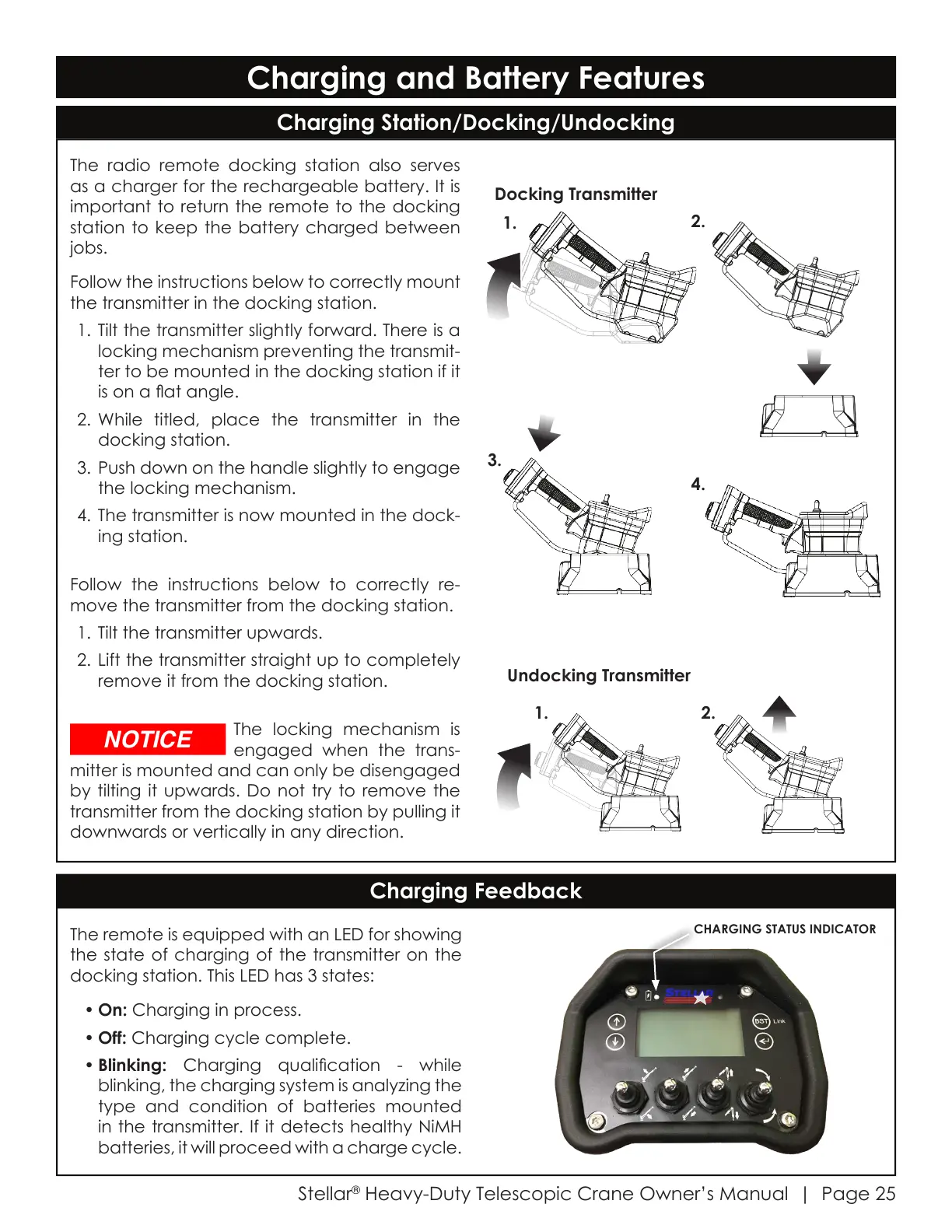
The remote is equipped with an LED for showing
the state of charging of the transmitter on the
docking station. This LED has 3 states:
• On: Charging in process.
• Off: Charging cycle complete.
• Blinking: Charging qualication - while
blinking, the charging system is analyzing the
type and condition of batteries mounted
in the transmitter. If it detects healthy NiMH
batteries, it will proceed with a charge cycle.
The radio remote docking station also serves
as a charger for the rechargeable battery. It is
important to return the remote to the docking
station to keep the battery charged between
jobs.
Follow the instructions below to correctly mount
the transmitter in the docking station.
1. Tilt the transmitter slightly forward. There is a
locking mechanism preventing the transmit-
ter to be mounted in the docking station if it
is on a at angle.
2. While titled, place the transmitter in the
docking station.
3. Push down on the handle slightly to engage
the locking mechanism.
4. The transmitter is now mounted in the dock-
ing station.
Follow the instructions below to correctly re-
move the transmitter from the docking station.
1. Tilt the transmitter upwards.
2. Lift the transmitter straight up to completely
remove it from the docking station.
The locking mechanism is
engaged when the trans-
mitter is mounted and can only be disengaged
by tilting it upwards. Do not try to remove the
transmitter from the docking station by pulling it
downwards or vertically in any direction.
Charging Station/Docking/Undocking
Charging Feedback
CHARGING STATUS INDICATOR
Docking Transmitter
1.
1.
2.
2.
3.
4.
Undocking Transmitter
Courtesy of CraneMarket.com



 To Next Page