EasyManua.ls Logo

Stelpro STE402NP - User Manual

Stelpro STE402NP
12 pages
Print Icon
To Next Page IconTo Next Page
Loading...
INSSTE402NP1010
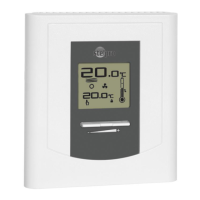
“STE402NP”
Electronic thermostat
User’s guide
www.stelpro.com
For further information or to consult this guide online,
please visit our Web site.

Questions and Answers

  • J
    Julie CarpenterAug 17, 2025
    What to do if the Stelpro Thermostat display doesn't come on?
    • K
      Kelsey LeonAug 18, 2025
      If the Stelpro Thermostat display isn't turning on, verify that the thermostat is correctly wired by checking the installation section. Also, check the power supply at the electrical panel and ensure the heating unit's switch, if present, is turned on.
  • L
    Laura MannAug 20, 2025
    How to fix weak luminosity of the Stelpro Thermostat display?
    • J
      Jacob GuzmanAug 20, 2025
      A weak luminosity of the display on your Stelpro Thermostat may indicate a bad contact. Check the thermostat wirings by consulting the installation section.
  • Z
    zpadillaAug 23, 2025
    Why is the displayed temperature on my Stelpro STE402NP Thermostat incorrect?
    • R
      Richard RobinsonAug 23, 2025
      If the displayed ambient temperature on your Stelpro Thermostat is incorrect, check for any air streams or heat sources near the thermostat and correct the situation.
  • B
    Bethany MooreAug 25, 2025
    Why does my Stelpro STE402NP Thermostat display turn off and on?
    • T
      Thomas ClarkAug 26, 2025
      If the display of your Stelpro Thermostat turns off and on, it means that the thermal protection of the heating unit has opened due to overheating. Make sure that the heating unit is in good working order and that the space around it meets the manufacturer's specifications.
  • S
    scott04Aug 27, 2025
    Why is the displayed ambient temperature incorrect on my Stelpro STE402NP?
    • T
      Terry MarquezAug 27, 2025
      If the displayed ambient temperature on your Stelpro Thermostat is incorrect, check for any nearby air streams or heat sources that might be affecting the reading. Correct the situation by removing the source of the air stream or heat.
  • W
    wbakerAug 30, 2025
    What to do if my Stelpro STE402NP display does not come on?
    • J
      jayshepardAug 30, 2025
      If the display does not come on, you should first check if the Stelpro Thermostat is properly connected, referring to the installation section. Next, verify the power supply at the electrical panel. Finally, check if the heating unit has a switch and ensure that it is turned on.
  • J
    Jerry LawrenceSep 2, 2025
    What to do if Stelpro STE402NP is on but heating does not run?
    • K
      Kelli RosarioSep 2, 2025
      If your Stelpro Thermostat indicates it's on, but the heating isn't running, verify that the thermostat is properly connected by checking the installation section.
  • R
    Randy BellSep 4, 2025
    Why is my Stelpro STE402NP Thermostat hot?
    • J
      Jeanette ParsonsSep 4, 2025
      Under normal operating conditions, the housing of Stelpro Thermostat can reach nearly 40°C at maximum load. This is normal and won't impact how well the thermostat works.
  • J
    Joshua WolfSep 7, 2025
    Why does my Stelpro Thermostat display have low contrast when heating?
    • K
      Kathleen LopezSep 7, 2025
      If your Stelpro Thermostat display has low contrast when heating is on, it may be because the load is lower than the minimum load. To fix this, install a heating unit that is within the load limits of the thermostat.
  • C
    Christopher JacksonSep 9, 2025
    What to do if my Stelpro STE402NP Thermostat display indicates E1 or E2?
    • R
      Robert WadeSep 9, 2025
      If your Stelpro Thermostat displays 'E1' or 'E2', this indicates a faulty thermal sensor. In this case, you should contact customer service for assistance.

Summary

Description

Incompatible Installations

Lists incompatible heating systems and load types for the thermostat.

Parts Supplied

Lists the components included in the thermostat package.

Installation

Thermostat Location Selection

Provides guidelines for choosing an appropriate mounting location for the thermostat.

Mounting and Connection

Details the steps and safety precautions for mounting and wiring the thermostat.

Two-Wire Installation

Illustrates the wiring diagram for a two-wire thermostat installation.

Four-Wire Installation

Illustrates the wiring diagram for a four-wire thermostat installation.

Operation

Operating Modes

Lists and describes the available operating modes: Frost free, Day, Night, Fan, and Automatic.

Display Elements Overview

Explains the function of display indicators like ambient temperature, timer, and set point.

Thermostat Controls

Identifies the buttons for adjusting set points, timers, and locking the set point.

Ambient Temperature

Details how ambient temperature is displayed and measured by the thermostat.

Temperature Set Point Adjustment

Explains how to adjust and the range of the temperature set point.

Day and Night Modes

Describes the dual Day and Night modes with independent set points and manual switching.

Night Mode Timer

Explains the timer function in Night mode for temporary temperature settings.

Night Mode Timer Adjustment

Step-by-step guide to adjusting the Night mode timer duration.

Automatic Mode

Explains the Automatic mode for alternating Day/Night cycles over 24 hours.

Automatic Mode Adjustment

Procedure for activating, deactivating, and setting the Automatic mode timer.

Troubleshooting

Frost-Free Warning

Explains the frost-free function and the meaning of the snowflake icon.

Celsius;Fahrenheit Display

Details how to switch and display temperature in Celsius or Fahrenheit.

Fan Mode Operation

Explains the importance and activation of Fan mode for heating systems with fans.

Fan Mode Adjustment

Step-by-step guide to activating or deactivating the Fan mode.

Technical Specifications and Warranty

Technical Specifications

Lists electrical ratings, temperature ranges, resolution, and certifications.

Limited Warranty Information

Details the 3-year warranty terms, conditions, and limitations.

Customer Service Contact

Provides contact details including address, email, and website.

Stelpro STE402NP Specifications

Power IconPower
supply voltage120/208/240 VAC
minimum electrical current with a resistive load1.2 A
maximum electrical current with a resistive load16.7 A
Electrical Power IconElectrical Power
minimum power at 240 VAC300 W
minimum power at 208 VAC260 W
minimum power at 120 VAC150 W
maximum power at 240 VAC4000 W
maximum power at 208 VAC3475 W
maximum power at 120 VAC2000 W
Temperature Specifications IconTemperature Specifications
temperature display range0°C to 40°C (32°F to 99.5°F)
temperature display resolution0.5°C (0.5°F)
temperature set point range3°C to 30°C (37°F to 86°F)
temperature set point increments0.5°C (1°F)
storage temperature-20°C to 50°C (-4°F to 120°F)

Related product manuals