CreatePrexnumber8.4.3
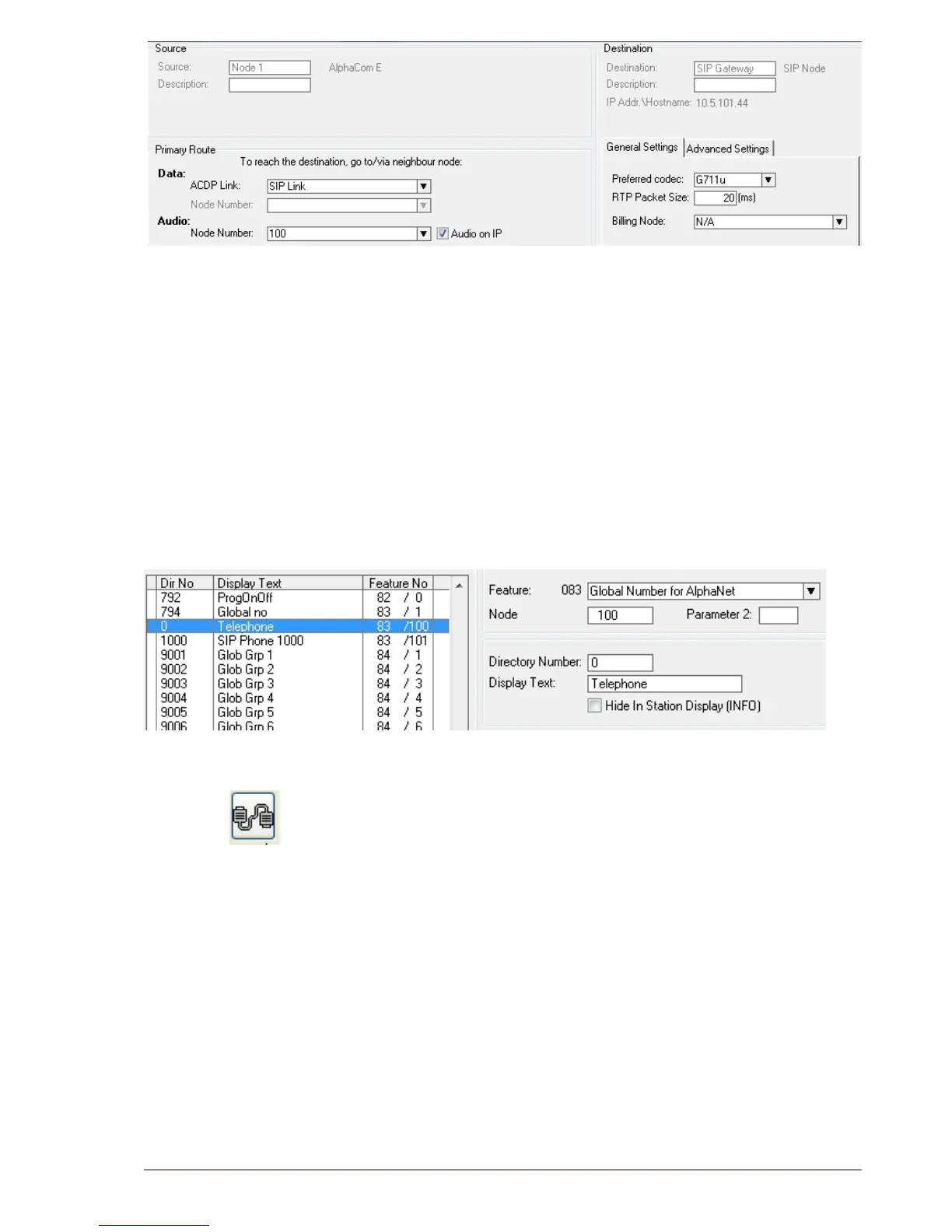
The directory number (prex) used to access the telephone line must be
programmed in the AlphaCom directory table with Feature 83
Click the ● Directory & Features icon
Select ● Global Number for AlphaNet – 83 from the Feature drop-
down list
Click ● Insert
Enter the ● Node number for the SIP Trunk node (100 in this example)
Enter the ● Directory Number for the SIP trunk
In this example, the default directory number 0 has been modied -
to be used as a prex.
Enter a ● Display Text
Conrm by clicking ● OK
Update the exchange8.4.4
● Log on to the exchange by clicking the Communication icon
Update the exchange by clicking the ● SendAll button.
Reset the exchange after the send operation is completed. ●
Billing System8.5
The VINGTOR Billing application makes it possible to manage and
administer the communication fees and expenses for your VINGTOR
ACM system. The application provides access authorization to external
communication. The calling users will be identied based on PIN or
subscriber number. Each user will have a set of authorization criteria
such as credit line, and trunk type, which determines if he/she will be
granted access to external communication.
The VINGTOR Billing application is a full billing system which allows you
to generate revenues from your VINGTOR system and to administer a
set of billing scenarios. Fees can, for instance, be calculated based on
carrier type, duration, called number, and time of day. Billing of users
can be done either by pre-paid or post-paid payment methods.


 To Next Page