Issue 6 6 15/06/2015
7 DEEP SEA 3110 OPERATING INSTRUCTIONS
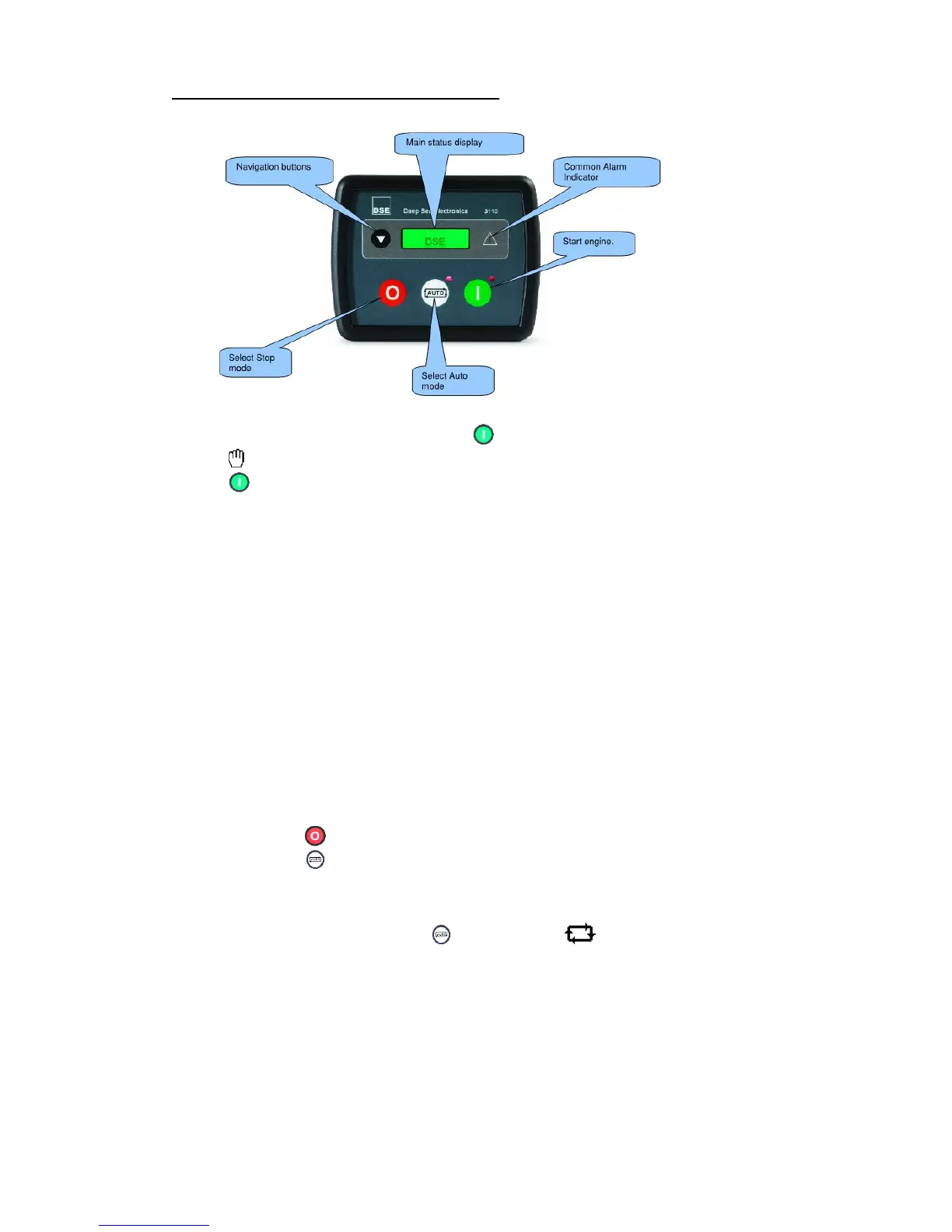
7.1 Description of controls
7.2 Starting the engine
To begin the starting sequence, press the button.
The icon is displayed to indicate Manual mode and the manual LED flashes.
The button must be pressed once more to begin the start sequence.
7.3 Starting sequence
If a start request is present, the fuel relay is energised and the engine will be cranked. If
the engine fails to fire during this cranking attempt then the starter motor is disengaged
for the crank rest duration after which the next start attempt is made. Should this
sequence continue beyond 3 attempts, the start sequence will be terminated and the
display shows Fail to Start.
When the engine fires, the starter motor is disengaged. Speed detection is factory
configured to be derived from the main alternator output frequency.
After the starter motor has disengaged, the Safety On timer activates (10 Sec), allowing
Oil Pressure, High Engine Temperature, Under-speed, Charge Fail and any delayed
Auxiliary fault inputs to stabilise without triggering the fault.
7.4 Engine running
Once the engine is running and all starting timers have expired, the animated icon is
displayed.
If all start requests are removed, the stopping sequence will begin.
7.5 Stopping the engine
In manual mode the set will continue to run until either:
The stop button is pressed – The set will immediately stop
The auto button is pressed. The set will observe all auto mode start requests and
stopping timers before beginning the Auto mode stopping sequence.
7.6 Automatic operation
Activate auto mode by pressing the pushbutton. The icon is displayed to
indicate Auto Mode operation if no alarms are present.
Auto mode will allow the generator to operate fully automatically, starting and stopping as
required with no user intervention.
7.7 Waiting in auto mode
If a starting request is made, the starting sequence will begin.
Starting requests can be from the following sources:
Activation of an auxiliary input that has been configured to remote start.


 To Next Page