ENGLISH
ENGLISH-40
Enabled in the Status pull-down list. Click the Save and the Return
button.
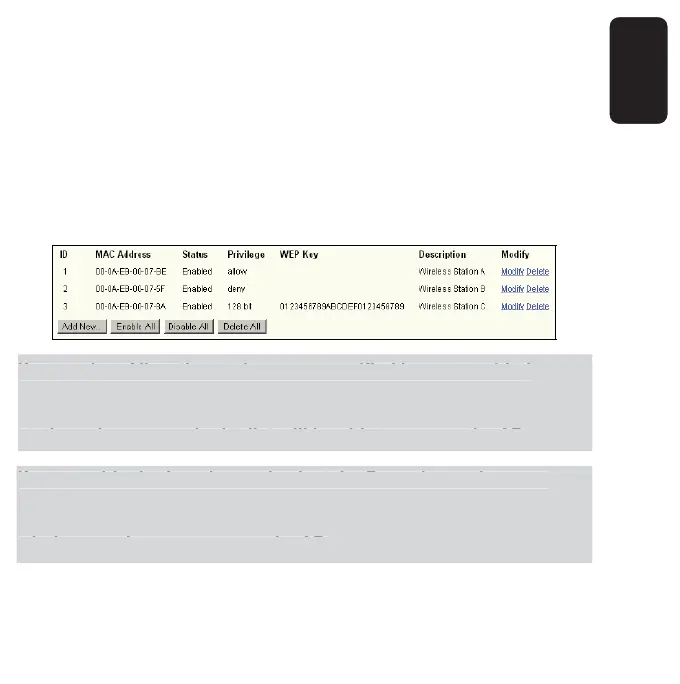
6. Click the Add New... button and enter the MAC address 00-0A-EB-00-
07-8A in the MAC Address fi eld, enter wireless station C in the
Description fi eld, select 128-bit in the Privilege pull-down list, enter 2F3
4D20BE2E54B326C5476586A in the WEP Key fi eld and select Enabled
in the Status pull-down list. Click the Save and the Return button.
The fi ltering rules that confi gured should be similar to the following list:
If you select Allow the stations not specifi ed by any enabled
entries in the list to access for Filtering Rules, the wireless station
B will still not be able to access the AP, however, other wireless
stations that are not in the list will be able to access the AP.
If you enable the function and select the Deny the stations not
specifi ed by any enabled entries in the list to access for Filtering
Rules, and there are not any enable entries in the list, thus, no
wireless stations can access the AP.
f
ou select Allow the stations not specifi ed b
an
enabled
ntries in the list to access for Filterin
Rules, the wireless station
will still not be able to access the AP, however, other wireless
tations that are not in the list will be able to access the AP
f
ou enable the function and select the Den
the stations not
pecifi ed b
an
enabled entries in the list to access for Filterin
ules, and there are not an
enable entries in the list, thus, no
ireless stations can access the AP.



 To Next Page