12
835.2
MAINTENANCE MANUAL
ANNUAL KIT (P/N: AC+AK)
Stages 1, 2, 3, and the UV Light’s lifespan are chronological and are replaced annually from the date
of installation. Their lifespan is tracked via the Filter Monitor on the far left side of the system. When
properly programmed, the Filter Monitor tracks the remaining months of the cartridges and UV Light
life.
STAGE 4 CARTRIDGES [P/N: AC+C4 OR (AC+DI: AC+C4 x3)]
Stage 4 Cartridge readings are based on the quality of water coming off them. Water quality readings can
be found on the far right monitor. When the reading on the Water Quality Monitor degrades to 10ppm on
D1, the audible alarm will sound, and the “Autoclave Water Quality” indicator lights on the front of the
system, and at the white Autoclave Faucet Disc, will illuminate red. At this point, the leading (left-most)
Stage 4 will need to be changed.
LOG READINGS (METHODOLOGY)
Because much of the system health is based on rates of reduction, it is important to log and monitor
water quality readings. Notating the water quality readings for the Source, RO, D1, and D2 will expedite a
solution if the need arises to contact Sterisil® customer service.
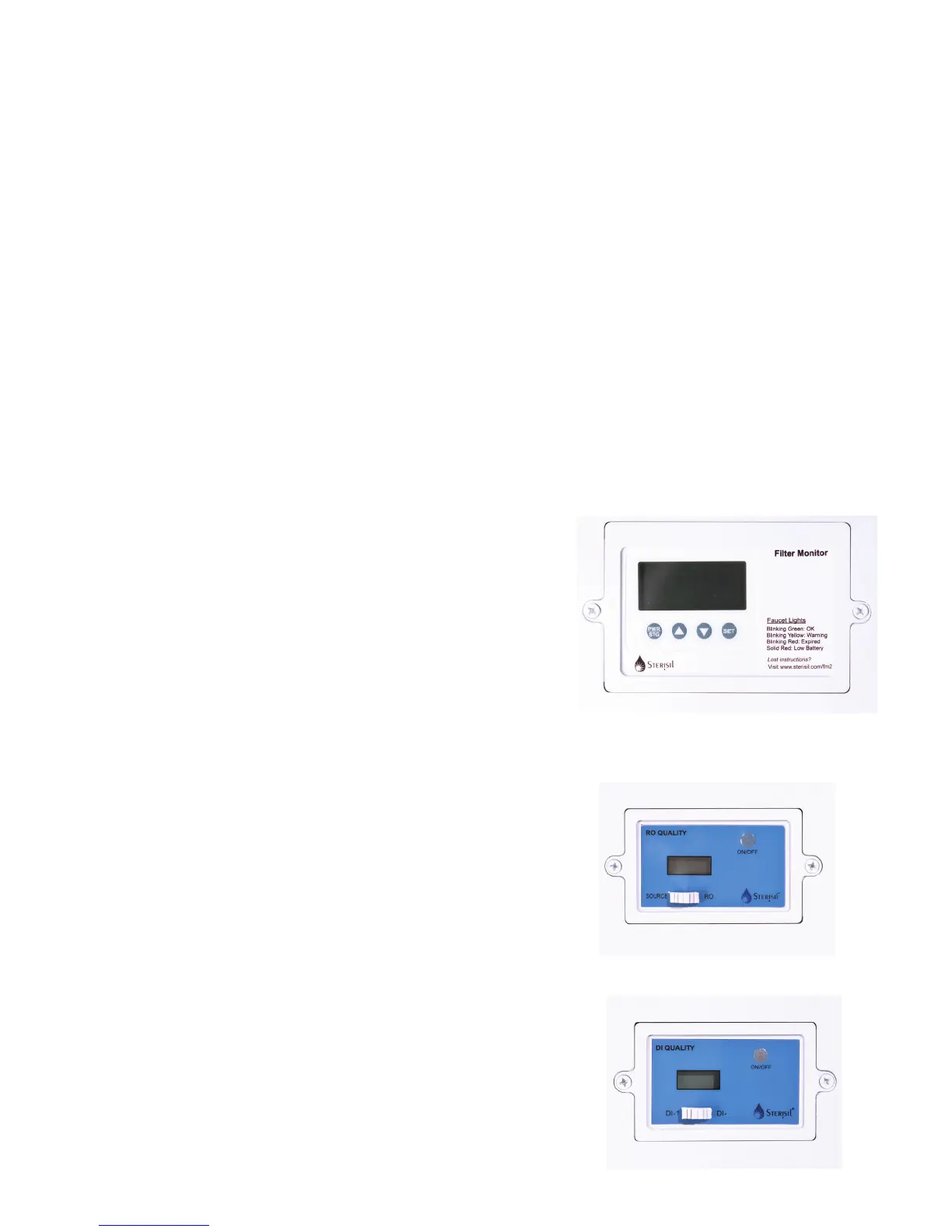
FILTER MONITOR (FAR LEFT)
The Filter Monitor, when properly programmed, tracks the
remaining lifespan in months for stages 1, 2, 3, the UV Light.
Month counts will always descend from a 12 month starting
point. When the month count reaches 0, an audible alarm
will sound and the word “change” will appear in the upper
portion of the Filter Monitor. At this point, Cartridges 1-3 and
the UV Light will need to be changed.
When the batteries in the Filter Monitor are ready to be
changed, the system will beep intermittently, and a battery
icon will appear in the upper center of the Monitor display.
RO WATER QUALITY MONITOR (CENTER)
The RO Monitor gives both source and RO water quality
readings. To get the source water quality, ensure the Monitor
is on with the white switch in the left hand position. To get
the RO reading, ensure the Monitor is on with the white
switch in the right hand position. To attain the most accurate
reading, run the water for 30 seconds prior to taking the
reading.
DI WATER QUALITY MONITOR (FAR RIGHT)
The DI Quality Monitor gives water quality readings for all
Stage 4 Cartridges. DI-1 refers to the leading (left-most)
Stage 4 Cartridge. To get the water quality reading for DI-1,
ensure the Monitor is on with the white switch to the left.
DI-2 refers to the secondary (right-most) Stage 4 Cartridge.
To get the water quality reading for DI-2, ensure the Monitor
is on with the switch to the right.
2



 To Next Page