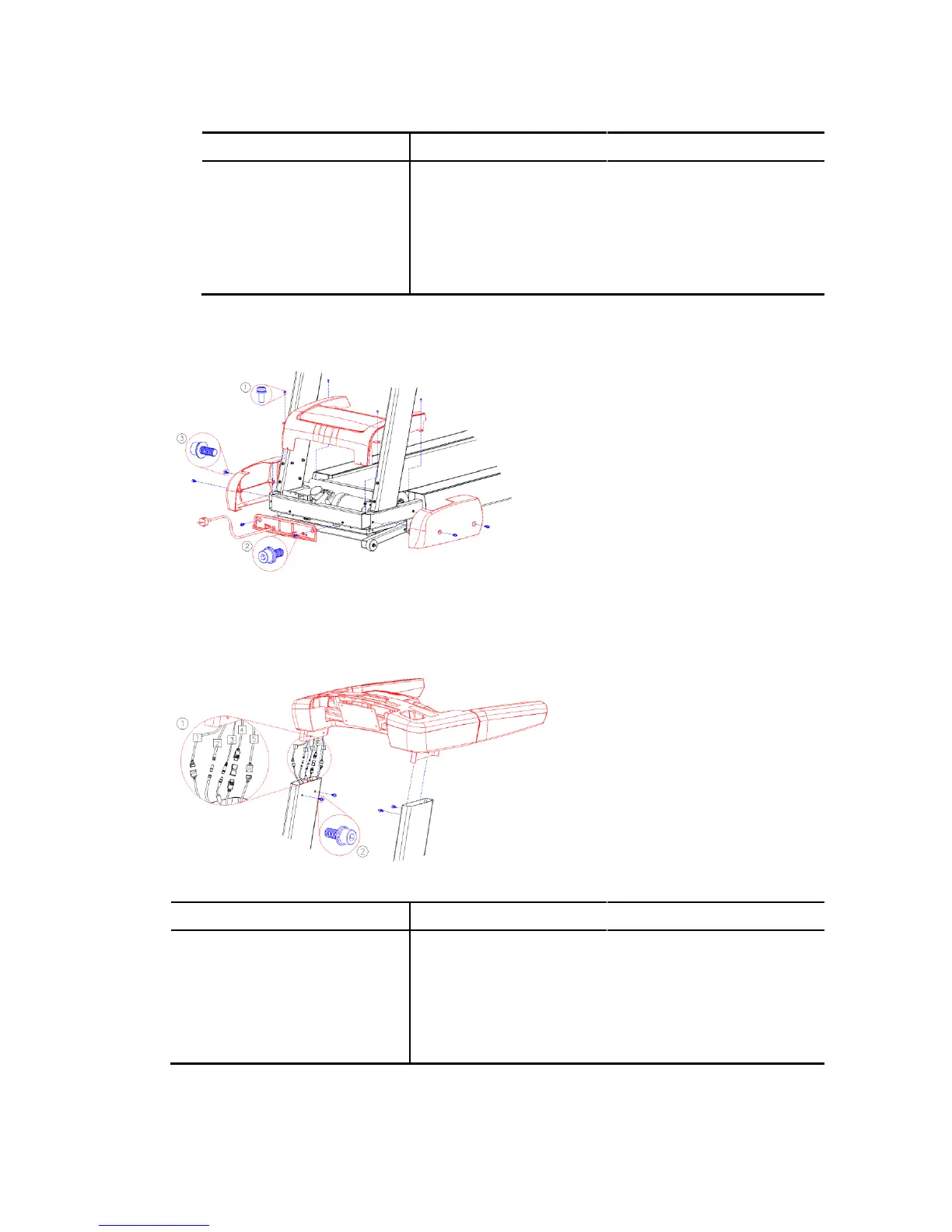
5. Reinstall the MOTOR COVER using the four previously removed SCREWS(①, M512L).
Position the FRONT COVER as shown. Reinstall the
FRONT COVER using the two previously removed
BOLTS(②, M820L).
Position the SIDE COVERS(LEFT & RIGHT SIDE
COVERS) as shown. Install the SIDE COVERS
using four BOLTS(③, M820L).
Keep the COVERS assembly procedures.
Tighten the SCREWS or BOLTS securely. Do not
overtighten the SCREWS or BOLTS.
6. Position the CONSOLE MIDDLE ASSEMBLY.
Connect all cables.
Carefully insert the CONSOLE MIDDLE
ASSEMBLY into the top of the RIGHT and
LEFT TUBE as shown.
Secure the CONSOLE MIDDLE ASSEMBLY
using four BOLTS(②, M820L) and
TOOTHED LOCK WASHER(③, M8).
[Connecting cables]



 To Next Page