< 46 >
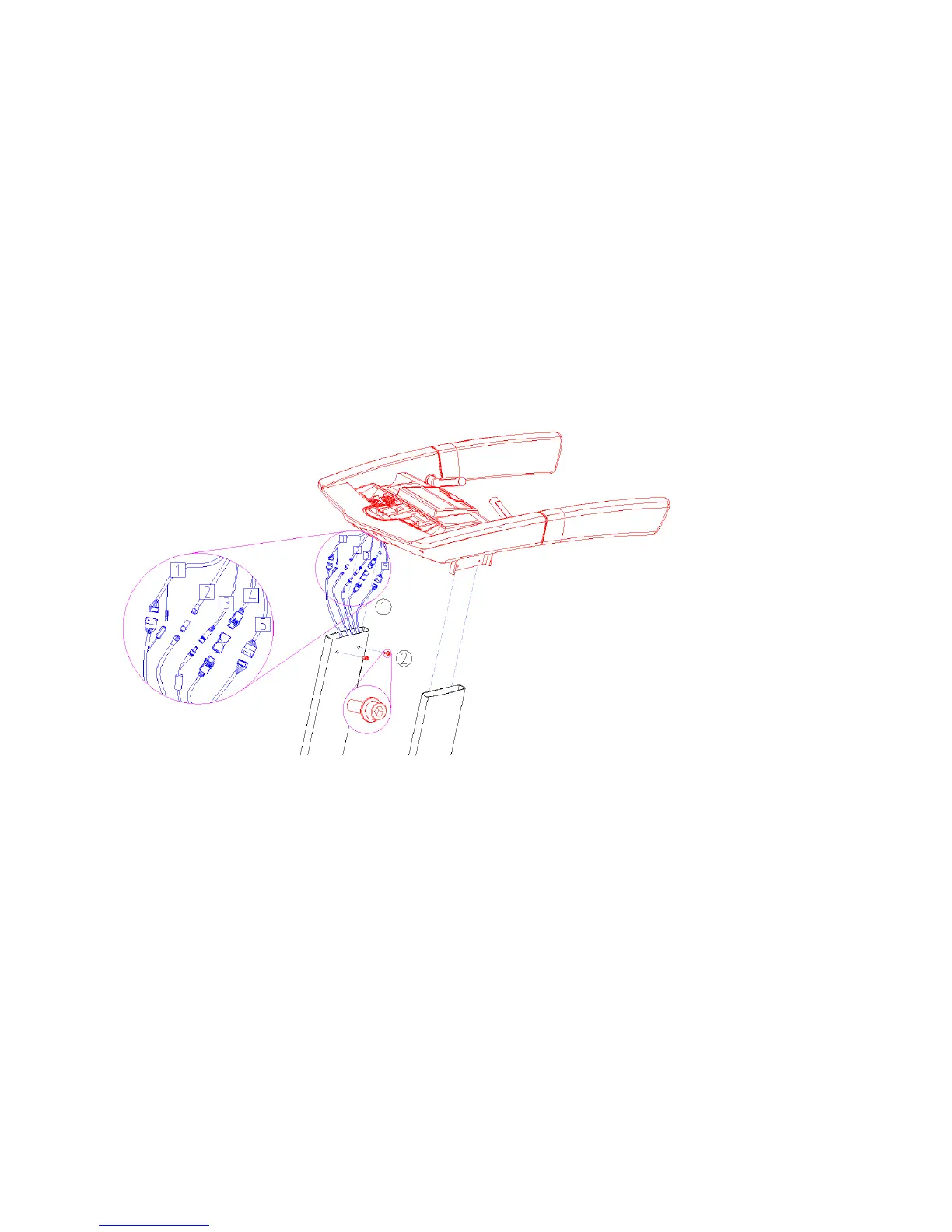
5. Secure the DISPLAY CONSOLE ASSEMBLY
① Connect the cables between the DISPLAY CONSOLE ASSEMBLY and DISPLAY SUPPORT as shown.(1)
1) Main cable - S25T , S25TX
- Connect the Main cable(+) and Main cable(-) .
2) RF cable - S25TX
- Connect the RF cables(+) with Gender .
3) Adapter cable - S25TX
- Connect the Adapter cable(+) and Adapter cable(-) .
4) HDMI cable (Option) - S25TX
- Connect the HDMI cables(+) with Gender .
5) CSAFE cable (Option) - S25TX
- Connect the CSAFE cable(+) and CSAFE cable( - ) .
② Slide the D ISPLAY CONSOLE ASSEMBLY on the D ISPLAY SUPPORT and Fasten 4 bolts(M8
×
20mm) w
ith



 To Next Page