14
Stille imagiQ2
TM
user manual Handling
n
Safety Information
Hand control
Important information
All movements are interrupted when the hand control
is switched off (OFF), or when the Quick shut-off is
switched off.
All motor-driven movements can be activated from
the hand or emergency hand control.
Only one movement at a time can be selected.
All movements except the parking function stop
immediately when the buttons on the hand control or
foot pedal is released.
If no buttons are pressed for two hours, the table is
switched off automatically. The (ON) lamp flashes
and a repeated beep gives a ten minute warning
before automatic switch-off. Press any button to
prevent automatic switch-off. If no movement is
required, press the (ON) button
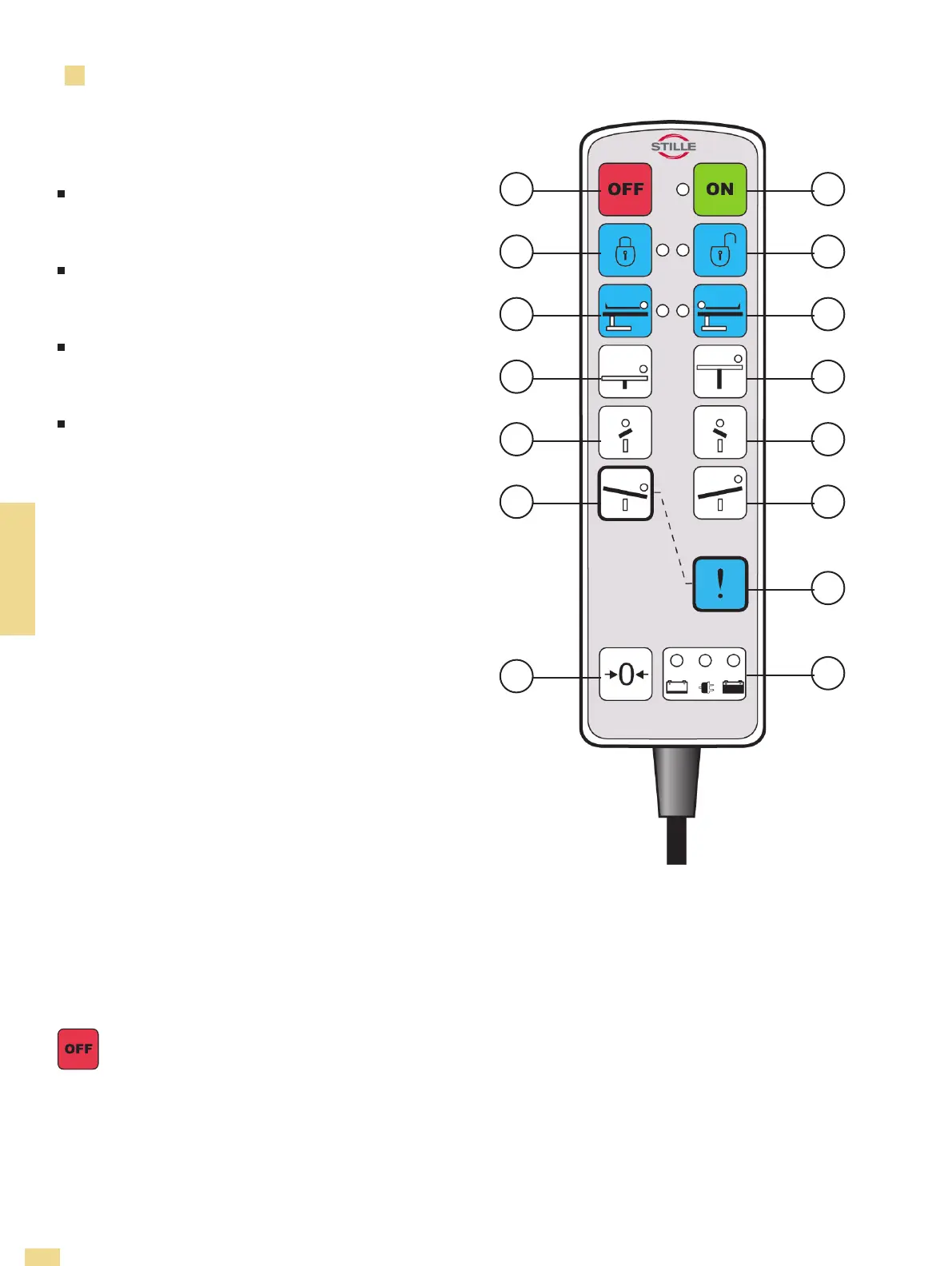
Overview
1. Off
2. On
3. Parked table
4. Unparked table
5. Setting of head-end
6. Setting of head-end
7. Column down
8. Column up
9. Lateral tilt
10. Lateral tilt
11. Trendelenburg
12. Anti-Trendelenburg
13. Quick trend
14. Return to zero
15. Battery indicator
HANDLING
1 2
3 4
5 6
7 8
9
10
12
13
15
11
14
1. Off
Swiches the operating table off.


 To Next Page