5
www.sngerelectronics-eu.com
Please note: conguraon layout may dier dependent on vehicle model.
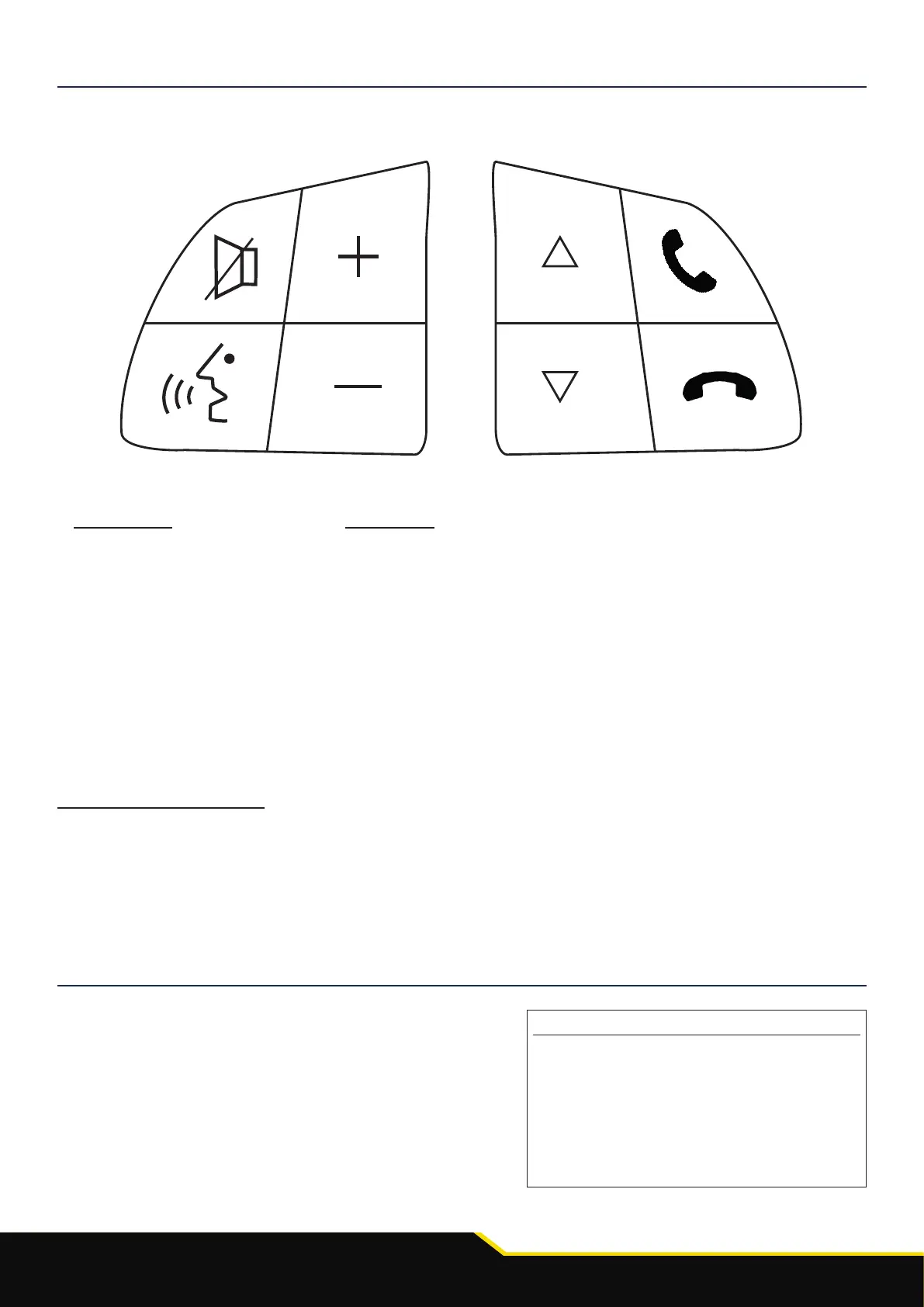
STEERING WHEEL CONTROL FUNCTIONALITY
1
2
3
4
5
6
8
7
1. Mute
2. Source
3. Volume +
4. Volume -
5. Track +
6. Track -
7. Pick Up
8. Hang Up
1. Mute
2. Speech
3. Volume +
4. Volume -
5. Up Arrow
6. Down Arrow
7. Pick Up
8. Hang Up
- Short press SPEECH to enter a sub-menu or conrm an opon within a menu.
- Press TRACK + to scroll up through the menu items, or to increment an opon within a menu.
- Press TRACK - to scroll down through the menu item, or to decrement an opon within a menu.
CONFIGURATION MENU FUNCTIONALITY
Press and hold SPEECH to enter into the conguraon menu.
From here you will then be able to use the steering wheel controls to navigate
through the various opons and sengs below.
Conguration Menu
Vehicle Settings
Infodapter Settings
Language
Version
< Back












 To Next Page