EasyManua.ls Logo

Stinger HEIGH 10 - User Manual

Stinger HEIGH 10
8 pages
Print Icon
To Next Page IconTo Next Page
Loading...
Copyright © 2022
StingerElectronics-EU.com
INTEGRATED INFOTAINMENT TOUCH SCREEN SOLUTION FOR
ALFA ROMEO GIULETTA 2014 - 2021
PART NUMBER: UN1810E-AR1
INSTALLATION GUIDE
Question and Answer IconNeed help?

Do you have a question about the Stinger HEIGH 10 and is the answer not in the manual?

Summary

Fitting Guide

Stereo Removal

Step-by-step instructions for removing the original car stereo unit.

Dash Modification

Guidance on modifying dashboard plastics to accommodate the new stereo.

HEIGH10 Assembly

Instructions for assembling the core HEIGH10 components.

Fitting Guide

Fascia Plate Set-up

Instructions for correctly attaching the fascia brackets and plate.

Interface Set-up

Configuration and connection steps for the vehicle interface harness.

Steering Wheel Control Functionality

Navigating Configuration Menus

How to navigate through the configuration menus using steering wheel controls.

Configuration Menu Functionality

Overview of steering wheel control functions within the configuration menu.

Steering Wheel Control Functionality

Vehicle Settings

Adjusting vehicle-specific settings via the new stereo interface.

Infodapter Settings

Customizing the layout and appearance of the infotainment menus.

Preferences (Sub-menu)

Fine-tuning specific vehicle and camera related preferences.

Wiring Diagram

Technical Assistance

Summary

Fitting Guide

Stereo Removal

Step-by-step instructions for removing the original car stereo unit.

Dash Modification

Guidance on modifying dashboard plastics to accommodate the new stereo.

HEIGH10 Assembly

Instructions for assembling the core HEIGH10 components.

Fitting Guide

Fascia Plate Set-up

Instructions for correctly attaching the fascia brackets and plate.

Interface Set-up

Configuration and connection steps for the vehicle interface harness.

Steering Wheel Control Functionality

Navigating Configuration Menus

How to navigate through the configuration menus using steering wheel controls.

Configuration Menu Functionality

Overview of steering wheel control functions within the configuration menu.

Steering Wheel Control Functionality

Vehicle Settings

Adjusting vehicle-specific settings via the new stereo interface.

Infodapter Settings

Customizing the layout and appearance of the infotainment menus.

Preferences (Sub-menu)

Fine-tuning specific vehicle and camera related preferences.

Wiring Diagram

Technical Assistance

Overview

The Stinger HEIGH10 is an integrated infotainment touch screen solution designed for the Alfa Romeo Giulietta (940 Facelift) models from 2014 to 2021. This system is specifically compatible with non-amplified Continental Mopar factory head units. Its primary function is to upgrade the vehicle's radio with a 10-inch infotainment system, while retaining all original equipment manufacturer (OEM) features, vehicle settings, and more, in a plug-and-play package.

Function Description

The HEIGH10 system enhances the in-car entertainment experience by offering a larger screen and a suite of modern infotainment features. Key functionalities include Apple CarPlay, Android Auto, DAB+ digital radio, and Bluetooth streaming. The system is designed to seamlessly integrate with the vehicle's existing controls, allowing drivers to manage key vehicle settings and infotainment features directly through the HEIGH10 display using their steering wheel controls.

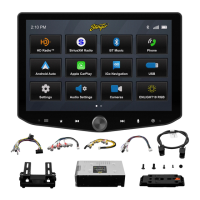
The core of the system involves a HEIGH10 unit, which serves as the central processing and display component. This unit is complemented by a vehicle retention interface, which is crucial for maintaining the original vehicle's functionalities and allowing communication between the new head unit and the car's systems. The interface ensures that features like steering wheel controls, parking sensors, and other vehicle-specific settings remain operational and can be accessed through the new display.

The installation kit includes a piano black double DIN fascia plate, which provides a factory-like finish for the new screen within the dashboard. Vehicle-specific antenna adapters and USB retention leads are also provided to ensure that existing vehicle connections for radio and USB are maintained and compatible with the new HEIGH10 unit. A Stinger stereo patch lead facilitates the connection between the HEIGH10 unit and the vehicle's interface.

Usage Features

The HEIGH10 system offers a user-friendly interface accessible through its 10-inch touch screen. Drivers can navigate through various menus and settings to customize their experience.

Steering Wheel Control Functionality:

The system is designed to integrate with the existing steering wheel controls of the Alfa Romeo Giulietta. The original buttons are remapped to new functions to control the HEIGH10 unit:

  • Mute: Retains its original function.
  • Speech: Becomes the "Source" button, with a long press entering the configuration menu.
  • Volume + / -: Retain their original functions for adjusting audio volume.
  • Up Arrow / Down Arrow: Remapped to "Track + / -" for navigating through audio tracks.
  • Pick Up / Hang Up: Retain their original functions for managing phone calls.
  • A short press of the "Speech" button (now "Source") enters a sub-menu or confirms an option within a menu.
  • Pressing "Track +" scrolls up through menu items or increments an option.
  • Pressing "Track -" scrolls down through menu items or decrements an option.
  • Pressing and holding the "Speech" button enters the main configuration menu.

Configuration Menu Functionality:

The configuration menu allows users to access and adjust various settings:

  • Vehicle Settings: This section retains the ability to adjust selected vehicle settings that were present with the original head unit. These settings can include display options, clock settings, safety and driving assistance features, lights, and door/lock controls. The specific options available depend on the individual vehicle and system specification. Users are advised to consult their vehicle handbook for more details on these features.
  • Infodapter Settings: This menu allows users to customize the layout and appearance of the menu screens.
    • Screen Size/Position: Adjusts the horizontal and vertical screen size/position to align with the new stereo display.
    • Picture Settings: Allows adjustment of brightness, contrast, and color saturation.
    • Preferences: Offers vehicle-specific options based on functionality and specification.
      • Park Assist Version: Selects the version according to the color configuration of the park assist fitted to the vehicle.
      • Camera Connected: Set to "Yes" if an optional aftermarket reverse camera is connected.
      • Reverse Priority: Determines whether the camera image or park assist image is shown by default when reversing. The driver can switch between images using the "Source" button while reversing. This option is only available if "Camera Connected" is set to "Yes."
      • Park Brake Source: Configures the park brake output to activate when the park brake is on ("Park"), when speed is less than 3km/h ("Speed"), or to remain on at all times ("Always On").
      • Restore Factory Settings: Resets all Infodapter settings to their factory defaults. Note that this does not restore vehicle settings.

Maintenance Features

The Stinger HEIGH10 system is designed for ease of installation and long-term use, with minimal specific maintenance requirements beyond general care for an electronic device.

Installation Guide:

The provided installation guide outlines a step-by-step process for stereo removal, dash modification, HEIGH10 assembly, fascia plate setup, and interface setup.

  • Stereo Removal: Involves carefully removing existing screws and using a panel removal tool to detach the main fascia panel and disconnect wiring.
  • Dash Modification: Some plastic cutting may be required to create space for the new stereo. The guide emphasizes taking due care and recommends professional installation to prevent damage to the vehicle.
  • HEIGH10 Assembly: Instructions are provided to assemble the core components of the HEIGH10 unit using the accompanying "Installation Manual."
  • Fascia Plate Set-Up: Details how to attach fascia brackets to the radio module and secure the fascia to the brackets, followed by reassembly of the main fascia panel.
  • Interface Set-Up: This crucial step involves configuring dipswitches on the interface to match the head unit type (Pioneer or other) and reverse camera format (PAL or NTSC). It also details connecting the 14-way vehicle interface harness, the 12-way stereo patch lead (with a 3.5mm jack to the HEIGH10 unit), the 4-way camera extension harness, the antenna adapter, and the USB retention lead. Specific RCA connections for reverse cameras are also outlined.
  • Wiring Diagram: A comprehensive wiring diagram is included, illustrating connections for OEM specific connectors, flying wire outputs (Speed Pulse, Park Brake, Reverse Gear), ISO connectors, main wiring loom, stereo patch lead, camera harness, and RCA connectors for optional reverse cameras. It highlights the importance of connecting the stereo patch lead to the interface first, before making power connections.

Software Updates:

The manual mentions that it is considered correct at the time of printing but is subject to change. Users are advised to refer to the StingerElectronics-EU.com website for the latest manuals and updates, indicating that software or firmware updates may be available to improve functionality or address issues.

Technical Assistance:

For further help or assistance, users can contact Stinger's technical support via email or phone. This ensures that users have access to expert help for any installation or operational issues, contributing to the long-term usability and maintenance of the device.

General Care:

As with any electronic device, general care such as keeping the screen clean, avoiding extreme temperatures, and protecting it from physical damage will contribute to the longevity and performance of the HEIGH10 system. The product is intended for off-road and passenger use, implying a certain level of durability for typical vehicle environments.

Stinger HEIGH 10 Specifications

General IconGeneral
TouchscreenYes
BluetoothYes
Wi-FiYes
GPSYes
Android AutoYes
Apple CarPlayYes
USB Ports2
Backup Camera InputYes
SiriusXM ReadyYes
Steering Wheel ControlYes
RadioAM/FM

Related product manuals