36
6. Triggers
Any triggers configured for Manual Switching
(see “Triggers” on page 30) will have a button
available here. Clicking one of these buttons
will toggle the trigger and therefore the
connected device.
7. Temporary Audio Adjustments
Even though you may have meticulously
calibrated the theater in Main Speakers
settings, some material may sound best with
slight adjustments. Adjustments here are
temporary and reset to 0 with each change
of Preset.
• Center Enhance: Adjust the level of the center
channel between -6 and +6dB in 1dB increments.
• Surround Enhance: Adjust the level of the
surround channels between -6 and +6dB in 1dB
increments.
• Sub Enhance: Adjust the level of the subwoofer
channels between -6 and +6dB in 1dB increments.
• Bass: Tone control to adjust the bass level in the
entire theater using both the subwoofer and main
channels between -6 and +6dB in 1dB increments.
• Treble: Tone control to adjust the treble level in
the entire theater between -6 and +6dB in 1dB
increments.
• Brightness: Tilt the tonal balance of the
presentation towards darker timbre (negative
figures) or brighter timbre (positive figures).
• Lipsync: Temporarily adjust lip sync delay to
accommodate some sources. Note that this is
also reset every time a new input is selected, so
if you find yourself regularly setting this to the
same figure, adjust the delay either per source
(“8. AV Delay” on page 13) or for the entire theater
(“Audio/Video General Delay per AV Zone” on
page 30).
8. Zone2 Control
Within the configuration for each preset,
you may select auxillary zones which may
be enabled. If zones are enabled for the
currently selected preset, you may choose
them from the dropdown menu and
individually adjust volume, bass, treble, EQ
(except for Downmix zone), mute for each
A/V and Headphone zones, also include a
temporary lipsync adjustment. A secondary
input can be selected for the Zone2 auxiliary
audio zones (10), different from the Main
Theater input. For each Zone it is possible
to then select either the Secondary Zone2
source or the source currently playing in the
Main Theater (9).
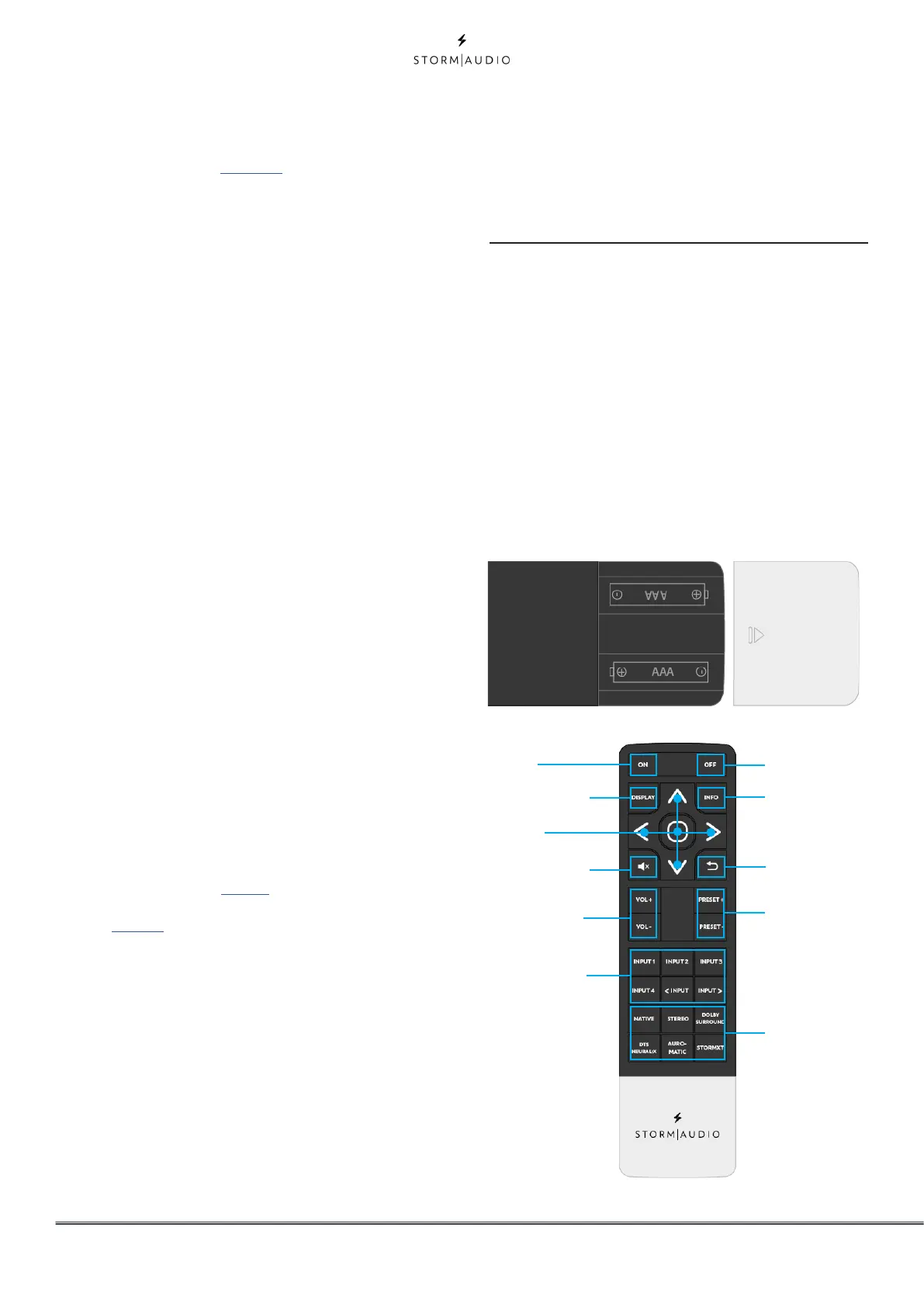
Independent Remote Control
The IR control unit operates effectively within
a distance of 23 feet (7 meters) and an angle of
30° from the processor. Using the control near
fluorescent lights may shorten this range, as will
any dust or dirt that accumulates on the front
of the remote control or the remote-sensor area
of the processor. Also, avoid blocking the line of
sight between processor and remote.
Install the two supplied AAA batteries in the
remote as shown. Be certain to follow the (+) and
(–) polarity indicators that are on the top of the
battery compartment.
Power ON
Front panel
navigation keys
Control front panel
display mode
MUTE audio of the
selected theater or
zone
Control volume of
the selected theater
or zone
Select the input of
the selected theater
or zone
Power OFF
Show the stream
information
Return to pre-
vious menu
Select the
Listening Preset
Select the
Preferred Upmix
mode of the
selected Theater



 To Next Page