ISP Immersive Sound Processor
5
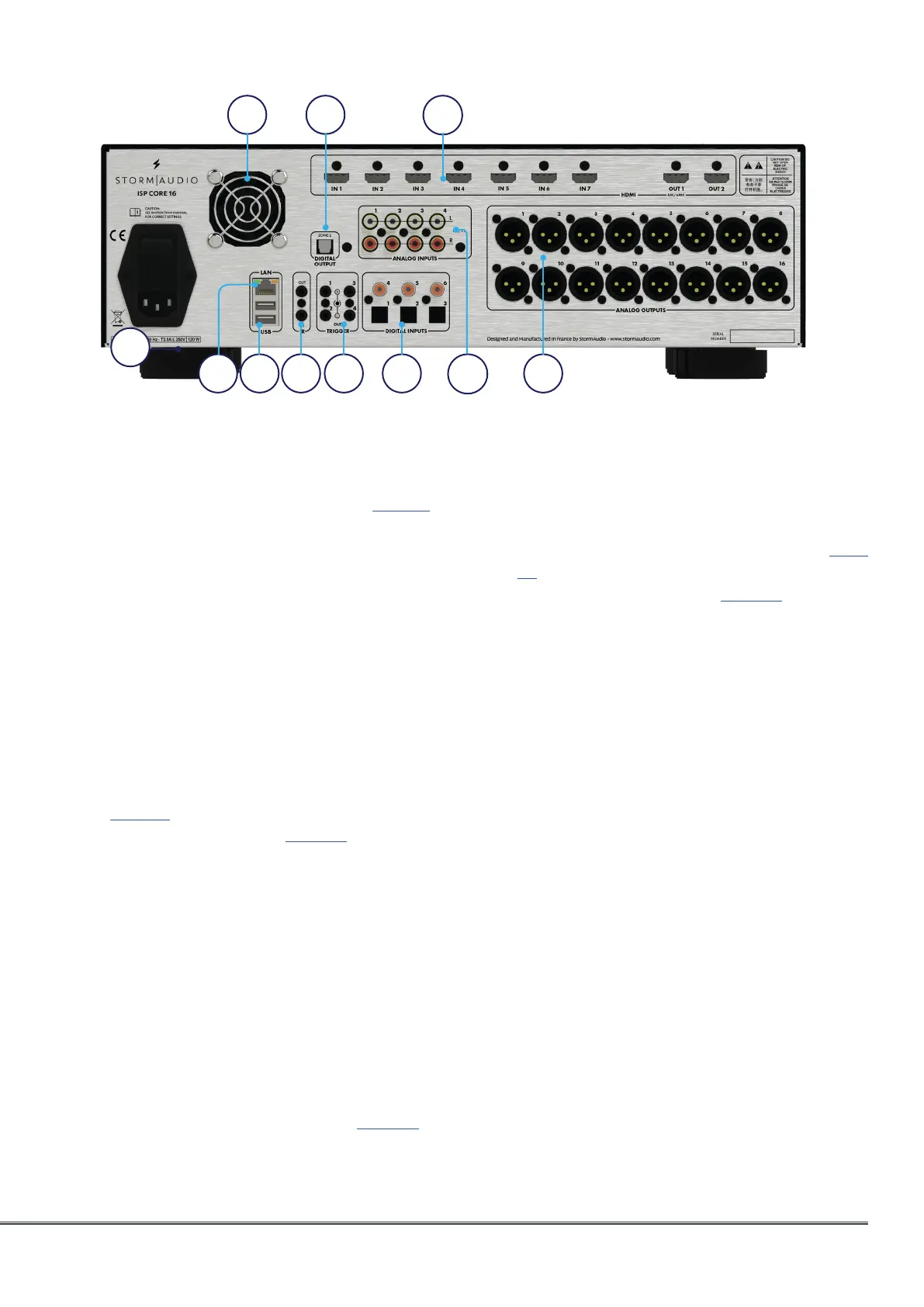
14. Analog Inputs
Eight RCA inputs and one XLR balanced input
are provided and can be used as following
depending on the “Input Settings” on page 12:
• 4x stereo pairs,
• 1x 7.1 input,
• 3x stereo pairs with XLR input,
• 1x 5.1 input with XLR input.
When connected as a 7.1 input, the channel
assignment is as follows, clockwise from top
left: LF, CF, LS, LB, RB, RS, SUB, RF.
15. Analog Outputs
Sixteen XLR analog audio outputs are
provided by default and fully assignable to
theaters or zones. See instructions starting
with “Building a Theater - Defining Channels”
on page 14. Outputs may also be remapped.
See “Output Mapping” on page 23. Pin 2 hot.
16. HDMI
7 HDMI inputs and 2 outputs are available,
with full support of HDCP 2.2 / HDMI 2.0
requirements up to 18 Gbps speed.
Outputs are mirrored, with HDMI Output
1 supporting eARC and ARC audio return
channel from compatible TVs.
Support of High Dynamic Range modes with
HDR10, HLG and Dolby Vision® compatibility.
Finally an OSD for on screen information
feedback is available. See more on page 38.
Note: do not use embedded 5V to supply optical fiber cables.
17. Zone2 Optical Output
An optical Toslink outputs is provided as
a dedicated 2 channel downmix output
(Zone2) of whatever audio is playing in the
selected theater or Zone2 source activated.
To configure, see “Parameters” on page
30. Downmix may be enabled for selected
presets. See “Presets” on page 33.
18. Rear Panel Fan
From time to time, the ISP may automatically
turn on the fan to draw cool air through the
ISP and out the back. Do not obstruct the fan
or any airflow vents on the chassis.
9 10 12
14
16
1511
8
18 17
13



 To Next Page