6. Installation of the system
16
Time Region &
Language
Hardness &
People
Holiday
Mode
Advanced
Settings
System
Information
Date and Time
15:57
jul. 22 , 2013
‘MENU’ BUTTON: Press this button to go to the menus and sub-
menus. Once inside, you can go back through the program-
ming process.
‘SET/REGEN’ BUTTON: Press this button to trigger immediate or
delayed regenerations. When programming, it allows to select
the parameter as well as to confirm it.
‘+ and -’ BUTTON: Press this button to select and modify the
parameter.
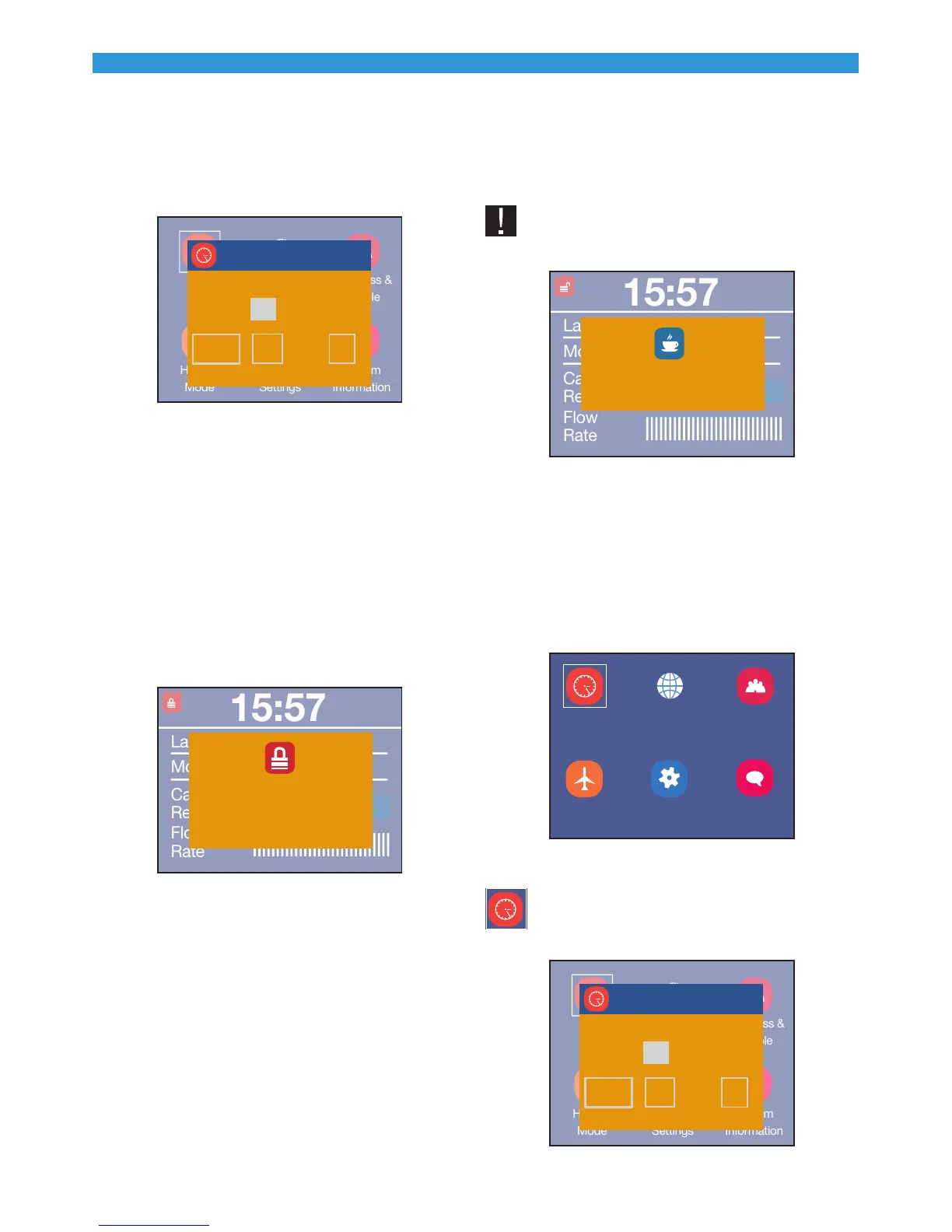
HOW TO LOCK THE PROGRAMMER: : If no button is pressed during
certain time, the programmer gets locked for security reasons,
and shows the message below when any button is pressed.
15:57
Last Regen. : jul. 01, 2012
Mode: Meter Override
Capacity
Remaining
Flow
Rate
Key Locked, Press and
Hold “MENU” Key for 3
Seconds to Unlock
To unlock the programmer, press the ‘MENU’ button during
3 seconds.
6.4 How to Program the System
STRATOS systems are configured to carry out delayed rege-
nerations at 2 a.m.
USER PROGRAMMING:
1. Connect the supplied transformer with the electrical con-
nector located on the rear part of the system. The program-
mer must be in service and show a message similar to that in
the previous section.
IMPORTANT: When connecting the system the fo-
llowing message may appear:
15:57
Last Regen. : jul. 01, 2012
Mode: Meter Override
Capacity
Remaining
Flow
Rate
Advancing to Service
Wait Please
This means that the system is entering the service mode.
If two minutes have gone by, and this message is still
showing, please contact your distributor.
2. Press the ‘MENU’ button for 3 seconds to get into the inter-
nal program of the system. At this point you may have access
to the following parameters:
Time Region &
Language
Hardness &
People
Holiday
Mode
Advanced
Settings
System
Information
Time: The current date and time can be configured.
Time Region &
Language
Hardness &
People
Holiday
Mode
Advanced
Settings
System
Information
Date and Time
15:57
jul. 22 , 2013



 To Next Page