ISTM-ALL MDVR-2012_Q2_Ver 1.0
22/27
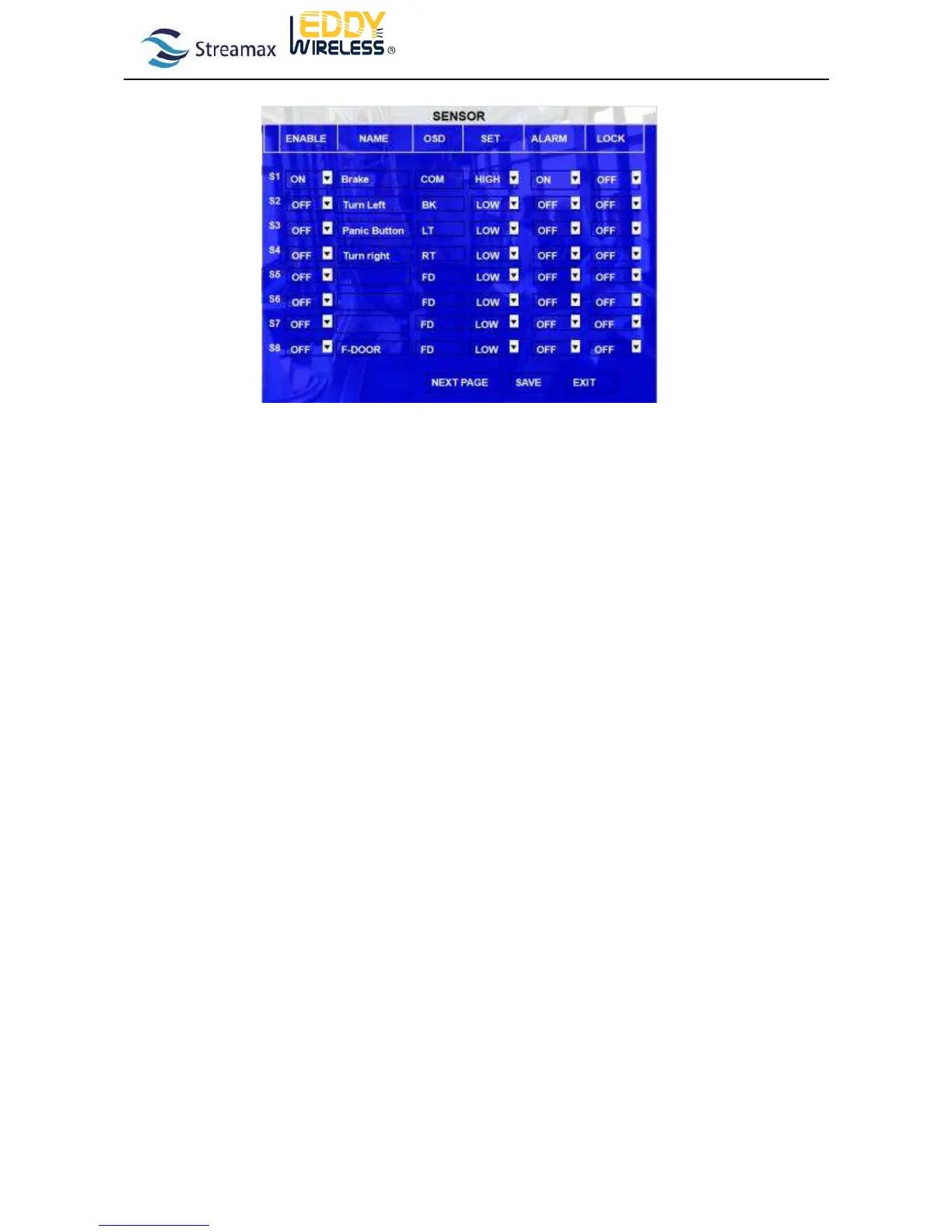
option. Define the name according to sensor connected.
EN: Enable, to active this function
NAME: Press ENTER on the Name field to display the soft keyboard. Enter the text name to identify the source of
each Sensor connected to the unit.
OSD: Input the numbers and Characters, they will be embedded into the alarm video files when alarms happen,
and it will also display in live view, Please press【Enter】 into the soft keyboard. The label also identifies the
type of event when doing a quick search using EVENT SEARCH option.
SET: LOW (normal close) means high to low trigger the alarm. When the sensor input is decreasing from 12V or 24V to
0V, the sensor alarm is triggered.
HIGH (normal open) means low to high trigger the alarm. When the sensor input is from 0V increasing to 12V or 24V, the
sensor alarm is triggered.
ALARM: Press ENTER to select between OFF or ON:
ON means when sensor triggered, alarm LED will flashing, until re-login the system with account, the flashing
will disappear, also, if the security set as OFF, I.E no need enter password to re-login, just pressing ENTER can
disappear the flashing.
LOG: Press ENTER to select YES/NO to enable or disable the input sensor to put as event log file, the
EVENT LOG is recorded in EVENT search file e.g.: If set as ON, using EVENT SEARCH option even sensor
triggered, there is event file on this menu.
LOCK: To enable the event does not erase during the over-write process of hard disk;
Get the video files embed the I/O sensor information and playback on the PC software. Check whether the data is correct.
If the MDVR system support wireless transmission, please check the alarm report to CMS as well.
1.4.3 Vehicle Speed and Pulse Testing
Please connect the SPEED-A on the alarm box with the vehicle speed signal cable and the GND on the alarm box to
the GND of the vehicle sensor.
Speed adjustment function: input the speed value to SPD before adjustment. P/S value will be obtained automatically.
When vehicle speed is stable (last half minute) and achieve to SPD speed, Please press “CHECK”, P/S will obtain the pulse
value automatically. Directly input P/S value for the same model vehicle.
For example:



 To Next Page