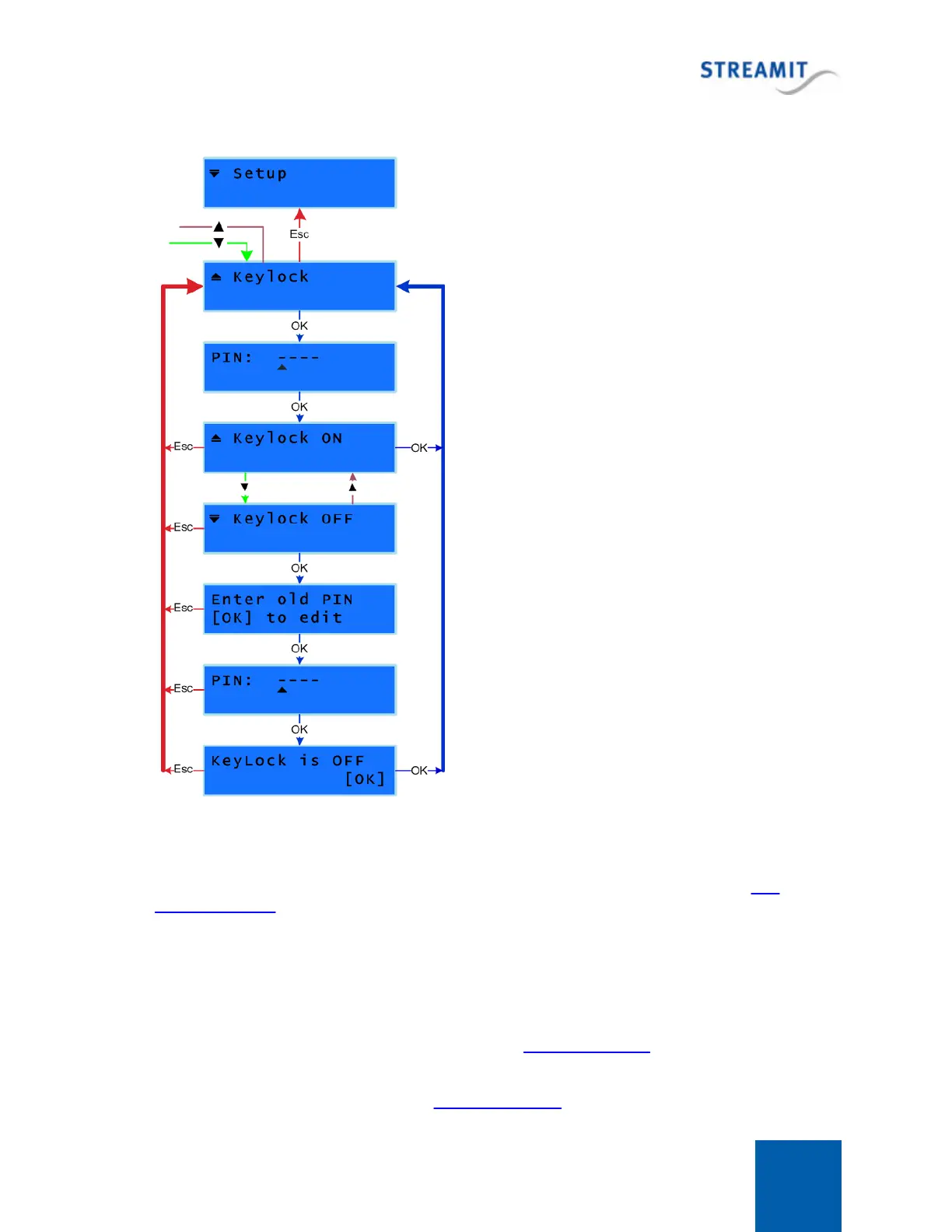
You can turn the Keylock OFF from the [Keylock] menu
as follows.
Enter the [Setup] and browse until you find the [Keylock]
option and press OK. This menu is locked, so you are
asked to enter the PIN code to access this menu. Once
you have entered the right PIN, press OK button to
confirm your entry and unlock the Keylock menu.
You have now accessed the [Keylock] menu where you
could choose between the two available options;
[Keylock OFF] or [Keylock ON].
Press OK to the [Keylock OFF] option. This will start a
wizard. In the first step of the wizard you are informed
that the old PIN is needed to turn OFF the Keylock.
Press OK to continue with the next step. Enter the old
PIN code and press OK to confirm your entry.
When the entered PIN is correct you will be informed
that the Keylock is now turned OFF. Press OK to
confirm and complete the wizard. The changes are now
applied to your device.
You can also exit the Keylock wizard without any
changes being applied by pressing Escape button.
1. Turn Keylock OFF. You can do that as explained in Turning keylock off. From this moment the old
2. Turn keylock back ON as explained in Turning keylock on by using the new PIN code.



 To Next Page