8
Operation
1
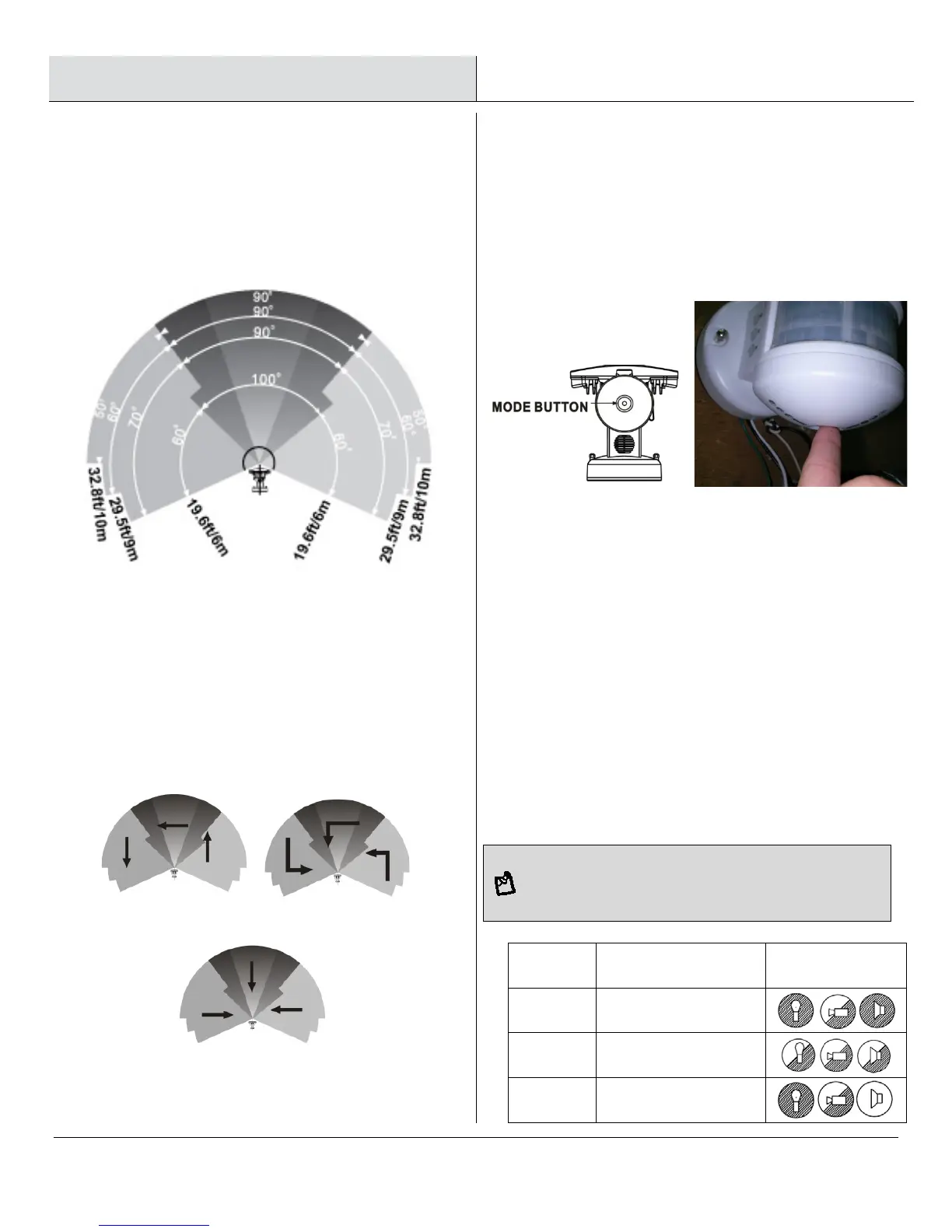
Detection range
2
Adjusting the settings
□ This light is equipped with three motion sensors:
zone 1 covers 60 degrees, zone 2 covers 100
degrees and zone 3 covers 60 degrees. The total is
220 degrees in all three zones.
Ensuring correct operation
□ To ensure correct operation of the sensor, mount
the unit so that the motion passes across the
motion sensor according to the “Good Sensitivity”
pictures below.
□ Selecting working mode: There is a “Mode” LED
indicator hidden inside the motion detector window
that will display different colored lights when
switching between modes. Once a mode has been
selected, the colored LED light will turn off after 30
seconds.
□ Mode 1: Recommended for home or business
(default setting)
- Camera will follow motion and record during the
day and night
- Light will illuminate at night only
- Speaker (optional dog bark, chime, or recordable
message) will operate at night only
□ Mode 2:
- Light illuminates during the day and night
- Camera records motion during the day and night
- Speaker operates during the day and night
□ Mode 3:
- Camera will follow motion and record during the day
and night
- Light will illuminate at night only
- Speaker will operate during the day only
For the above 3 modes, after audio has been triggered, no
audio (speaker) will be triggered again during the following 30
Mode LED indicator
(Hidden inside the lens)
Symbol
Mode 1
RED
Mode 2
ORANGE
Mode 3
GREEN


 To Next Page