12
NOTE: During the PROBE function, the T-Mike E velocity is temporarily reset to the velocity of the probe
disk(0.2330 in./msec.). Upon completion of the PROBE function the velocity will return to the last calibrated value.
This allows the operator to continue measurements on the previously calibrated material.
C. Material Calibration to Known Thickness
The following procedure is used to calibrate the T-Mike E sound velocity to a known sample of material. Some
materials may exhibit sound velocity variations which can cause errors in measurement. Be sure to check a
representative group of samples to determine if such variation is present.
First follow the above PROBE ZERO procedure to calibrate the delay of the ultrasonic transducer being used.
Apply a drop of couplant to the representative piece of material of known thickness. This piece is called the
sample.
Place the probe in steady contact with the surface of the sample. The T-Mike E will display a thickness reading
using the last calibrated velocity.
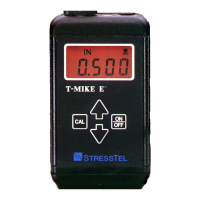
Press the CAL key to lock in the reading. The transducer may now be removed from the sample. The
display on the T-Mike E will momentarily display CAL. Small arrows will appear in the upper left portion of the
display above the thickness readings. This indicates that the T-Mike E is in the calibration mode and enables the
UP/DOWN arrow keys.
Adjust the thickness shown on the T-Mike E display by using the UP and DOWN arrows. Note that when
these keys are held continuously, the speed at which the thickness changes will increase, making it easy to make
the large adjustments for materials such as plastic and aluminum.


 To Next Page