19
Chapter VII
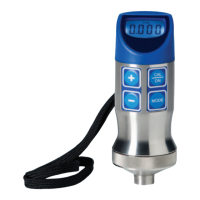
T-Mike Basic
A. Configuration and Calibration
The T-Mike Basic has five operator selectable materials (steel, aluminum, stainless steel, cast iron, and plexiglass)
with preset sound velocities. One custom material ca be programmed by connecting the T-Mike B to an IBM
compat-
ible computer running special software, or from a T-Mike E. In either case, a special cable is required.
B. Material Selection
First follow the above PROBE ZERO procedure to calibrate the delay of the ultrasonic transducer being used.
Press the MAT key to select the material being tested.
Select the material by using the UP and DOWN arrows. Press the MAT key a second time to store the velocity
for the selected material.
Some materials may exhibit sound velocity variations which can cause errors in measurement. Be sure to check a
representative group of samples to determine if such variation is present.
C. Initial Setup
In order to change the settings of the T-Mike B, the instrument must be powered on in the Initial Setup
mode. The setting, which may be changed, are the units of measure and the backlight. This
procedure is defined on pages 11 and 12 of the manual. Use the MAT key on the T-Mike B as CAL
key referenced in the procedure.
MAT


 To Next Page