23
WWW.STROMLTD.COM
STROM LIMITED
INSTALLATION GUIDE
CONTROLLER COMMISSIONING
Once you are happy that the control has been tted and wired in accordance
with this installation manual you will need to commision the controller and
ensure the following has been completed:
1. Power has been restored to the controller.
2. Ensure the controller is powering on and responding to user input.
3. Ensure the date and time is correct and ammend as required, see
page 23.
4. Set the backlight settings as required, see page 23.
5. Set the correct heating schedule for the user in accordance with
page 11, and ensure that the custom heating schedule template is
completed on page 9.
6. Leave the “FUNCTION SLIDER” set to “AUTO”.
7. Leave a copy of these instructions with the controller for the
homeowner.
Setting the time and date is really easy to do, just follow these steps:
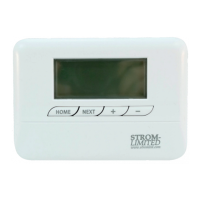
1. Move the “FUNCTION SLIDER” to “TIME/DATE”.
2. Using the “ADUSTMENT SELECTORS” set the correct details,
using the “NEXT” button you can cycle between, Hours, Minutes,
Day, Month, and Year.
3. Once completed please press the “HOME FUNCTION” button .
4. Return the “FUNCTION SLIDER” to the “AUTO” position.
Setting the backlight timeout is really easy to do, just follow these steps:
1. Move the “FUNCTION SLIDER” to “TIME/DATE”.
2. Press the “NEXT” button until the controller displays “LIGHT”
3. Using the “ADUSTMENT SELECTORS” set the time out between
5 and 15 seconds or o completely.
4. Once completed please press the “HOME FUNCTION” button .
5. Return the “FUNCTION SLIDER” to the “AUTO” position.
SETTING THE TIME & DATE
9
4
3
2
SETTING BACKLIGHT TIME OUT
9
3
4
2


 To Next Page