REAR PANEL FUNCTIONS
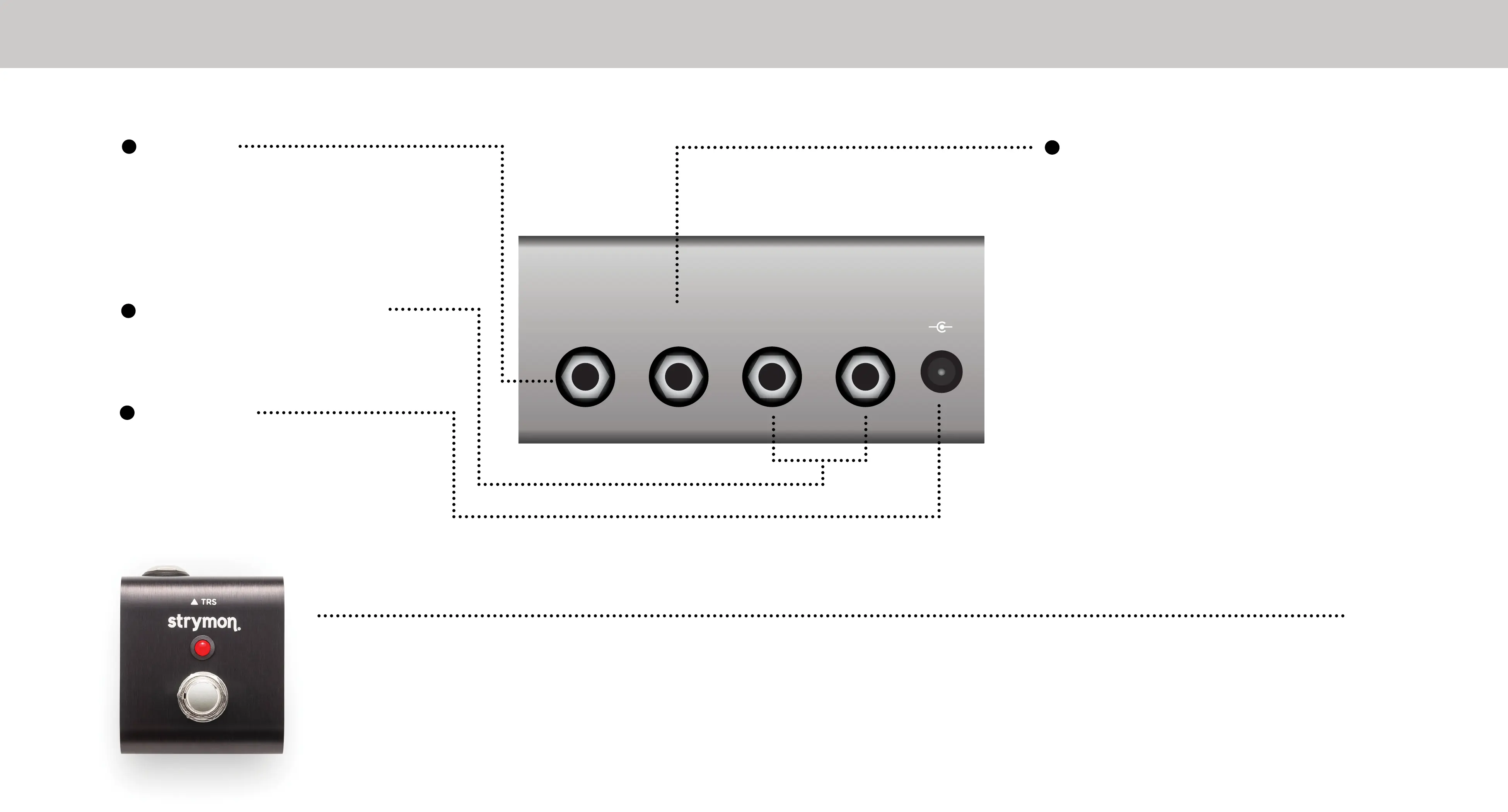
EXP
INPUT
9VDC
+
-
RIGHT OUTLEFT OUT
INPUT
High impedance mono or TRS
stereo input (internal jumper
configurable - see full user
manual for details).
EXP
Connect a standard TRS
expression pedal for continuous
control over any selectable knob
parameter. To select the knob
controlled by the expression
pedal, hold the TAP footswitch
during power up. The first knob
turned is then assigned to the
expression pedal. The maximum
position the knob is turned up to
becomes the expression pedal
“toe down” maximum value.
POWER
Use an adapter with the
following rating: 9VDC
center negative. 250mA
minimum.
STEREO OUTPUTS
Use left output for mono
operation.
ADD EVEN MORE CONTROL & FLEXIBILITY
Connect the optional Strymon Miniswitch to remotely tap Lag Time tempo or to
quickly access a saved favorite setting. See strymon.net/support for more details.



 To Next Page