Cleaning the Tape Heads and Tape Path
For continued high performance from your cassette deck, periodically clean the head, pinch
roller, and capstan. We recommend cleaning after every 20-30 hours of operation.
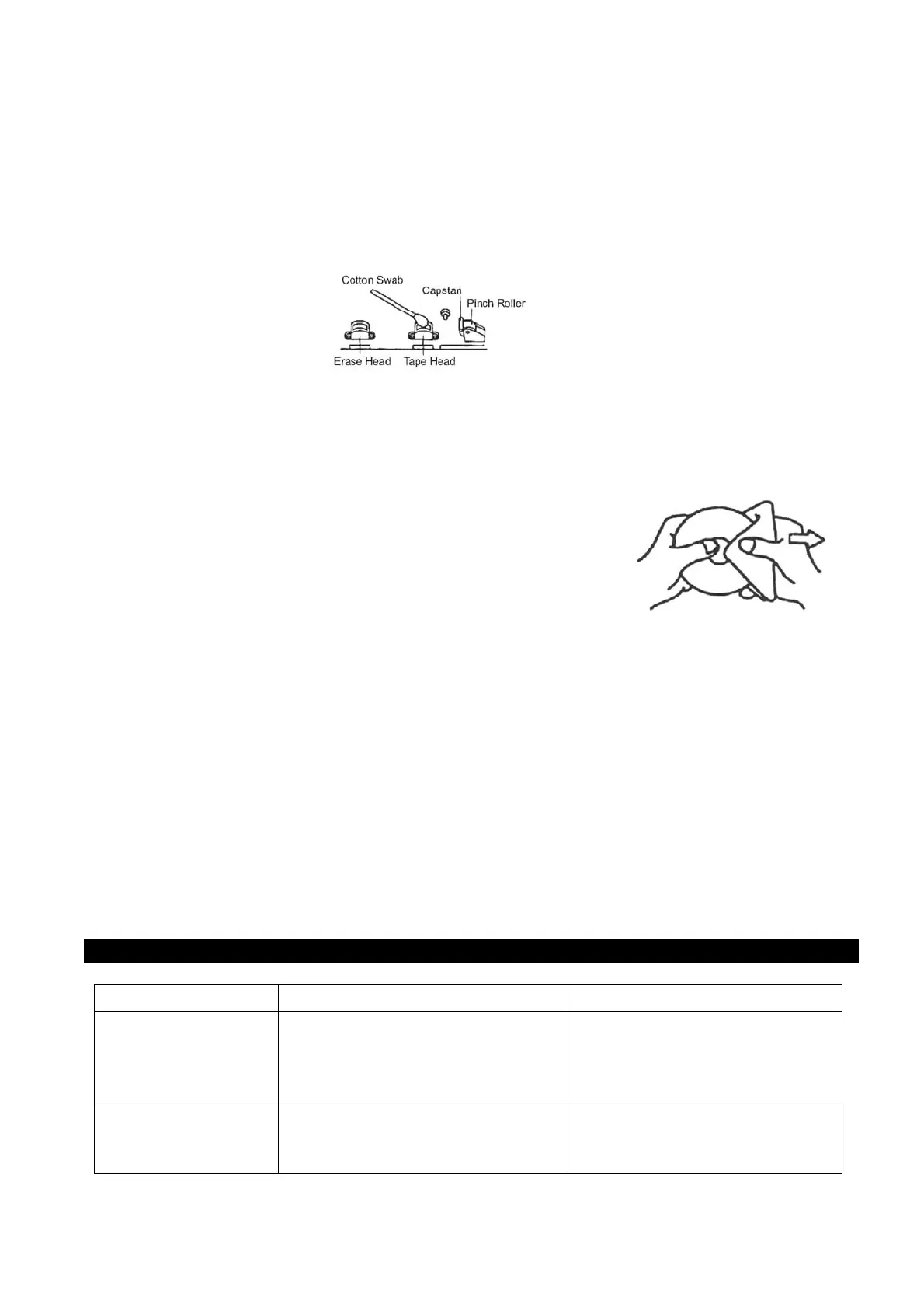
To clean the tape deck, press the STOP/EJECT key to open the deck door. Remove any
tape in the deck. Make sure that the power to the unit is OFF. Moisten a cotton swab with
isopropyl alcohol or a special head cleaning fluid. Carefully rub the face of each head, pinch
roller, and capstan with the moistened cotton swab.
About Disc
1. Do not subject the unit to excessive force, shock, dust or extreme temperature.
2. Do not tamper the internal components of the unit.
3. Clean your unit with a dry cloth. Solvent or detergent should never be used.
4. Avoid leaving your unit in direct sunlight or in hot, humid or dusty
places.
5. Keep your unit away from heating appliances and sources of
electrical noise such as fluorescent lamps or motors.
6. If drop-outs or interruptions occur in the music during CD play, or
if the CD fails to play at all, its bottom surface may require
cleaning. Before playing, wipe the disc from the center outwards with
a good soft cleaning cloth.
CLEANING THE UNIT
• To prevent fire or shock hazard, disconnect your unit from the AC power source when
cleaning.
• The finish on the unit may be cleaned with a dust cloth and cared for as other furniture, Use
caution when cleaning and wiping the plastic parts.
• If the cabinet becomes dusty wipe it with a soft dry dust cloth. Do not use any wax or polish
sprays on the cabinet.
• If the front panel becomes dirty or smudged with fingerprints it may be cleaned with a soft
cloth slightly dampened with a mild soap and water solution. Never use abrasive cloths or
polishes as these will damage the finish of your unit.
CAUTION: Never allow any water or other liquids to get inside the unit while cleaning.
TROUBLE SHOOTING GUIDE
If you experience difficulties in the use of this unit, please check the following:
S
y
m
p
t
o
m
Possible Ca
u
s
e S
o
l
u
t
i
on
Noise o
sound
distorted on FM
broadcast
Station not tuned p
operly for FM.
Telescopic antenna is not fully
extended.
Fine tune the FM
broadcast station.
Fully extend the FM
Telescopic antenna.
FM no sound Unit not in Radio mode,
Master Volume at minimum
Slide Function switch to select
RADIO.
Increase Master Volume level.


 To Next Page