Setup & Operation
Bridge Mode Configuration
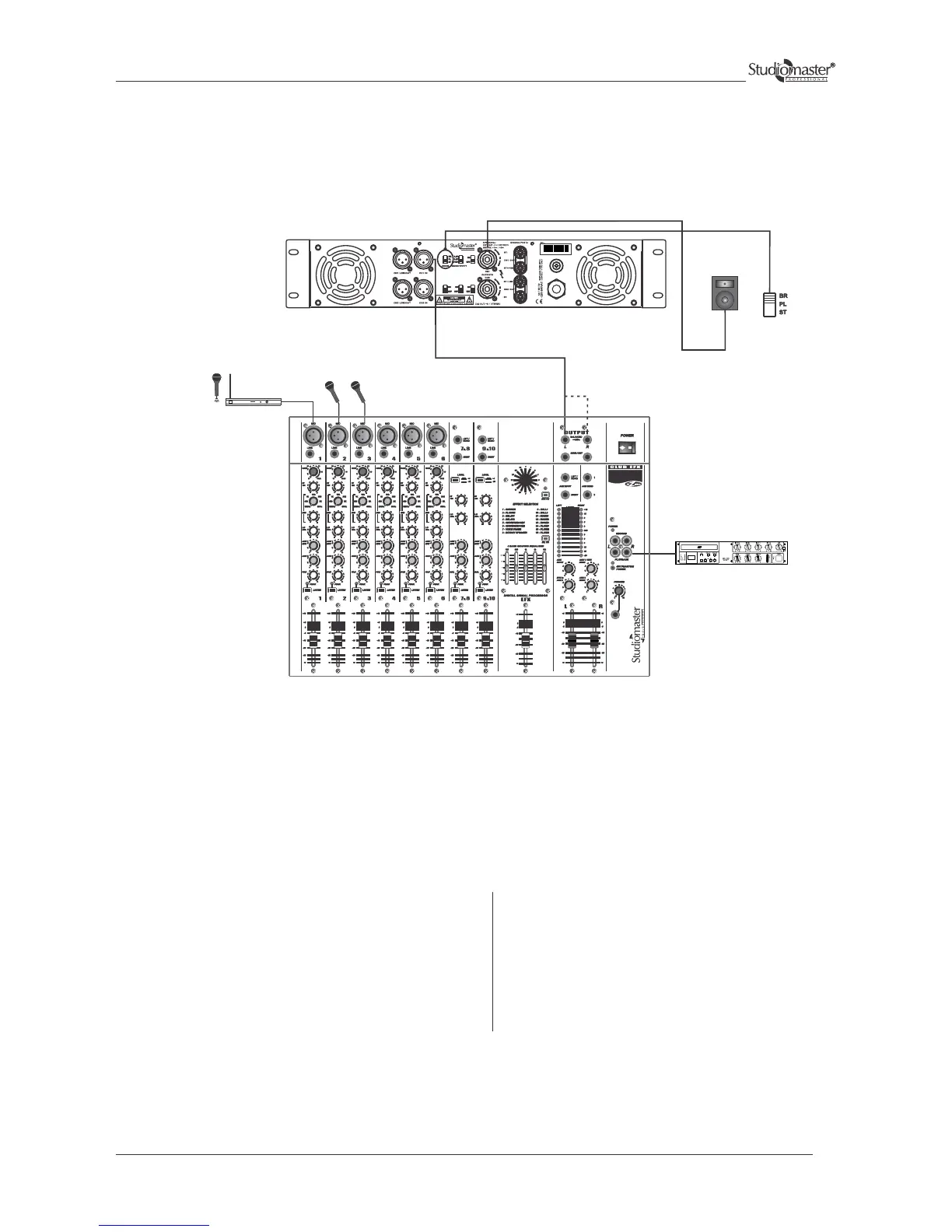
For BRIDGE mode operation, the signal source should be connected to the balanced / unbalanced inputs of channel 1 only.
In this mode, the combined power output of both channels should be connected to a single loudspeaker load. The combined
loudspeaker load should not go below 4 ohm.
Connect the line output of a mixer to a channel 1 input of
the amplifier. Input can be wired as per fig.1 & 2 (Input
Connections for Balanced and Unbalanced Mode)
Connect a speaker system (8 ohm/4 ohm) on the speakon
output of channel 1 only. Either use the speakon
connectors and wire these as per fig.4 (Output Connections
for Bridge Mode) or Binding Post connections as per fig. 6.
To select BRIDGE mode, keep the slide switch,
provided at rear panel, in Bridge position and ensure
that the bridge LED located on the back panel glows.
The desired output levels of both the channels are
adjustable by volume control of channel 1 only.
The level indicator LEDs glow to indicate the
presence of signal at the output terminals.
MICROPHONES
P A MIXER
CD PLAYER
SERIES
WIRELESS
MICROPHONE
‘Y’- Cable
Note:- ‘Y’ cable to be used to make mono cable or use mono output of mixer.
SPEAKER SYSTEM
(IMP 8Ω / 4Ω)
13


 To Next Page