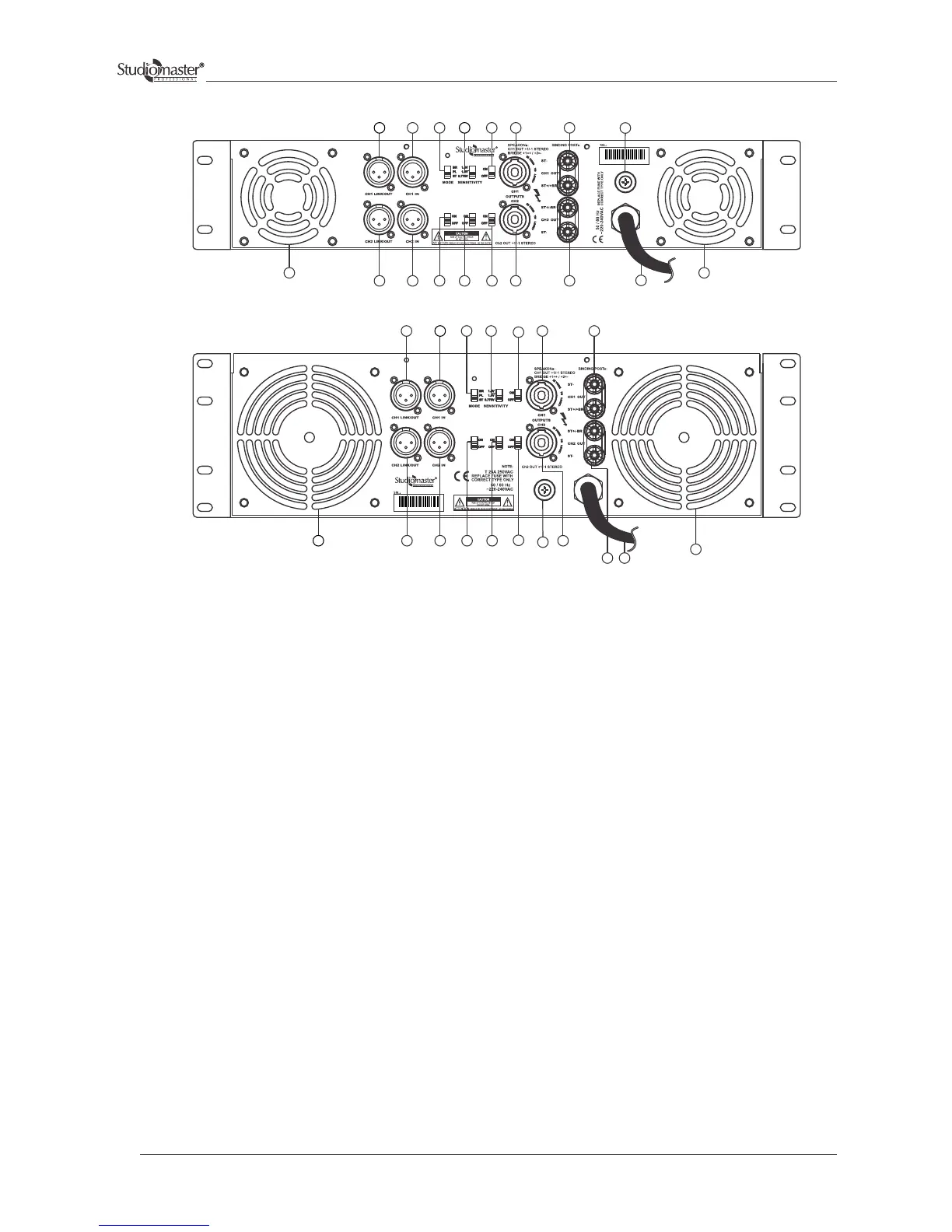
Rear Panel Controls & Features
1 Balanced XLR input
3 CH 1 output speakon connector
2 Link Out
To Cascade amplifiers.
4 CH 2 output speakon connector
5 CH 1 output binding post.
6 CH 2 output binding post.
7 Power cable
8 Configuration switch
9 Air Outlet grill
Use this connector for picking up the amplified signal of CH 1 and signal for bridged configuration.
Use this connector for picking up the amplified signal of CH 1 and signal for bridged configuration.
Use this connector for picking up the amplified signal of CH 2.
Use this connector for picking up the amplified signal of CH 2.
Use this cable for supplying power to unit.
This three way switch configures the amplifier for the three working modes: parallel, stereo and bridge.
The air sucked from the front grills is thrown out from these grills. Do not obstruct the grills. The air filter
whenever necessary.
This XLR connector takes the signal (balanced/unbalanced) for driving the channel. If the signal is unbalanced, pin 2
can be used for the signal and pin 3 connected to the earth.
7
9
6
2
9
1
12
11
4
8
10
2
1
8
10
3
14
14
3
5
5
13
13
2
2
1
9 9
1 12
11
4
6
7
15
15
DPA-2000
DPA-3200,4500 & 5000
8


 To Next Page