18
AIR BOOSTER 2
UAF %
LAF %
SPt + HYSPtSPt - HL tIP
EN/10.2018/IT30I © STULZ SpA – all rights reserved
INFORMATION
• The temperature values (B1, B2, B3) are expressed in Celsius or Fahrenheit degrees;
• The pressure value (B4) is expressed in Bar or PA;
• Flashing “Err” label indicates that there is a probe failure;
• “nu” (not used) label indicates that the probe is not enabled or that the analogue output / digital
input is not used by any function;
• A value from 0% to 100% expresses the output value of the resource, for analogue outputs
AO1 and AO2;
• “OFF” label indicates that the digital input (In1, In2) is not enabled, while “ON” indicates that the
digital input (In1, In2) is enabled.
5.1.2. Basic display and setpoint
The temperature (SPt) or pressure (SPb) setpoint is displayed according to the type of control,
temperature or pressure control. If there is no operation for at least 30 seconds, the display of the
controller returns automatically to basic display.
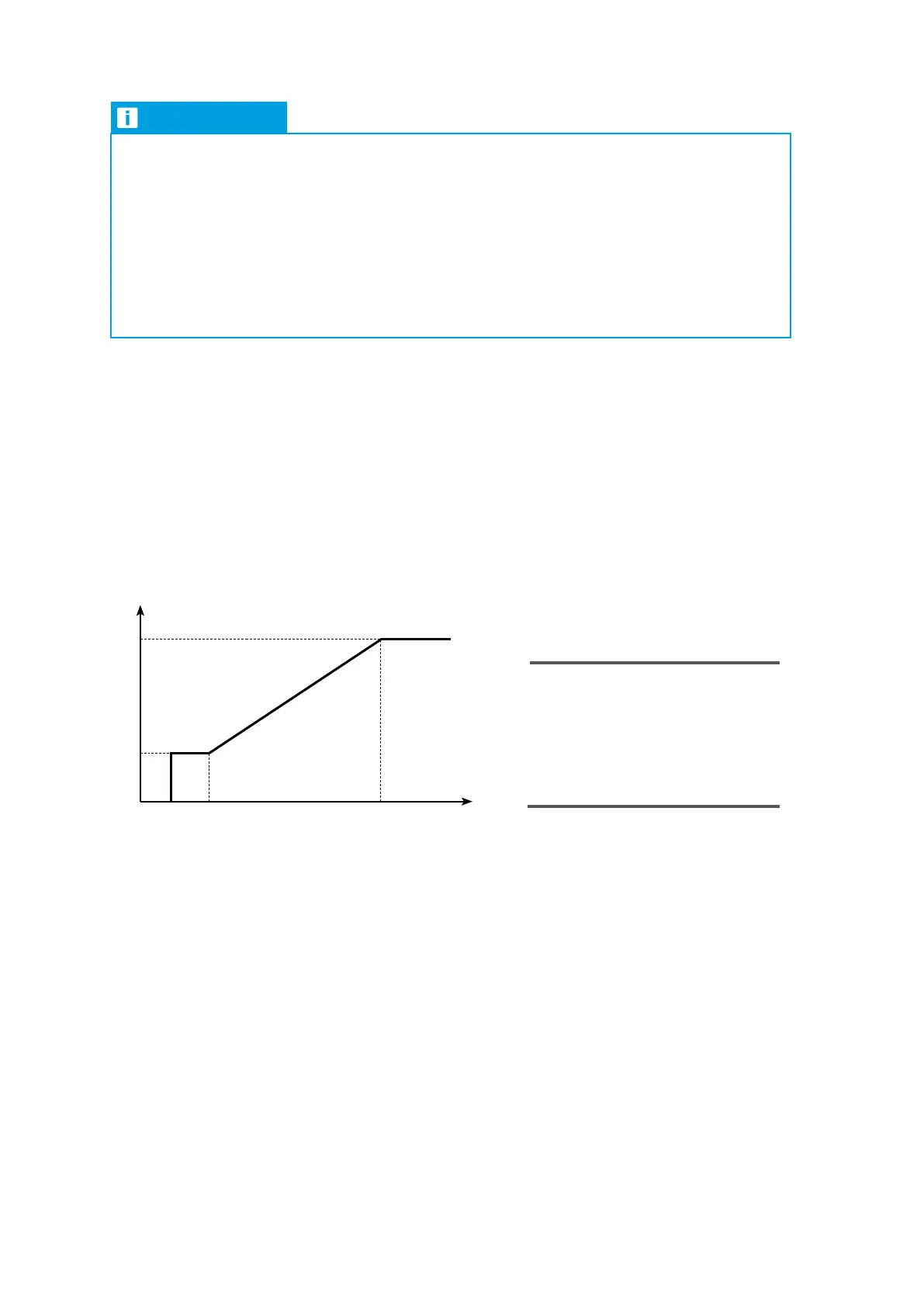
5.1.2.1. Controller logic and main parameters
Fan Speed
UAF Maximum fan speed (100%)
LAF Minimum fan speed (20%)
SPt Temperature setpoint (25°C)
HL Temperature switch-off hysteresis (3°C)
HY Temperature proportional band (10°C)
tIP Calculated temperature
The factory setting and the complete parameter list is provided in chapter 5.2.
5.1.2.2. Changing the setpoint
Make sure that the keypad is not locked (see paragraph 5.1.4). To modify the setpoint, follow the
procedure below:
1. Press SET;
2. The temperature (SPt) or pressure (SPb) setpoint is displayed and °C/°F led starts to flash;
3. To change the value, press UP and DOWN keys;
4. To save new setpoint and return to the standard display, press SET or wait 30 seconds to exit the
programming.


 To Next Page