Electronic Control Information
WARMING DRAWER WWD30
3-11
FIELD SERVICE MODE
Initiating Diagnostics Mode:
Note: Diagnostics mode can only be entered from a unit “‘OFF” state.
Mode Entry:
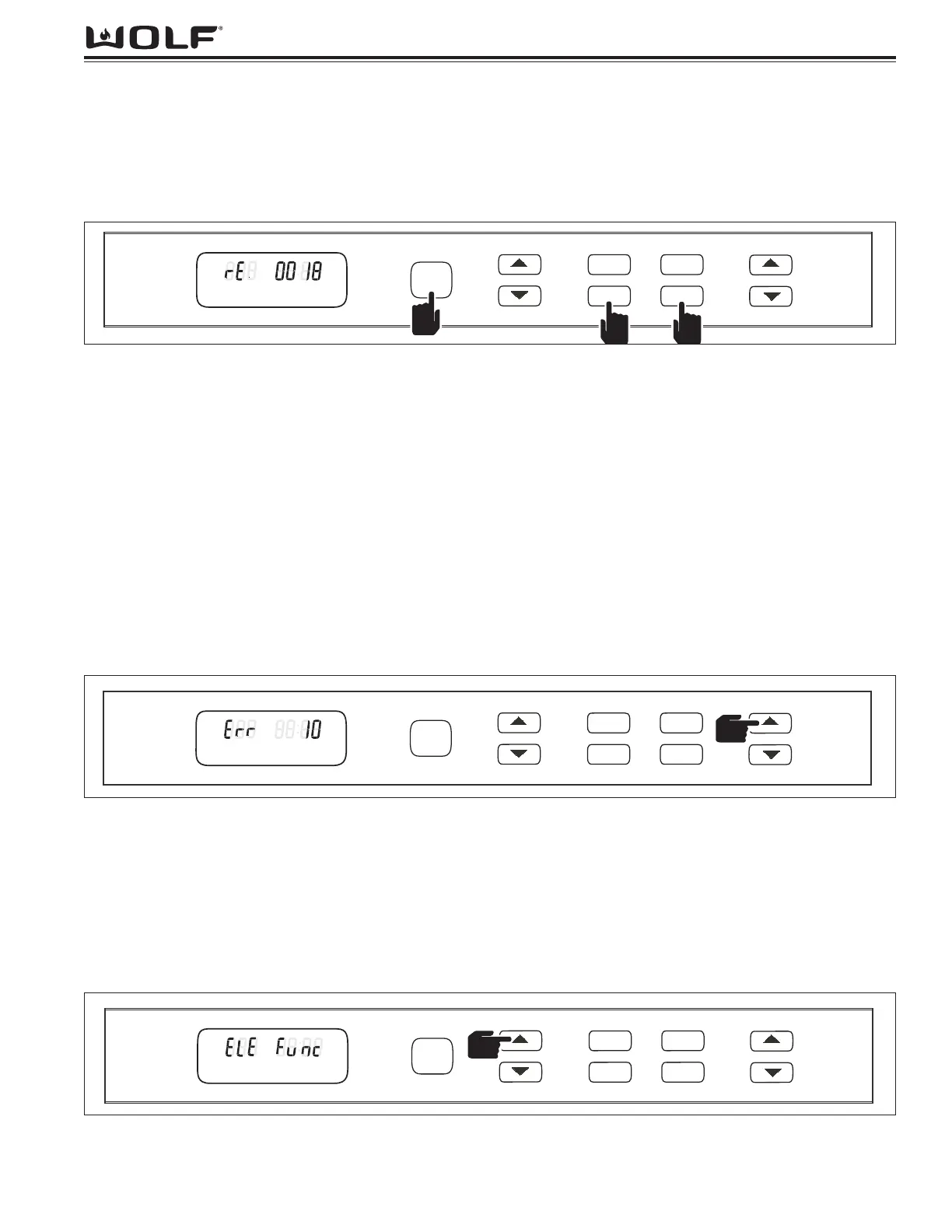
The Field Service mode can be entered by pressing and holding “Power On/Off” key, along with “MED” and
“PROOF” keys simultaneously for 5 seconds. (See Figure 3-16)
Operations:
Once in this mode, software version will read in timer area. Revision will be displayed initially. (See Figure 3-16)
NOTE: If unit is in Showroom Mode, temperature display will read “Sr” upon entering Field Service Mode. Cycling
of fan, element and drawer is non-functional. Display will show Can, CEL then Sr will be displayed at 1 second per
word then repeat until Field Service Mode is canceled or times out. To use this feature, Showroom Mode must be
canceled. See Showroom Mode for details.
To scroll through errors control has seen, use “TIMER” up or down arrow keys. Once you begin scrolling through
errors, (i.e. “Err 10”, where “Err” is displayed in the temperature readout and “10” is displayed in the timer section).
You can also scroll through additional control information parameters such as total hours used. (See Figure 3-17 &
3-19)
NOTE: Using the opposite “TIMER” up or down arrow key will reverse your previous order.
NOTE: To clear error codes logged, press and hold “TIMER” up and down arrow keys for 5 seconds, while in Field
Service Mode. See Troubleshooting, Section 5, for list of error codes and meanings.
NOTE: Once you have made it through all errors and information parameters, revision of the control will again illu-
minate, starting the sequence over.
Functionality of fan, element and drawer switch can be tested by pressing the “TEMP” up or down arrow key.
(See Figure 3-18)
When checking operation of fan and element, power is either supplied or not supplied based on the selection made.
(See Figure 3-21)
Mode Exit:
Pressing the “Power On/Off key will cancel field service mode.
NOTE: If no other keypresses are noted after 2 minutes, control will also exit field service mode and power down.


 To Next Page