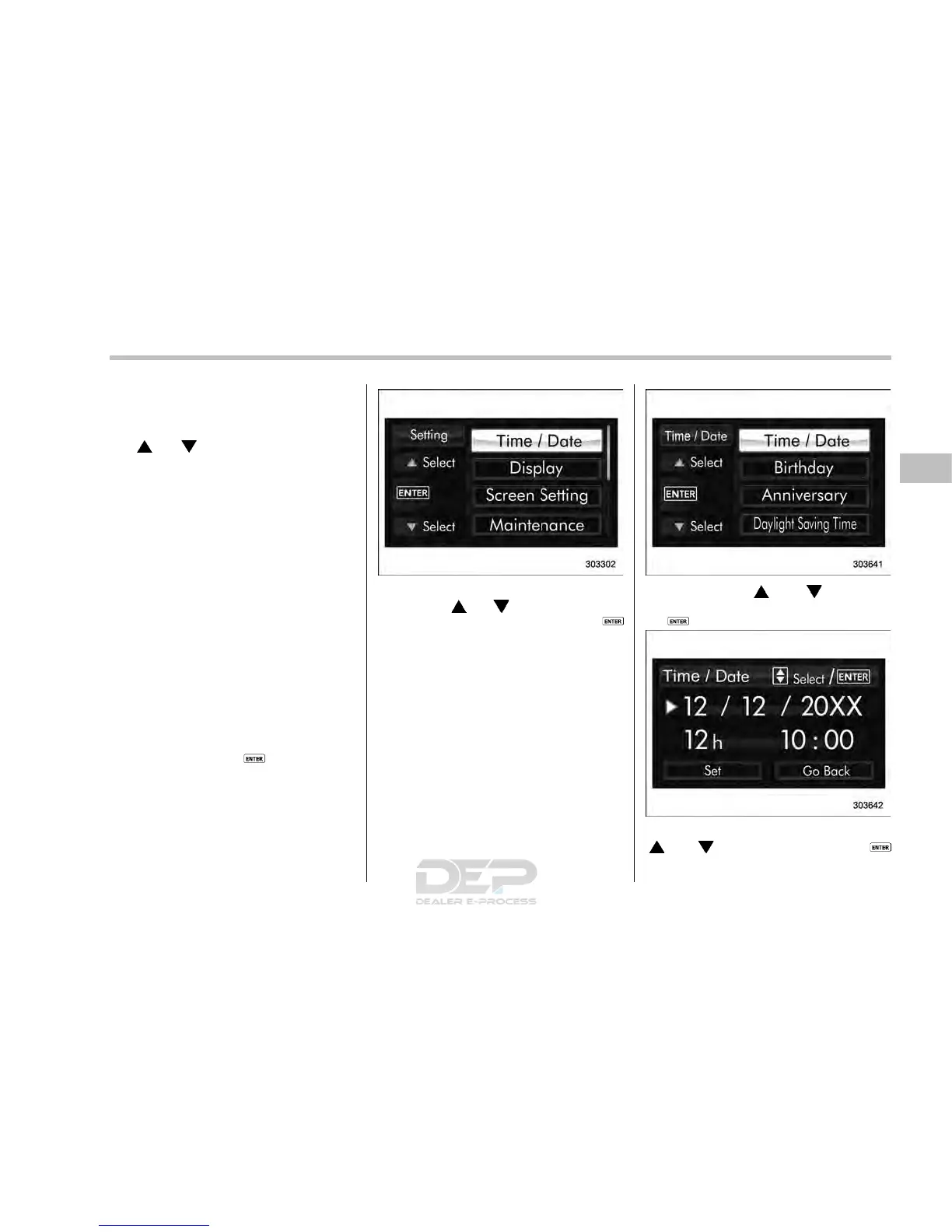
& Date and time settings
The items in the date and time settings
can be set. To change the items, operate
the “
” or “ ” switch.
NOTE
. The “Time/Date” item must be set to
display the “Birthday”, “Anniversary”
and notifications for vehicle mainte-
nance.
. The “Birthday” and “Anniversary”
items can be entered after the “Date”
item has been set.
. Dates that do not exist in the
Gregorian calendar cannot be set (for
example, April 31).
. If your vehicle is equipped wi th
genuine SUBARU navigation system,
the clock of navigation system must be
set separately.
! Preparation for date setting
1. Turn the ignition switch to the “ON”
position.
2. Push and hold the
button to show
the selection screen.
3. After the selection screen is displayed,
operate the “
” or “ ” switch to show the
“Time/Date” item. Then, push the
button.
! Current date and time setting
1. Perform the preparation steps accord-
ing to “Preparation for date setting” F3-
57.
2. Operate the “ ” or “ ” switch to
select the “Time/Date” item. Then push
the
button.
3. Select the item to set by operating the
“
” or “ ” switch. Then push the
button.
Instruments and controls/Multi function display
– CONTINUED –
3-57














 To Next Page