6-12
#7013455 - Revision A - April, 2009
Component Access/Removal
International W
International W
ine Storage
ine Storage
(ICBWS)
(ICBWS)
Series
Series
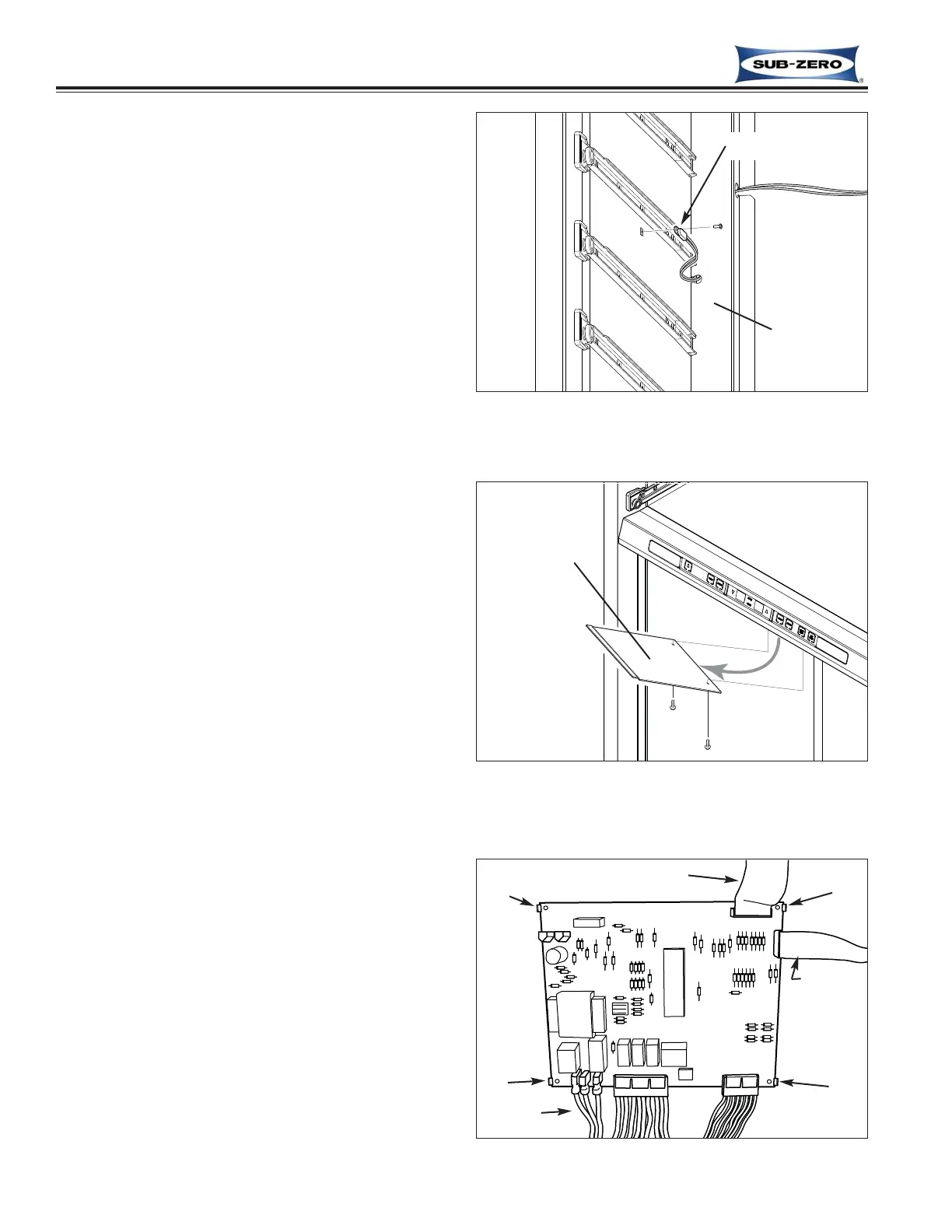
Lower Compartment Thermistor
The lower compartment thermistor is attached to the
handle-side wall with a screw .
To remove a compartment thermistor, first remove the
lower duct grille and lower duct, then (See Figure 6-25):
1. Extract thermistor mounting screw.
2. Extract side cover mounting screws and pull side
cover forward while feeding thermistor through key-
hole shaped notches in cover.
3. Cut thermistor’s wire leads six (6) to twelve (12)
inches from the back wall, then pull thermistor from
compartment.
Electronic Control Board
The electronic control board is located at the bottom of
the compartment divider, behind the control panel and
is concealed by an access panel. The control board is
held in place by four tabs, one at each corner of the
board.
To remove the control board, (See Figure 6-26 & 6-27):
1. Extract the two screws at back of access panel,
then lower panel down and pull it toward the rear of
unit, then forward and out of compartment.
2. Disconnect all electrical leads from control board.
3. Expand the four tabs to release the control board,
then pull board down and out of compartment.
NOTE: take note of membrane switch ribbon cable ori-
entation and be sure to reconnect it in the same orien-
tation and position.
Figure 6-27. Wine Storage Control Board
Tab
LED Ribbon Cable
Membrane
Switch
Ribbon Cable
Electrical
Connections
Tab
Tab
Tab
Figure 6-26. Control Board Access Panel
Figure 6-25. Compartment Thermistor Removal
Thermistor
Side Cover
Access Panel



 To Next Page