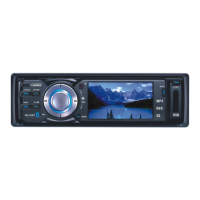
FRONT PANEL FUNCTIONS
1. – Front panel release button
2. Menu – System settings
3. Band/RDM – To toggle change between FM1/FM2/FM3/AM1/AM2 and Random
Play
4. Source/Power – To turn the unit on and toggle between Modes
DVD/CD/Tuner/USB/SD/AUX/Bluetooth modes
5. Four directional buttons – To change setting using up/down/left/right
6. ST/RPT – To change audio from Stereo/Mono/Repeat on/off
7. MIC – (microphone) Use when on Bluetooth mode
8. Mute– Mute
9. USB Port – For inserting supported USB device
10. APS/ – Reception Scan/Play/Pause
11. CLK/ – Clock display/Stop button
12. TFT LCD Screen – 3” Full touch TFT LCD Screen
13. Volume Knob – For adjusting volume levels
14. Disc Slot – For inserting discs
15. SD/MMC Slot – Memory Card Slot
16. Reset – To reset all setting to factory default
17.
– To eject inserted discs
7


 To Next Page