INSTALLATION
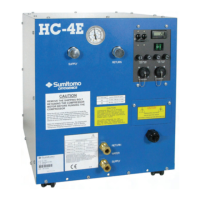
The HC-4E Compressor is shipped in an operable condition. Installation consists of:
Unpacking
Examining for damage
Placing the compressor at its point of use
Connecting utilities
Checking compressor operation
Connecting other system components.
Introduction
Install the Compressor and the Gas Lines according to the following procedures.
To prevent contaminating the components or the system, it is important to follow the procedures
in this manual step by step.
Be sure to have 99.995% pure helium gas available at installation. See
Refrigerant Quality in Specifications.
Receipt Inspection Instructions
1. Upon receipt, inspect the shipping container and the compressor for damage.
AVOID EQUIPMENT DAMAGE. Remove the shipping bolt retaining the
compressor motor before running the compressor.
AVOID CONTAMINATION. When checking the compressor for shipping
damage do not connect gas lines and cold head. The components may become
contaminated with compressor oil.
AVOID EQUIPMENT FAILURE, CONTAMINATION OR NUISANCE
SHUTDOWN. Do not tip the compressor more than 5 degrees from horizontal to
avoid flowing oil into unwanted places.
1.1. If there is any evidence of external damage to the container, be sure the carrier’s driver
sees the damage. Note it on the shipping documents and have the driver acknowledge
it by his initials on the delivery receipt.
1.2. Remove the compressor from its shipping container and inspect for damage. If there
was external damage to the compressor, remove its covers and check for internal
damage. Notify the carrier immediately and take photographs of the damage to
document your claim to the carrier. Keep the damaged shipping container.
2. Raise the left rear corner of the compressor to locate the hex head shipping bolt. Support
the compressor base with blocks only high enough to gain access to the bolt. Do not raise
the corner more than 50 mm (2”).


 To Next Page