Chapter 3 Setting Up the Sun Fire X4450 Server 29
Cabling the Server
Connect the server power cables, and external cables in the following order:
1. Connect two grounded server power cords to grounded electrical outlets (1, 2).
Note – Connect only one cable if your server does not have a redundant power
supply.
2. Connect the two server power cords to the AC power connectors on the back
panel of the server.
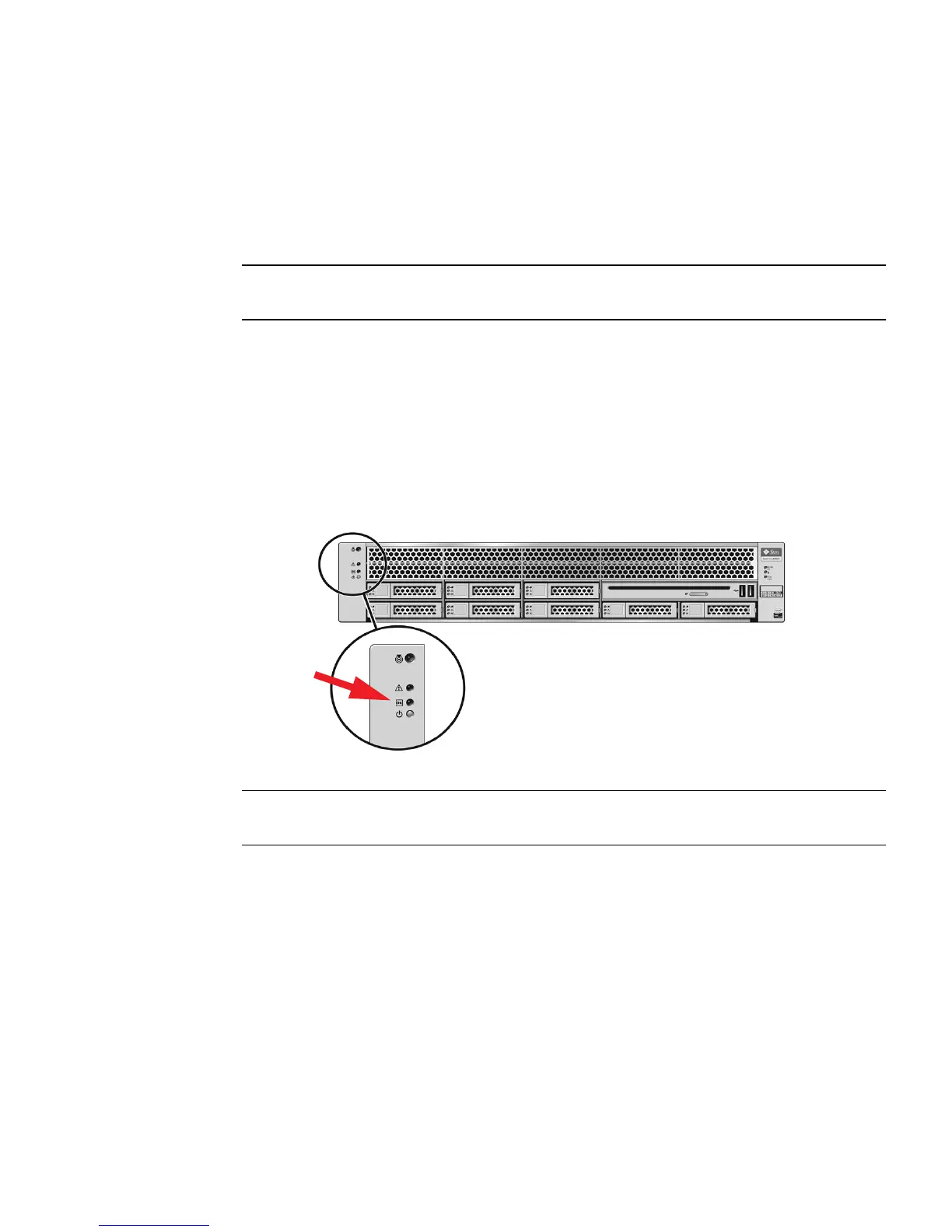
In standby power mode, the Power/OK LED on the front panel flashes,
indicating
that the service processor (SP) is working as shown in FIGURE 3-2. At this
point,
before initial configuration, standby power is supplied only to the SP and
power supply fans.
FIGURE 3-2 Front Panel Power/OK LED
Note – Do not push the Power button at this time. Do not apply main power to the rest
of the server until you are ready to install a platform operating system.
3. Connect a serial null modem cable to the RJ-45 serial port (4).
See “Connecting to the LOM Service Processor for the First Time” on page 33 for
more information about viewing system output from a serial console.
4. Connect Ethernet cables to the SP NET MGT Ethernet port (5).
5. Connect Ethernet cables to the RJ-45 GigabitEthernet (LAN) connectors as
needed (6) for OS support.
6. Connect any additional external devices, as required, to the server’s USB (7)
and/or HD-15 video (8) connectors (optional).








 To Next Page