76
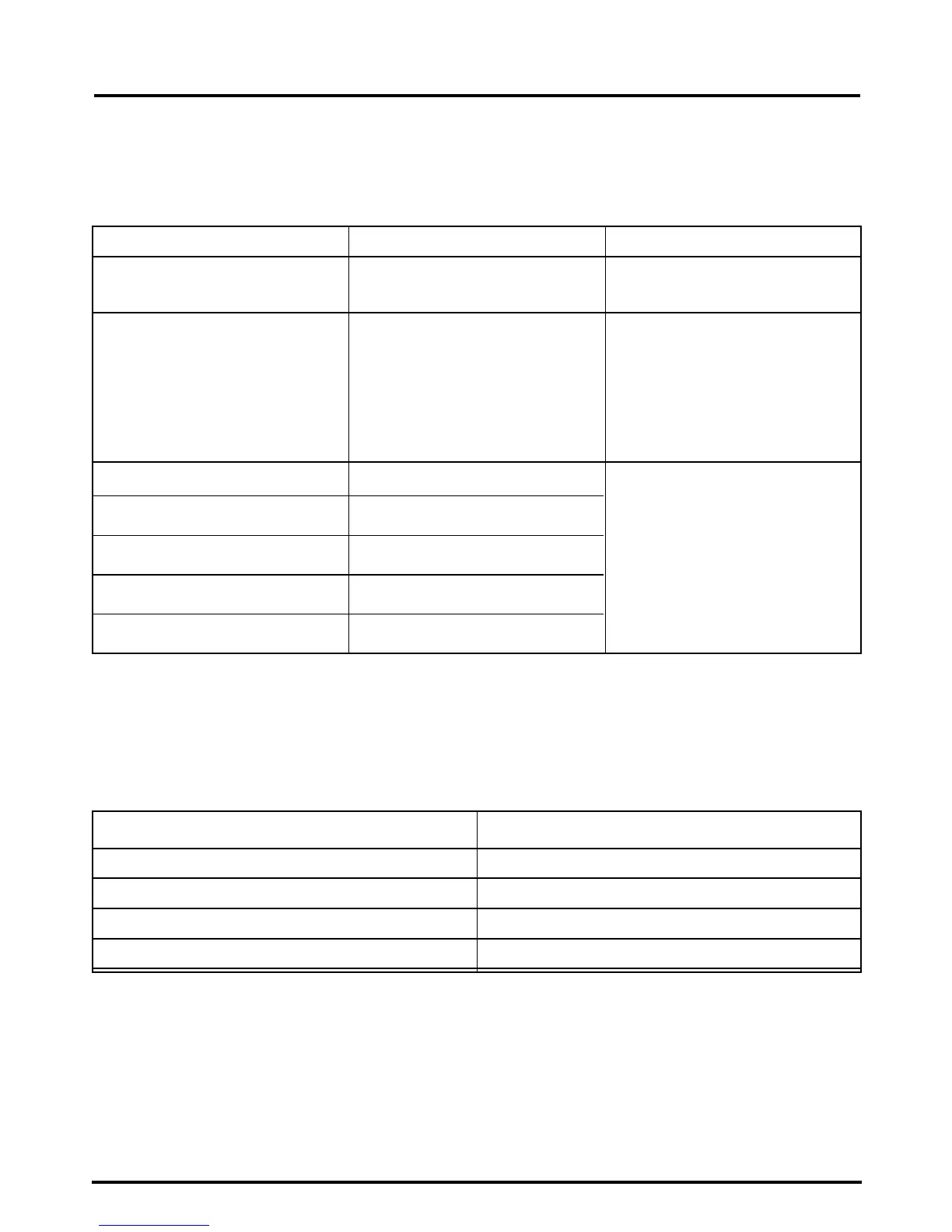
Program Setting Times and Display Information.
The LCD window will tell you if there is a problem
with your Quantum SmartBake. Always use your
Quantum SmartBake in a room free of drafts. Do
not use your Quantum SmartBake outdoors, near a
heat vent or in direct sunlight.
DISPLAY READS PROBLEM SOLUTION
“0:00” (:) flashing Select program setting. Use the Menu button to
select program.
“
E:01” flashing The baking chamber is too Open the lid and remove
hot to begin another cycle. bread pan to cool the chamber.
After the panel message
disappears, put the bread pan
back into the chamber and
press START again.
“
E:02” flashing Sensor malfunction.
“
E:03” flashing Sensor malfunction.
“
E:04” flashing CPU malfunction
“
E:05” flashing Heater control malfunction.
“
E:08” flashing Heater control malfunction.
Note: After baking a loaf of bread, it is recommended to cool the breadmaker down to room
temperature as temperatures above ambient reduce the rising height of the bread due to the
sensitivity of yeast.
Contact Customer Service
on the toll free number
1800 025 059.
The power is turned ON Long beep
Select a setting from the Menu Short beep
Invalid key-in Long beep
Commencement of baking cycle 2 long beeps
Completion of bread baking process Short and Long beeps
You will hear a beep when:




 To Next Page