EasyManua.ls Logo

Sungrow COM100E - Page 24

Sungrow COM100E
42 pages
Print Icon
To Next Page IconTo Next Page
To Previous Page IconTo Previous Page
Loading...
6 Electrical Connection User Manual
20
Cable
Type
RS485 cable
Outdoor ultraviolet protection shielded twisted pair (STP)
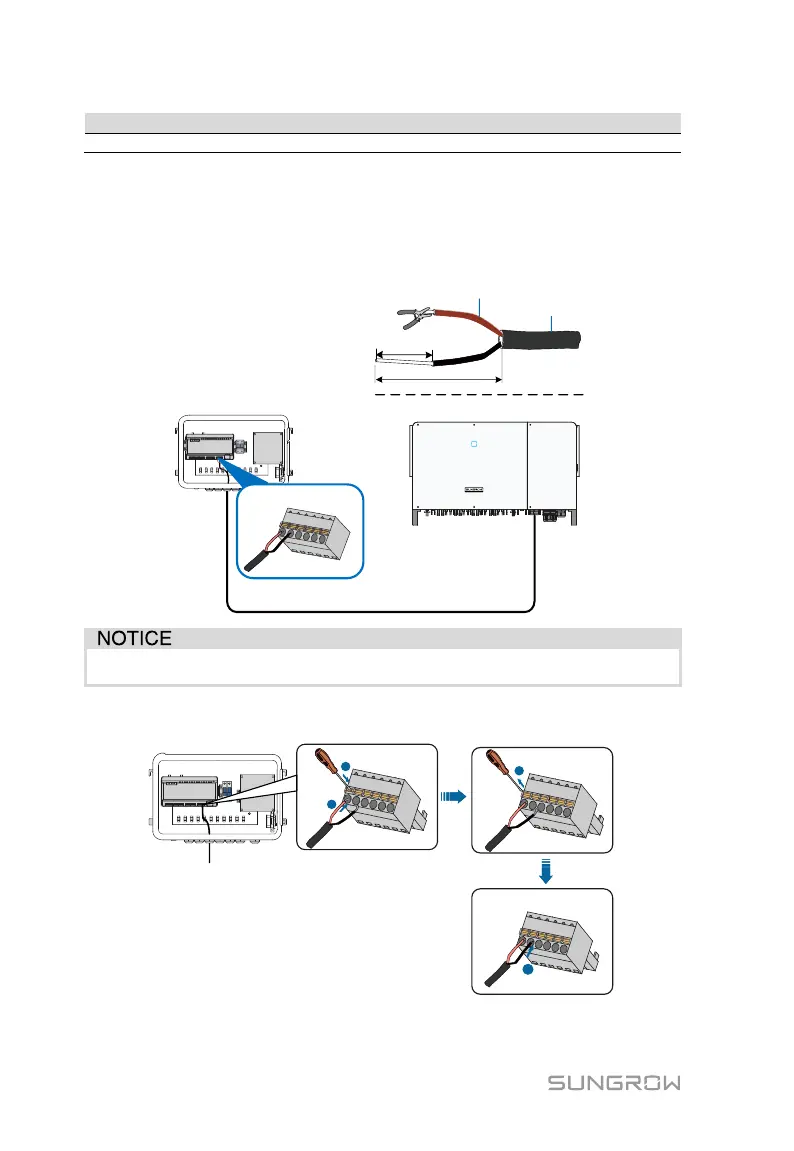
Step 1 Loosen the "RS485-1/2/3" waterproof terminal on the bottom of the
COM100.
Step 2 Lead the RS485 cable through the "RS485-1/2/3" waterproof terminal.
Strip the cable jacket and insulation layer of the communication cable
with a wire stripper respectively.
15mm
0.75~1.5mm
2
8~10mm
Ф6~Ф18mm
BA1 1-A3B3
RS485A is connected to port A while RS485B is connected to port B.
Step 3 Connect the stripped cable to the RS485 ports of the Logger1000, as
shown in the figure below.
1
2
3
4
Step 4 Fasten the "RS485-1/2/3" waterproof terminal.

Related product manuals