User Manual 6 Electrical Connection
21
6.5.2 Connect to the Device with RJ45 Port
Communication cable specification:
Outdoor STP Ethernet cable
Step 1 Loosen the "RS485-1/2/3" waterproof terminal on the bottom of the
COM100.
Step 2 Lead the Ethernet cable through the "RS485-1/2/3" waterproof terminal.
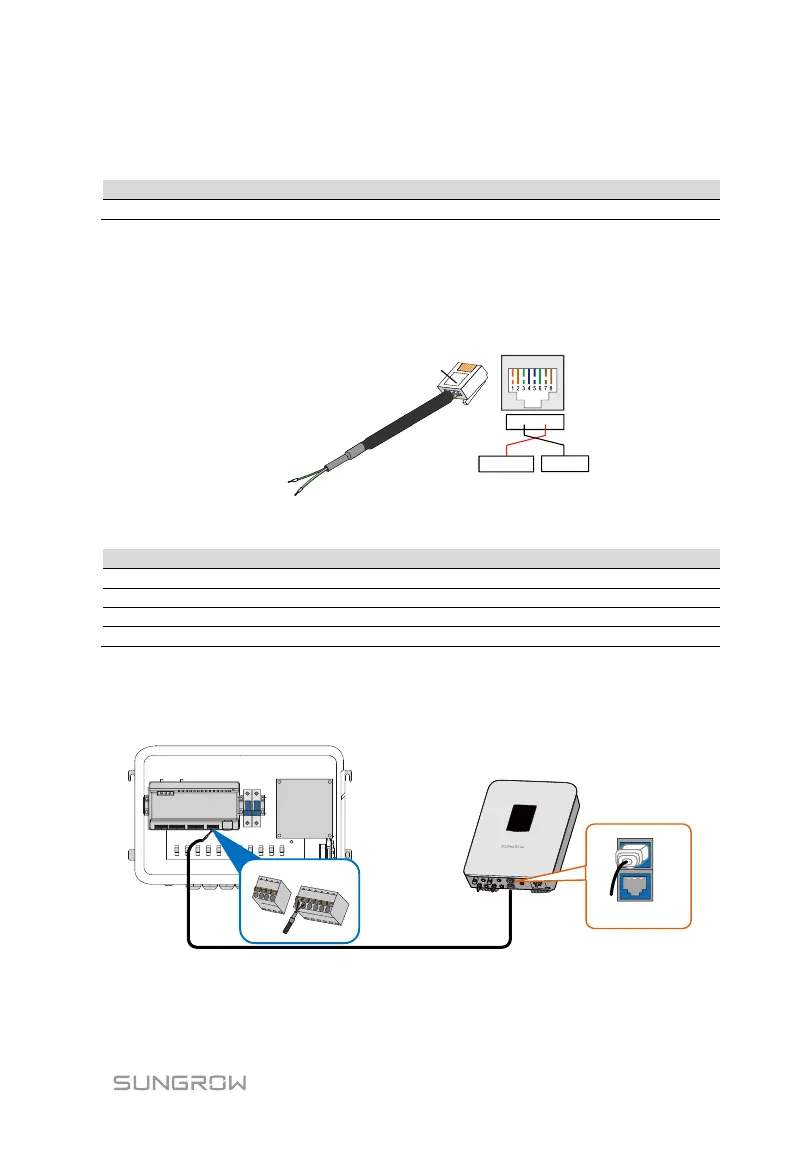
Strip the insulation layer of the communication cable with an Ethernet
wire stripper.
RJ45 port
RS485 - B
RS485+ A
RS485 + A
RS485-
B
1 2 3 4 5 6 7 8
RJ45 connector
Tab. 6-2 Correspondence between wire colour and pin of RJ45 connector
Step 3 Insert the stripped communication cable into the RJ45 connector in the
correct order, and crimp it with a crimping tool.
Step 4 Insert the RJ45 connector of the Ethernet communication cable into the
"ETH" port of the Logger1000.
Step 5 Fasten the "RS485-1/2/3" waterproof terminal.


 To Next Page