44
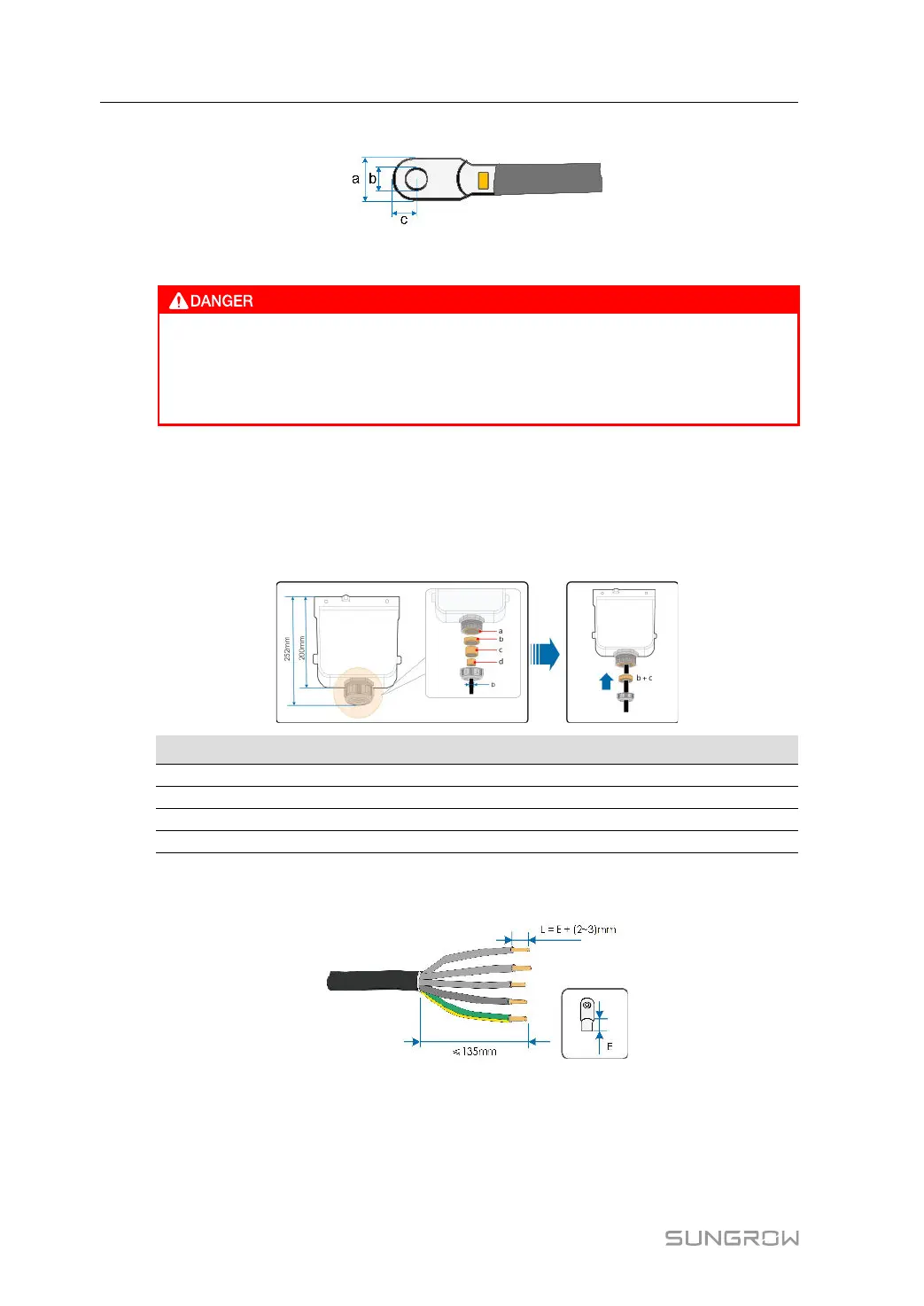
• Dimensions: a≤30mm / 8.4mm≤b≤10.5mm / c≤16mm
5.6.3 Connection Procedure
High voltage may be present in inverter!
Ensure all cables are voltage-free before electrical connection.
Do not connect the AC circuit breaker until all inverter electrical connections are
completed.
Step 1 Disconnect the AC-side circuit breaker and prevent it from inadvertent reconnection.
Step 2 Take out the AC junction box and loosen the swivel nut. After removing the seals, select one
or more appropriate seals for use in combination according to the cable outer diameter, by
referring to the table below. Lead the cable through the swivel nut, seal, and junction box
successively.
Outer diameter D(mm)
Seals
20~25 a+b+c+d
25~30 a+b+c
30~40 a+b
40~50
a
Step 3 Strip the protection layer and insulation layer by specific length, as described in the figure
below.
Step 4 Make the cable and crimp OT/DT terminal,refer to " Crimp OT/DT terminal".
5 Electrical Connection User Manual




 To Next Page