APPENDIX A
Sunit Telematics quick start guide
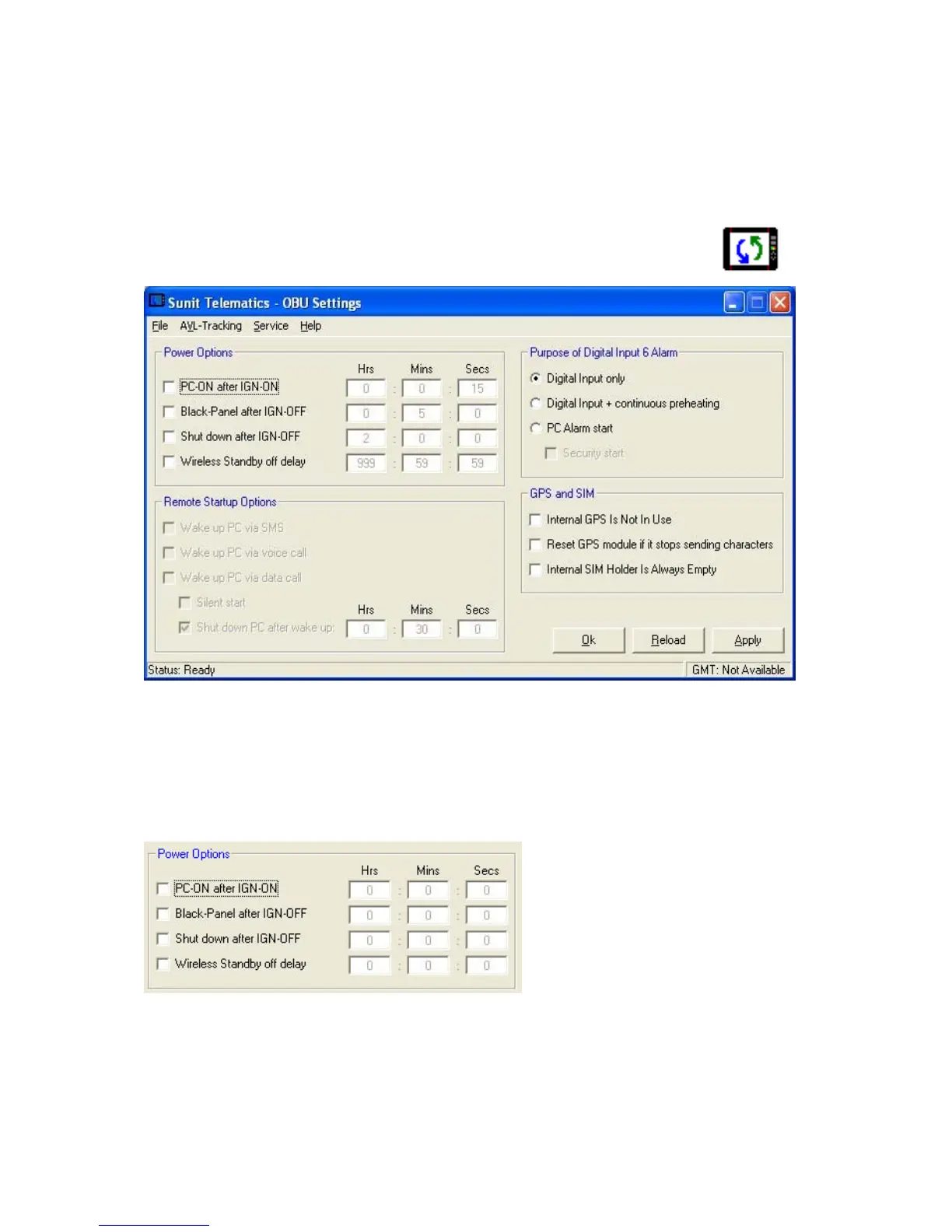
Sunit Telematics –application is used for setting the properties of the Sunit vehicle PC. You can find
the complete user’s guide from the Support folder.
Start the application by clicking the icon in the Windows Control panel
17
The main window is divided into 4 functional frames
Power Options: Contains options when the ignition key is turned on/off
Remote Startup Options: Contains options when the OBU is in wireless standby mode
Purpose of Digital Input 6 Alarm: Contains options regarding the functionality of digital input 6
GPS and SIM: Contains options regarding the handling of the internal GPS receiver
POWER OPTIONS
PC-ON after IGN-ON
Selected: The PC starts automatically after the ignition is turned on. You can setup a timer to delay
the startup.
Note: If the startup temperature is too low the PC startup is delayed until the OBU has pre-
heated enough or the maximum preheat time of 6 minutes is reached.


 To Next Page