13
14. Create A Program
• Select Create Program
• Enter a name, duration and set heaters to desired output.
• Heaters can be set individually in segments adding up to 60 minutes
• The length of a segment indicates how long a heater setting will run
Edit or Delete a Custom Program: If you have one or more custom
programs, the Delete and Edit options will be available. Select Delete or
Edit, and a list of created programs will appear with corresponding delete
or edit buttons next to them.
Quick Infrared Guide for Customization:
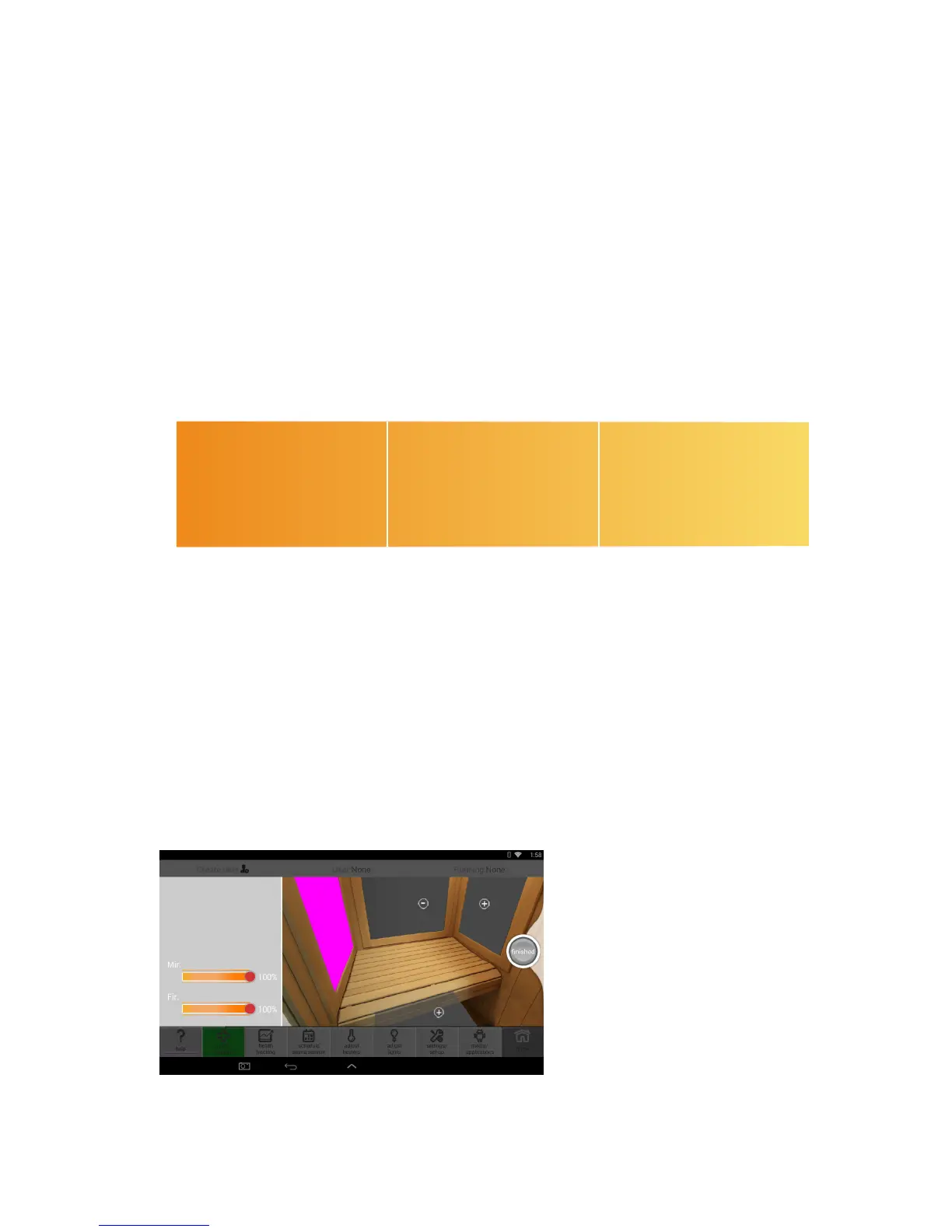
15. Adjust Heater Output
• Select Adjust Heaters tab
• Select the heater panel you wish to adjust (the panel being adjusted will be
pink to show which one is being adjusted)
• Press the +/- on the slider bars to adjust the level of Mid and Far infrared
emitted (oor heater is Far only)
• Press on/o to adjust Near infrared (not available on every heater panel)
• You can rotate the perspective in the sauna by swiping right or left
• When adjustments are complete, press “Finished” to save the settings
NOTE:
Adjusting the heaters during
a health program will stop
the program and switch to
a Custom Program with the
applied heater settings. You
will see the custom program
name in the top right corner.
Near Infrared
• Cell Health/Immunity
• Skin Purification
• Pain Relief
Far Infrared
• Weight Loss
• Detoxification
• Blood Pressure Reduction
Mid Infrared
• Pain Relief
• Improved Circulation
• Weight Loss









 To Next Page