Silent Mode Settings
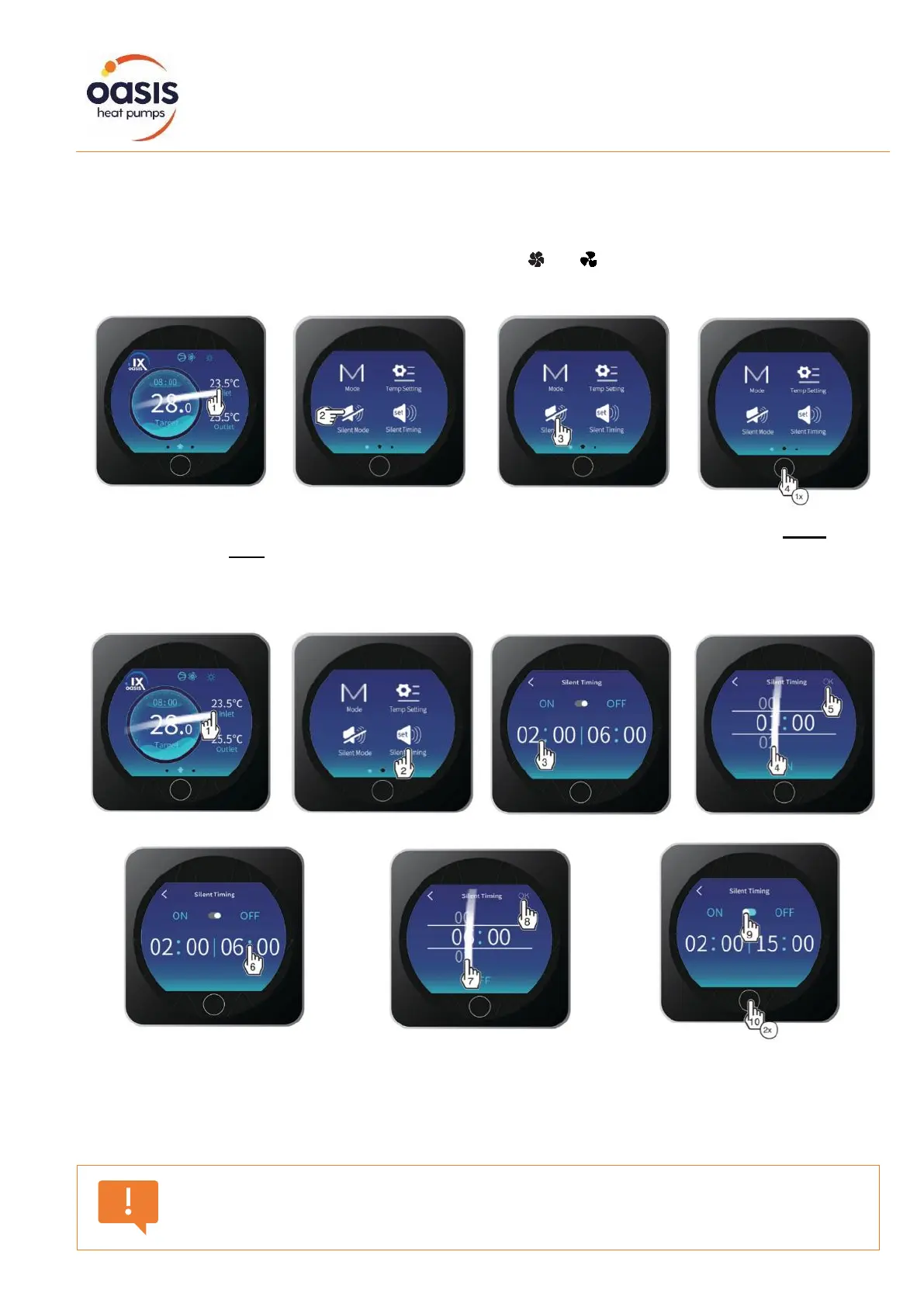
Silent mode forces the heat pump to operate in an economic and quiet manner. This feature is
commonly used to reduce noise when running the heat pump overnight. When silent mode is active,
the fan indicator icon on the home screen will change from [ ] to [ ].
This function can be activated or deactivated manually, or by setting the silent timer.
To activate silent mode, swipe across to the right and touch the Silent Mode key. The icon is white
when activated and grey when deactivated. Press once (x1) to return to the home screen.
Adjusting the Silent Mode Timer
To set the silent mode timer, swipe across to the right and touch the Silent Timing key. Adjust the
start and finish times in one-hour increments and press OK to save (note this is a 24-hour clock).
Activate or deactivate the silent timer by swiping on the icon, as shown above. The icon is blue when
activated and grey when deactivated. Press twice (x2) to return to the main screen.
Activating silent mode will reduce output and may result in a loss of water
temperature, and/or a reduced ability to reach the desired target temperature.


 To Next Page