Need help?
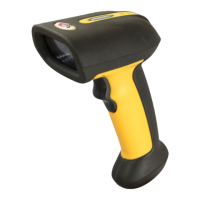
Do you have a question about the Sunlux XL-9620D and is the answer not in the manual?
Displays the current software version of the scanner.
Resets the scanner to its original factory configuration.
Configures how data is output, including USB priority and simultaneous output.
Specifies how scanned data is transmitted, such as immediate upload.
Manages data capture and storage, including inventory and automatic saving when disconnected.
Configures the 2.4GHz wireless connection and pairing process.
Configures Bluetooth HID connection and pairing for data transmission.
Supports Bluetooth Low Energy and Serial Port Profile for data transfer.
Chooses between USB-HID and USB-VCOM interfaces.
Defines data output formats for USB-HID, like keyboard keys or ASCII.
Selects specific USB data transfer modes like Keyboard+ASCII or Send ASCII.
Options for managing inventory data: clear, upload, view statistics.
Configures scanner audible feedback levels, including mute.
Sets audible alerts for the scanner base station.
Configures the scanner's sleep duration to conserve power.
Sets specific sleep intervals for the scanner, from 10 seconds to 30 minutes.
Defines how GS characters are converted for data transmission.
Controls the case of transmitted data, allowing lower, upper, or inverted case.
Selects the scanner's language for interface and operation, supporting multiple regions.
Configures scanner language for additional regions like Canada, Spain, Brazil, Sweden, Portugal, and Belgium.
Supports language settings for Italy, Turkey, Netherlands, Poland, Finland, and Serbia.
Configures languages for Hungary, Denmark, Japan, and character encoding conversions for Russian, Turkish, and Czech.
Configures how Code ID is output: disabled, in front, or behind the barcode.
Allows setting and clearing custom Code IDs for specific applications.
Manages AIM Identifier output, including enabling it before or after the barcode.
Configures the order of prefixes and suffixes appended to scanned data.
Customizes barcode data by editing fields and configuring start/end lengths.
Controls which parts of the barcode data are transferred, like full data or just the start field.
Selects transfer of center or end fields of barcode data.
Enables scanning of inverse color barcodes, including normal, inverse, or both.
Manages compatibility with non-standard barcodes, with an option to disable.
Enables or disables all barcode types simultaneously.
Manages enabling or disabling all 1D or all 2D barcode types.
Controls the enabling and disabling of Codabar barcode reading.
Configures the transfer of start and end characters for Codabar barcodes.
Sets the minimum length for reading Codabar barcodes.
Enables Code 39 reading and sets maximum length constraints.
Configures Code 39 check bit transfer and Full ASCII mode.
Manages Code 39 start/end character transfer and length ranges.
Configures Code 39 Full ASCII mode and start/end character transfer.
Sets minimum and maximum length parameters for Code 39 barcodes.
Enables Code 32 functionality and its prefix option.
Controls the reading of Interleaved 2 of 5 barcodes.
Configures ITF25 check bit handling and data transfer options.
Sets various fixed lengths or random length ranges for ITF25 barcodes.
Sets specific fixed lengths for ITF25 barcodes from 12 to 24 bits.
Sets minimum and maximum length limits for Interleaved 2 of 5 barcodes.
Enables or disables reading of Industrial 2 of 5 barcodes and configures its length range.
Enables Matrix 2 of 5 reading and sets its length range.
Enables Code 93 reading and sets its length range.
Enables Code 11 reading and sets its minimum and maximum length.
Configures Code 11 check bit output and settings.
Sets specific lengths for Code 11 barcodes, such as 1 or 2 bits.
Controls the enabling and disabling of Code 128 barcode reading.
Configures whether leading zeros in Code 128 are ignored.
Enables or disables reading of GS1-128 and ISBT barcodes.
Sets minimum and maximum length parameters for Code 128 barcodes.
Enables UPC-A reading and configures its check bit output.
Configures UPC-A leading characters, including conversion to EAN-13.
Manages UPC-E reading and its check bit output settings.
Configures UPC-E expansion to UPC-A and leading character output options.
Enables EAN/JAN-8 reading and conversion to EAN-13.
Configures the output of the check bit for EAN-8 barcodes.
Enables EAN/JAN-13 reading and configures check bit output.
Configures the scanner to read UPC, EAN, or JAN additional codes.
Enables EAN13 conversion to ISBN and ISSN formats.
Enables reading of GS1 DataBar (RSS14) barcodes.
Enables or disables GS1 DataBar Limited and Expanded barcode reading.
Enables or disables PDF417 barcode reading.
Enables or disables Micro PDF417 barcode reading.
Configures QR Code reading and specific URL link handling.
Enables or disables Micro QR barcode reading.
Enables or disables Data Matrix and Aztec Code barcode reading.
Enables or disables reading of Hanxin Code barcodes.
Configures automatic scanning modes, including Auto Sense On/Off.
Controls detection of repeated barcodes within a set time interval.
Sets specific time intervals for repeat barcode detection.
Enables scanning only barcodes within the center area of the window.
Configures the scanner's LED indicator light status.
Details the pairing process for 2.4G and Bluetooth HID connections.
Controls the visibility of the virtual keyboard on iOS devices.
Sets the data transfer speed for Bluetooth HID connections.
Configures the character used as a suffix terminator, including 'None'.
Sets various suffix terminator characters like Enter, Line, or Tab.
Configures hiding front or back characters in scanned data.
Step-by-step guide to hide front characters in scanned data.
Step-by-step guide to hide back characters in scanned data.
Configures adding a prefix to scanned data, including step-by-step instructions.
Configures adding a suffix to scanned data, including step-by-step instructions.
Provides detailed steps for adding suffixes to scanned data.
Configures shortcuts to hide the first 1, 2, or 3 bits of scanned data.
Configures hiding the first 4 to 8 bits of scanned data.
Configures hiding the back 1 or 2 bits of scanned data.
Configures hiding the back 3 to 8 bits of scanned data.
Displays the data code representation for the number 0.
Displays data code representations for numbers 1 through 8.
Displays the data code representation for the number 9.
Lists ASCII control characters and their corresponding barcode representations.
Lists ASCII special characters, punctuation, and control codes with their barcode representations.
Displays barcode representations for ASCII numbers, punctuation, and symbols.
Displays barcode representations for uppercase ASCII letters A through Z.
Displays barcode representations for lowercase ASCII letters and function keys like DEL, Caps Lock, F1.
Lists barcode representations for function keys F2 through F12, PrintScreen, Home, etc.
Displays barcode representations for keypad numbers and operators.
Configures adding Ctrl, Shift, Alt, and GUI keys to scanned data.
Details barcode representations for releasing modifier keys like Ctrl, Shift, Alt, and GUI.
 General
| Light Source | 650 nm visible laser diode |
|---|---|
| Decode Capability | 1D barcodes |
| Operating Temperature | 0°C to 50°C |
| Input Voltage | 5 VDC ± 5% |
| Type | Handheld |
| Scan Rate | 100 scans/sec |
| Interface | USB, RS-232 |
| Storage Temperature | -20°C to 60°C |
| Operating Humidity | 5% to 95% (non-condensing) |
| Current Consumption | 100mA |


 To Next Page