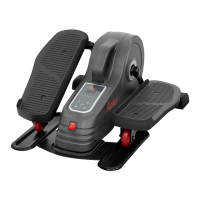
The device described in the manual is the Sunny Health & Fitness Sitfit Motorized Under Desk Elliptical, model SF-E3959.
Function Description
The Sitfit Motorized Under Desk Elliptical is designed for exercise while seated, providing a low-impact workout for the legs. It operates with a motor to move the pedals, offering both manual and automatic modes with various speed and direction settings. The elliptical is intended for adult use and is not suitable for standing. It helps users stay active, especially in sedentary environments like offices or homes, by allowing them to pedal discreetly under a desk. The device comes with a remote control for convenient operation, allowing users to adjust speed, mode, and direction without bending down.
Important Technical Specifications
- Model: SF-E3959
- Rated Voltage: 120V
- Rated Power: 220W
- Speed Levels: 18 speed levels (L1 to L18)
- Speed Range (MPH):
- L1: 0.674 MPH
- L18: 1.896 MPH
- Rotate Speed (RPM):
- Automatic Modes: P1, P2, P3, each with different speed and direction patterns.
- Battery for Remote Control: 1pc CR2032 3V battery
- Safety Features:
- Auto-stop if tilted over 45 degrees.
- Auto-stop within 10 seconds if problems are detected during exercise.
- Automatic shutdown after 30 minutes of continuous operation.
- Grounding: Must be properly grounded to a 120V circuit with a grounding plug (Figure A).
- Clearance: Requires at least 2 feet (60 CM) of free space all around for safety.
Usage Features
The elliptical offers a user-friendly experience with both a console on the device and a remote control for operation.
Control Interface:
- Start/Pause Button: Initiates or pauses the machine. A long press (over 5 seconds) clears all LED display information.
- Mode Button: Toggles between manual mode and three automatic modes (P1, P2, P3).
- Direction Button: Changes the pedaling direction (forward or backward) in manual mode.
- Speed +/- Buttons: Increases or decreases the speed level (L1 to L18) in manual mode.
Operating Modes:
- Manual Mode: Allows users to manually adjust speed and direction. The LED display alternates between speed level, speed, and time.
- Automatic Modes (P1, P2, P3):
- P1 Mode: Pedals move 13 times forward, then 13 times backward, repeating this pattern based on speed Level 1.
- P2 Mode: Pedals start forward, gradually increasing speed from Level 1 to Level 9, then decreasing from Level 9 to Level 1. Upon reaching Level 1, the direction reverses, and speed again increases from Level 1 to Level 9, then decreases to Level 1, before reversing direction and repeating the cycle.
- P3 Mode: Similar to P2, but the speed range is extended from Level 1 to Level 18, with gradual increases and decreases in both forward and backward directions.
Remote Control:
- The remote control (No. 11) duplicates the functions of the console buttons.
- Pairing Method: If the remote is unresponsive or a replacement is used, it needs to be paired with the elliptical. This involves restarting the elliptical, then simultaneously pressing and holding the Mode and Direction buttons on the elliptical until three "beep" sounds are heard. Immediately after, press and hold the Mode button on the remote control for about 3 seconds until a "Beep" confirms successful pairing. The remote should be kept close to the elliptical during pairing.
Safety Guidelines for Usage:
- Seated Use Only: The elliptical is strictly designed for use while seated. Standing on the elliptical is prohibited and can lead to serious injury.
- Stability: Must be placed on a solid, flat, horizontal, and stable surface. Avoid slippery or wet surfaces.
- Footwear: Do not use with wet shoes, wet feet, or socks.
- Unattended Operation: Never leave the appliance unattended when plugged in. Unplug when not in use or before cleaning.
- Overheating Prevention: Do not cover the machine while in use to prevent motor overheating.
- Health Considerations: Consult a physician before use, especially if you have medical conditions like diabetes. Stop using immediately if you feel uncomfortable or experience adverse symptoms.
- Error Display: If "ERR" appears on the display, press the Start/Pause button to reset. If the error persists, contact customer service.
Maintenance Features
- Power Disconnection: Always unplug the appliance from the electrical outlet immediately after use and before cleaning or maintenance.
- Storage: When not in use, disconnect the power supply, store the power cord, and keep the appliance in a dry location out of reach of children or play areas.
- Cleaning: Ensure the appliance is unplugged before cleaning.
- No User-Serviceable Parts: The manual explicitly states that there are no user-serviceable parts in the appliance. Any servicing should be performed by an authorized service person.
- Battery Replacement (Remote Control):
- Press the arrow and buckle point on the battery seat to pull it out.
- Remove the old CR2032 3V battery.
- Install a new CR2032 3V battery with the positive end facing up.
- Reinsert the battery seat.
- Dispose of old batteries according to regional guidelines.
- Power Cord Care: Do not carry the appliance by the supply cord, use the cord as a handle, or wind it around the appliance. Keep the cord away from heated surfaces.
- Environmental Conditions: Do not use in wet or dusty environments, or in humid environments like bathrooms. Avoid direct sunlight.
- FCC Compliance: The device complies with FCC rules, and users are cautioned against unauthorized modifications. If interference occurs, users are advised to reorient the receiving antenna, increase separation between equipment and receiver, connect to a different circuit, or consult a radio/TV technician. The equipment should be installed and operated with a minimum distance of 20cm between the radiator and the user's body.
Customer Support: For replacement parts or issues, contact support@sunnyhealthfitness.com or call 1-877-90SUNNY (877-907-8669). When ordering parts, provide the model number, product name, and part number from the exploded diagram/parts list.

 Need help?
 General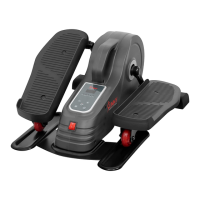

 To Next Page