Home
Sunso
Printer
WTP-801
Page 45
Sunso WTP-801 - Page 45
124 pages
Manual
Save Page as PDF
To Next Page
To Next Page
To Previous Page
To Previous Page
Loading...
WTP-801
User
Ma
nual
42
5)
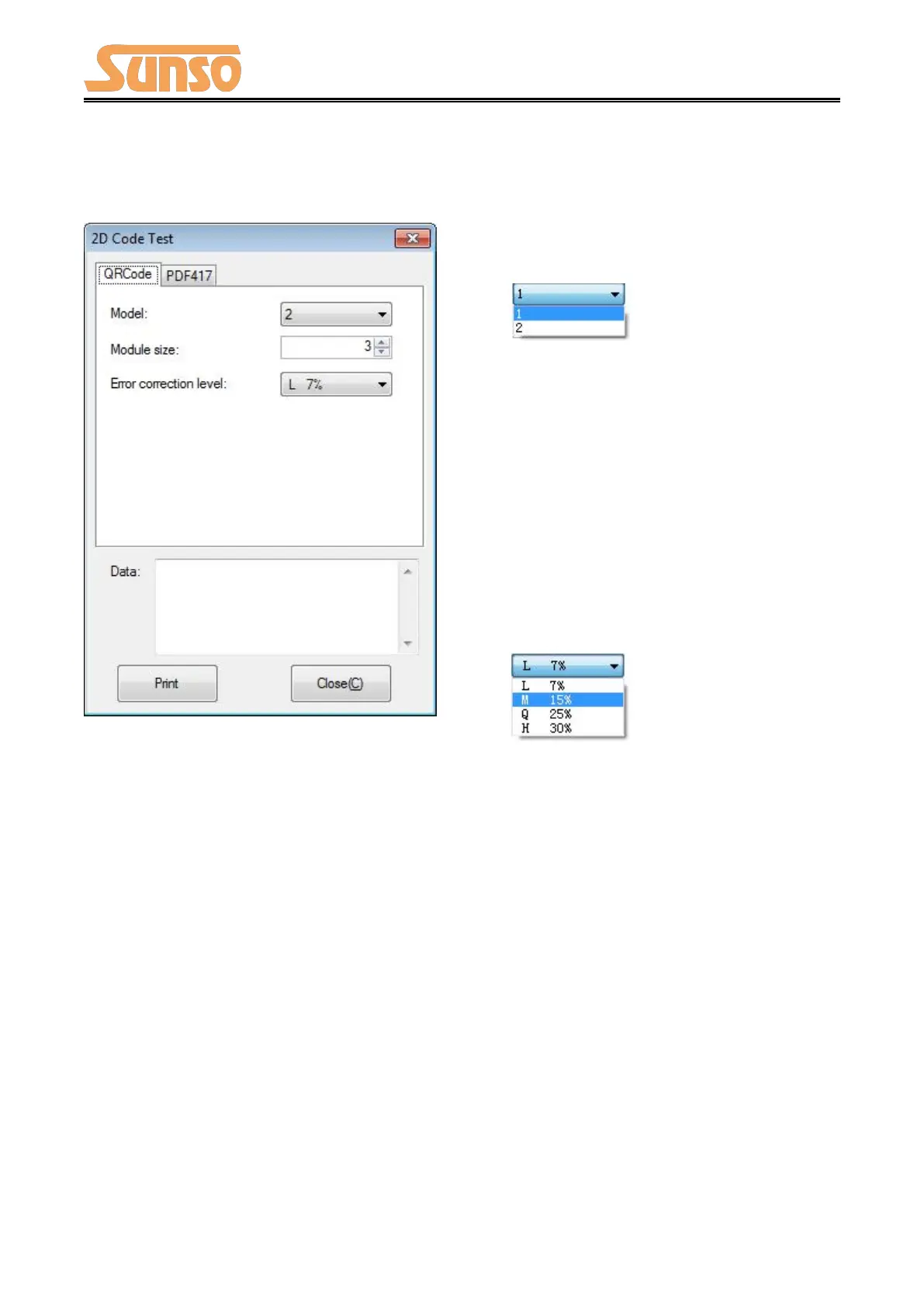
2D
Code
Click
th
e
QRCode
mode.
▲
Model:
1~2
▲
Module
size:
1
~16
The
larger
th
e
module
value,
the
larger
th
e
printed
QR
code
is,
and
the
smalle
r
th
e
opposite.
▲
Error
correc
tion
level:
7%~30%
The
high
er
the
error
correction
level,
the
more
intensiv
e
t
he
module
graphics.
44
46
Table of Contents
Main Page
Table of Contents
2
Statement
4
Important Safety Instructions
5
Overview
7
Introductions
7
The Main Features
7
Getting Started
8
Packing List
8
Appearance and Components
9
Specifications
10
Printer Specification
10
Printing Media Specification
12
Continuous Thermal Paper Specification
12
Notices
12
Printing and Cutting Position
13
Printing Position
13
Cutting Position
13
Installation and Usage
14
Media Loading
14
Paper Confirmation
14
Paper Loading
14
LED Indicator and Beeper
16
Power Connection
17
Interface Cable Connection
19
Cash Drawer Connection
19
Print Test
19
Print Self-Test
19
Printing of Windows Driver Program
19
Interfaces
20
Usb
20
Serial Interface
21
Ethernet Interface
22
Cash Drawer Interface
23
Power Supply Interface
24
Troubleshooting
25
Printer Not Working
25
LED Indicator and Beeper
25
Troubles Occur During Printing
26
Problems Emerge During the Paper Cutting
27
Removing Jammed Paper
27
Printer Cleaning and Maintenance
28
Cleaning Head
28
Cleaning Sensors, Roller And/Or Paper Path
28
Utility Tool for Pos Instruction
29
Installation of Utility Tool
30
Using Utility Tool
35
Add/Modify/Delete/Connect Printer
35
Functions
42
Firmware Update
74
Windows Driver
76
Manual Information
76
Operating System (OS) Environment
76
Windows Driver Preparation
76
Windows Driver Installation
77
Detailed Windows Driver Setting
81
Printing Preferences
81
Printer Properties
119
Uninstall Windows Driver
123
Other manuals for Sunso WTP-801
Quick Start Guide
2 pages
Related product manuals
Sunso WTP-800
27 pages


 To Next Page