
 Need help?
Do you have a question about the Sunstech RP-DS800 and is the answer not in the manual?
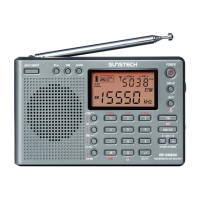
Identifies all external buttons, knobs, and jacks on the radio unit.
Details the function of each numbered control on the radio.
Explains the various icons and indicators shown on the radio's liquid crystal display.
Essential steps for inserting batteries to power the radio.
Guides users on how to find and select radio stations using various tuning methods.
Details how to store, manage, and retrieve preset radio stations for quick access.
Provides instructions for deleting single or all stored radio stations from memory.
How to set the sleep timer and the current time on the radio.
Guides on setting alarms, preset alarm stations, and using the snooze feature.
Explains key lock, FM stereo, and AM bandwidth adjustment functions.
Covers configuration options like FM frequency range, clock format, and MW step.
Details battery installation, charging, and consumption display for rechargeable batteries.
Offers crucial advice on battery usage, low power indication, and long-term storage.
Lists the detailed technical characteristics and performance data of the radio.
 General
| Brand | Sunstech |
|---|---|
| Model | RP-DS800 |
| Category | Portable Radio |
| Language | English |

 To Next Page