Network & Communicating Settings
The CONSOLE port of the Master A2 is pre-assigned from the factory with the default IP address – 10.7.3.200. To enable
local/remote access to the system, you must assign a unique routable address within the domain of the local/wide-area-
network.
Configure the IP address of the CONSOLE port as follows:
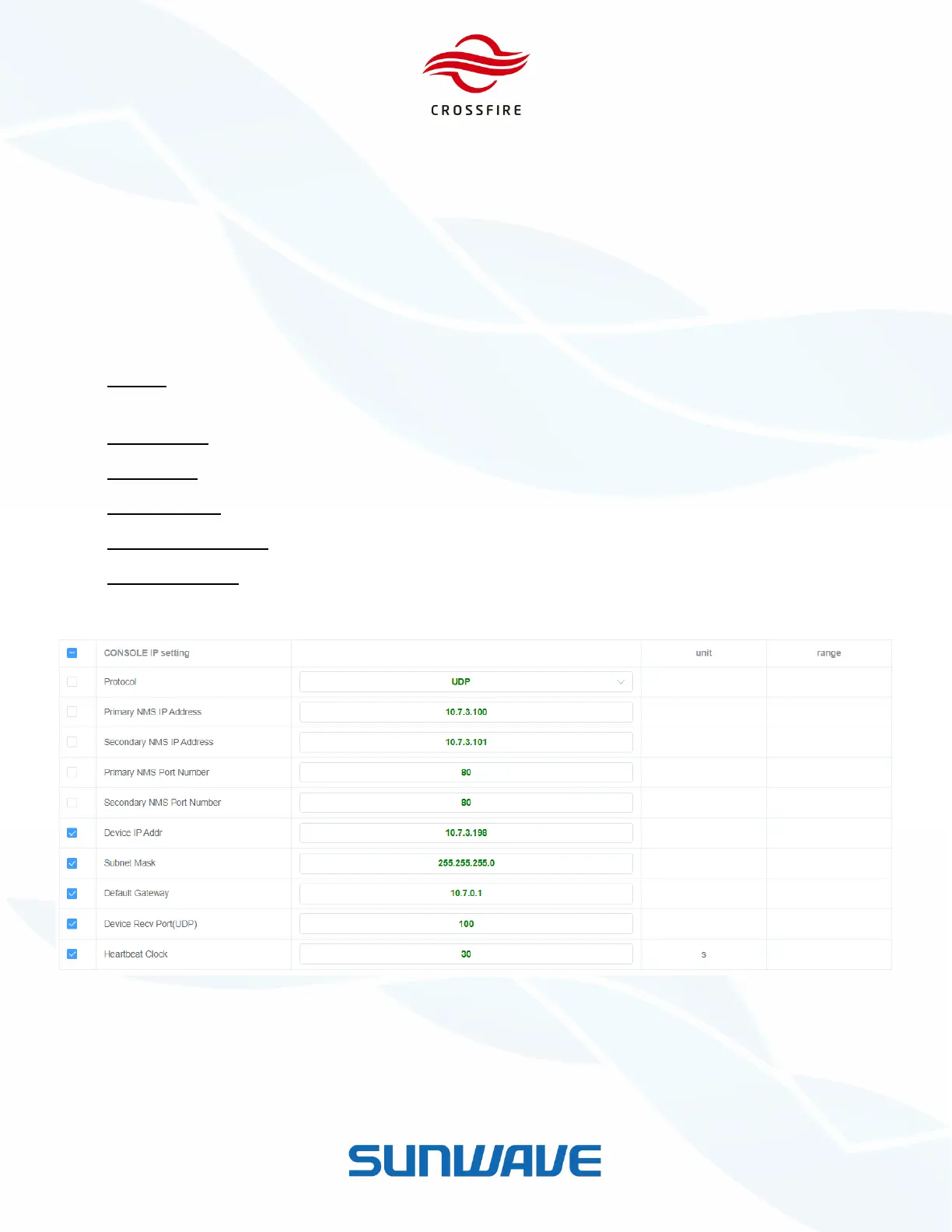
1. Log in the Master A2 OMT, and go to the LAN Connectivity section.
2. Go to the IP Settings section and assign the following fields as appropriate:
Protocol - The CrossFire system supports SNMP (Get & Set, Trap, etc.) and SUNWAVE NMS for remote
monitoring.
Device IP Addr - address assigned to the A2 for local and remote access
Subnet Mask
Default gateway
Device Recv Port (UDP) - The Port number assigned for communication with SUNWAVE NMS.
Heartbeat Interval - The interval in which the Master A2 sends a heartbeat to the surveillance server.
3. Click Set to save the setting.
Figure 14. IP Address Configure


 To Next Page