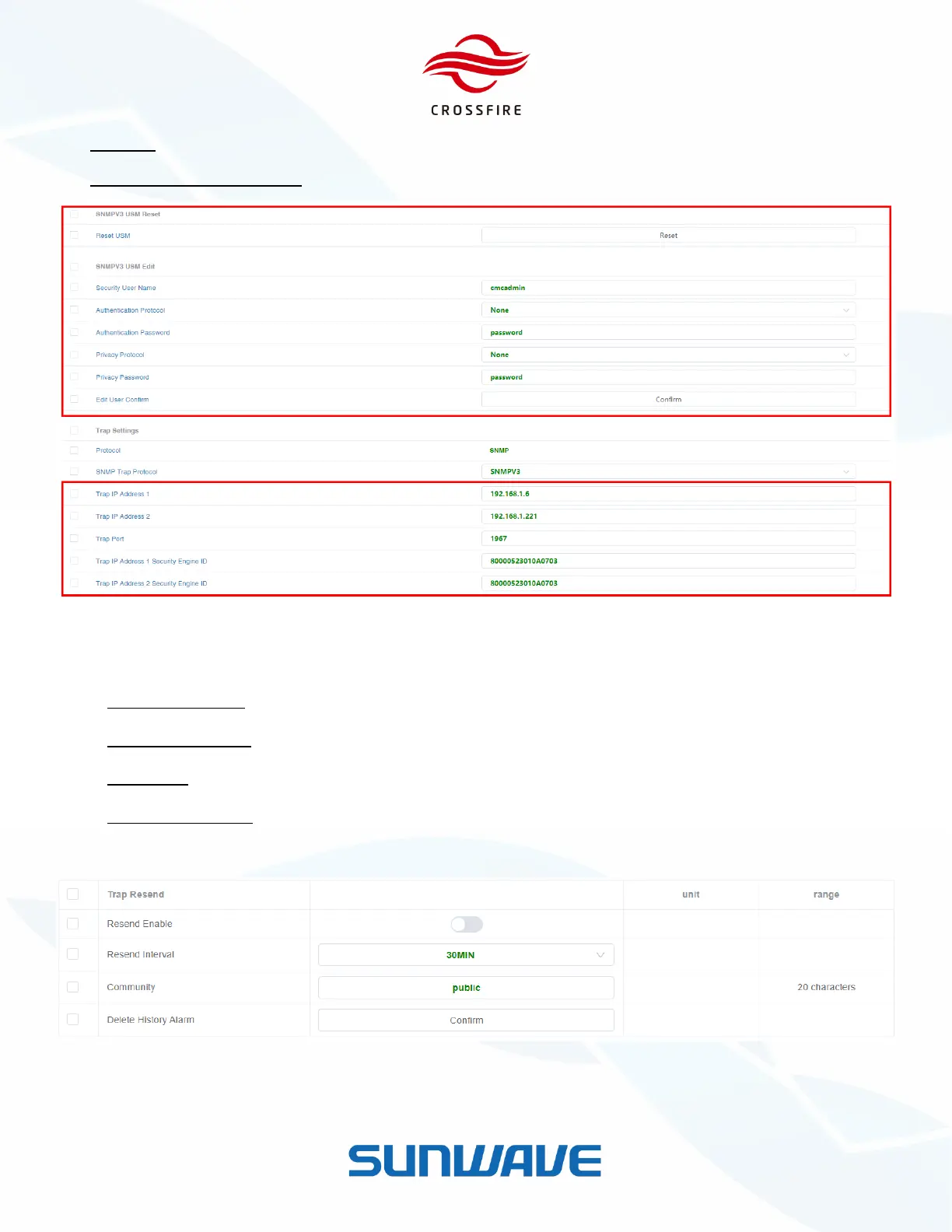
Trap Port - The target port of SNMP trap (default defined port of 162).
Trap IP Addr Security EngineID - The Security EngineID of target Trap IP address.
Figure 18. SNMP V3 Configuration
6. Go to the Trap Resend section at the bottom of the page.
Trap Resend Enable: On / Off to enable / disable trap resend.
Trap Resend Interval: The interval time to resend the SNMP trap.
Community: Community Identifier.
Delete History Alarm: Click Confirm to delete history alarms.
7. Click Save to save the settings.
Figure 19. Trap Resend
Note that the Write/Read Community in SNMP server to communicate with CrossFire Device is ‘Community + Device
Sub ID’. For example, the defaut community is ‘public’ and the Device Sub ID of Master A2 is ‘0’. SNMP Server must use
‘public0’ to communicate with Master A2.


 To Next Page