The CrossFire provides Service Management to configure the mapping information with different orders according to
the various situations, swap the mapping of M2 modules, M2-Module3 to A2-Module2 and M2-Module4 to A2-
Module1.
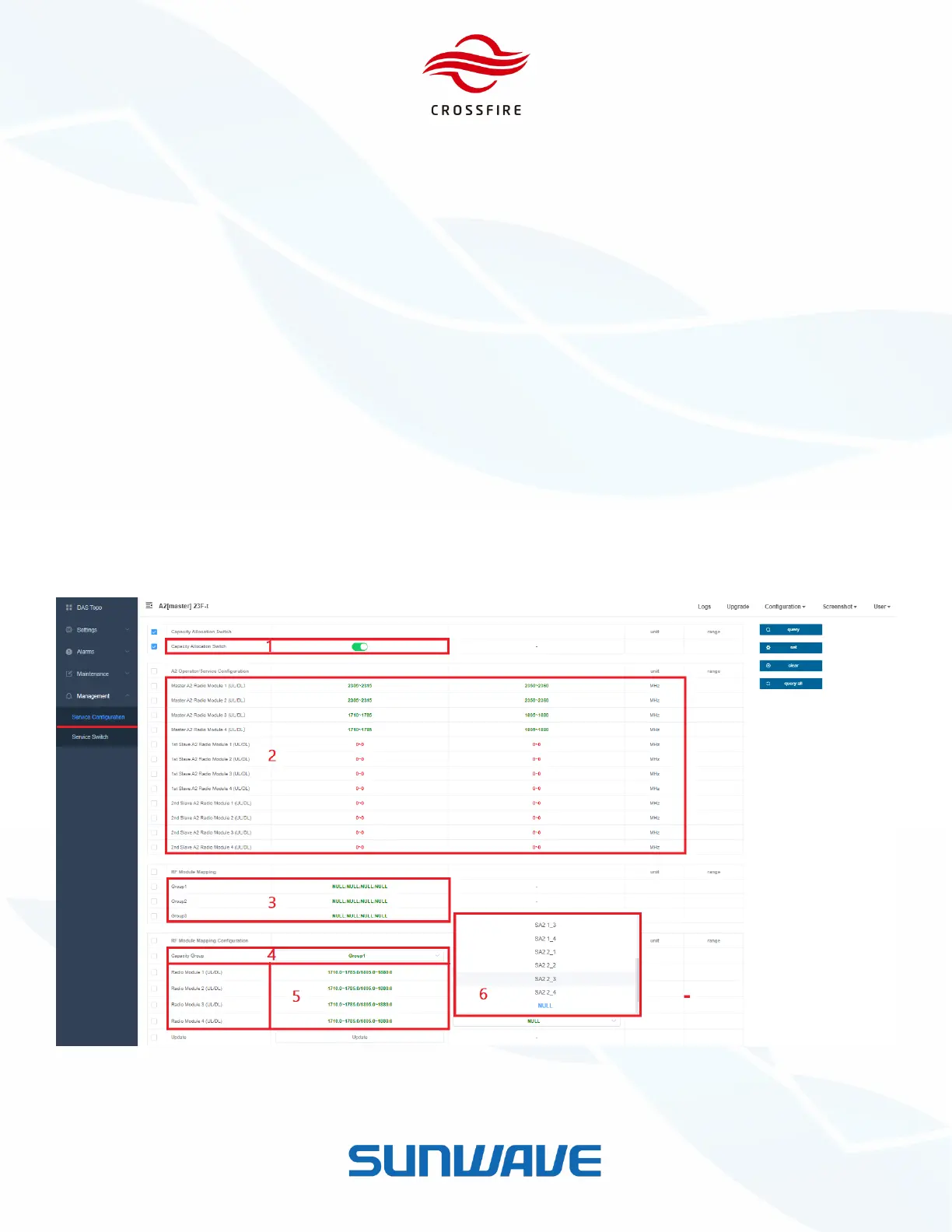
To manage the mapping:
1. Jump to the M2 OMT
2. Go to Management -> Service Configuration -> Allocation Switch
3. Turn the Capacity Allocation Switch on in #1 and click Set to validate it
4. Click QueryAll to check the A2 Operator/Service Configuration in #2 and M2 Module Information in #5
5. Dropdown the Capacity Group to select the group in #4
6. Select the A2 module which is required for mapping in the RF Module Mapping Configuration in #6
7. Select all checkbox of RF module Mapping Configuration - Capacity Group, Radio Module mapping and Update
8. Click Set and then Update to validate the mapping
9. Click QueryAll to check RF Module Mapping in #3
Figure 43. Service Configuration


 To Next Page