EasyManua.ls Logo

Sunwebcam Solar 4G Camera - 4.3. 4 G Camera Setup; 4.3.1. 3 G;4 G Parameters

Sunwebcam Solar 4G Camera
33 pages
Print Icon
To Next Page IconTo Next Page
To Previous Page IconTo Previous Page
Loading...
7
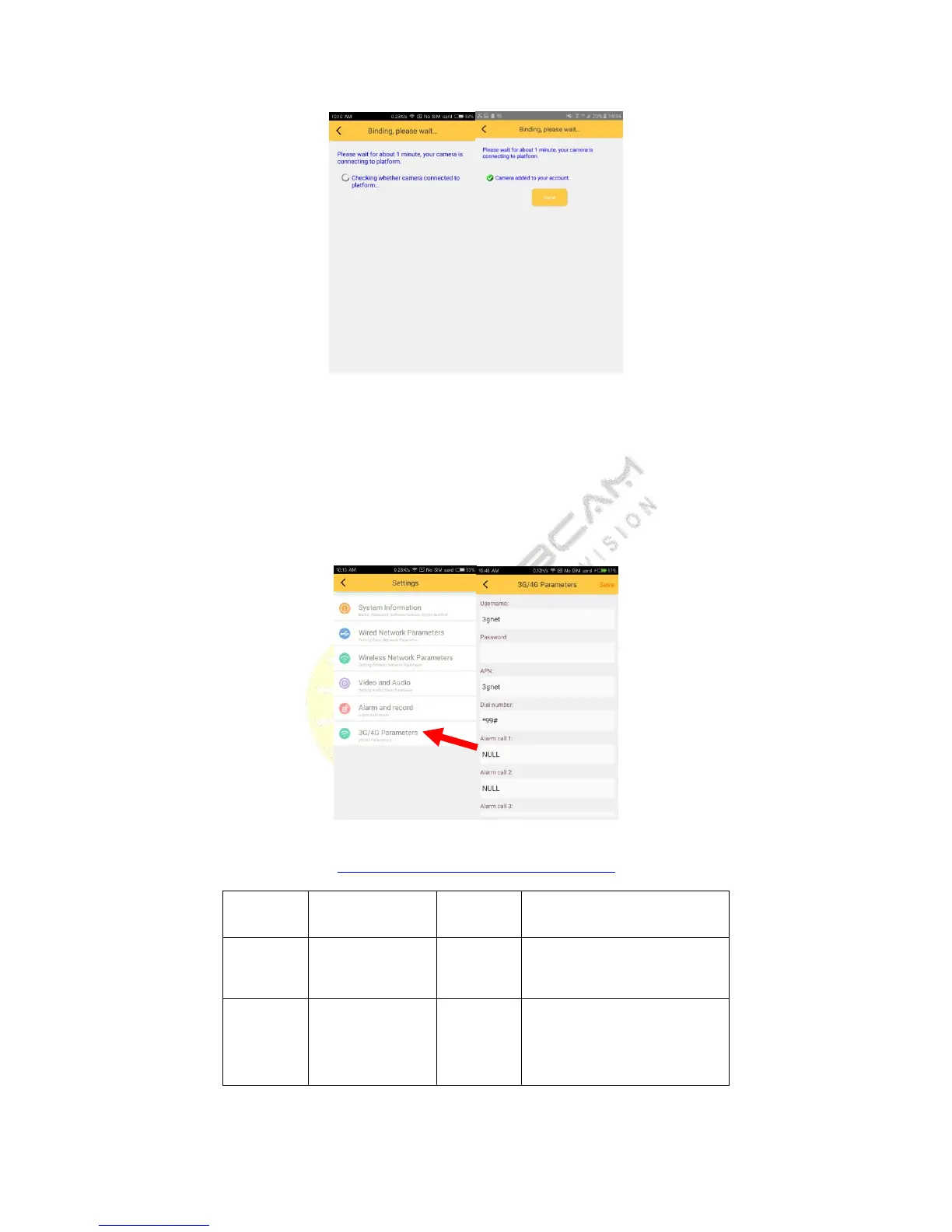
4.3.4G camera
Insert the card correctly, power on the camera,
about 3 minute, please wait
, then click ‘add camera, choose
‘add devices by ID’, input the camera’s ID, click button next, Do not operate cell phone at this moment, until the
camera add successfully. Back to sliding menu, click ‘Remote device’, refresh the list, you can see the camera you
add.

4.3.1. 3G/4G Parameters setting
http://wiki.apnchanger.org/Main_Page
ISP
Dial
Number
account
password
Germany
vodafone
*99#
vodafone
vodafone
Bulgaria
VIVACOM
*99#
VIVACOM
VIVACOM