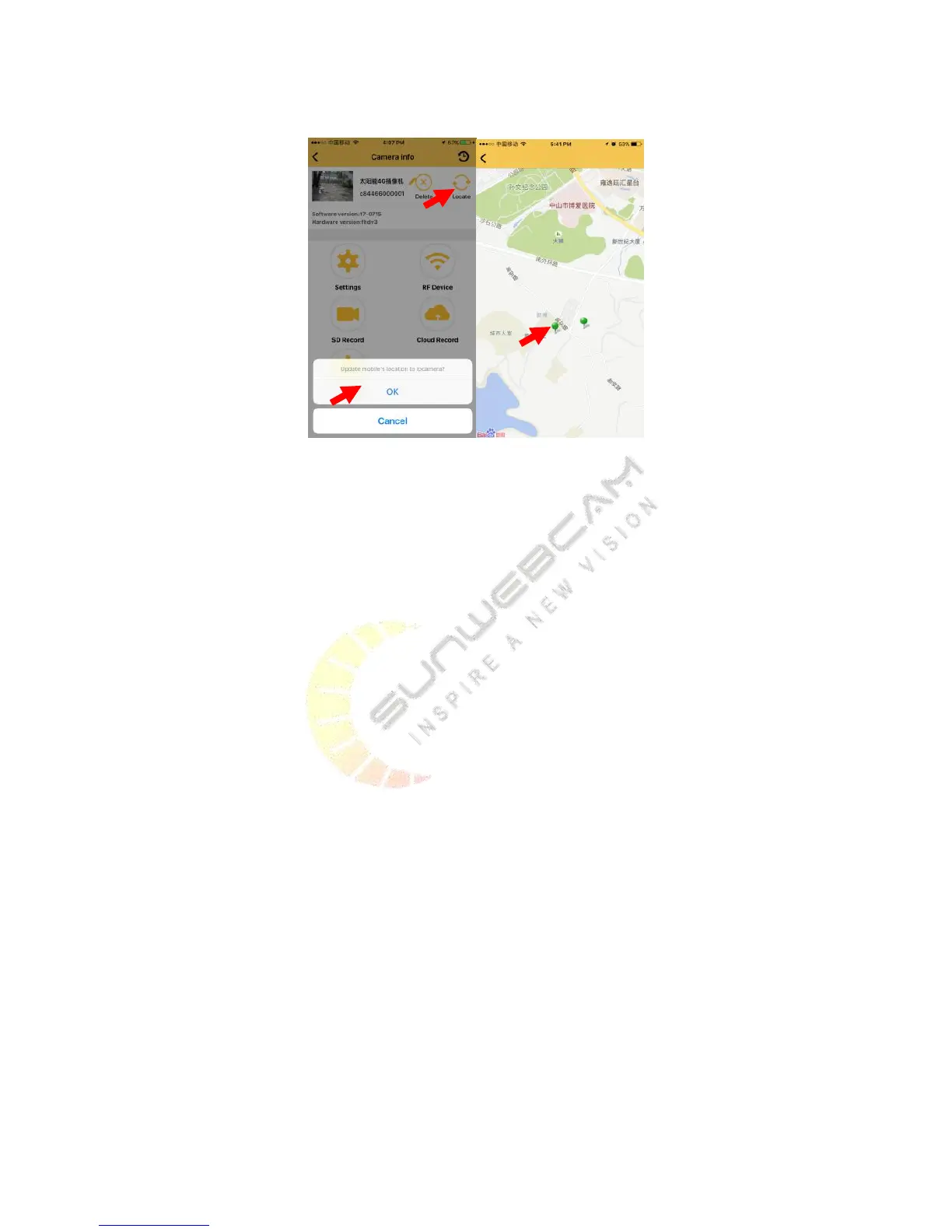
Click ‘Locate’ on top right corner, you can update mobile’s location to camera. Then you can find cameras on map,
and you can check the camera directly.
5. User Guide for PC Client
5.1.Preparations required before installation
Accessing to the Internet is necessary to use the product, otherwise only PC local videos are available.
You must register for an account to use the product. Note that the computer or mobile phone must have
accessed to the Internet, otherwise the registration will be unsuccessful.
5.2.Detailed introductions for installation process
5.2.1. Installation process preview
1) Connect the CAM and the router with the network cable.
2) Register for an account.
3) Search the camera.
4) Set the network parameters and bind the camera to account.
5) Watch the video.
6) Install the RFID accessories (optional).
5.2.2. Detailed introductions for basic installation process
The detailed introductions of installation process are shown as follows through the example of PC clients.
Step 1: Connect the CAM and the router with the network cable


 To Next Page