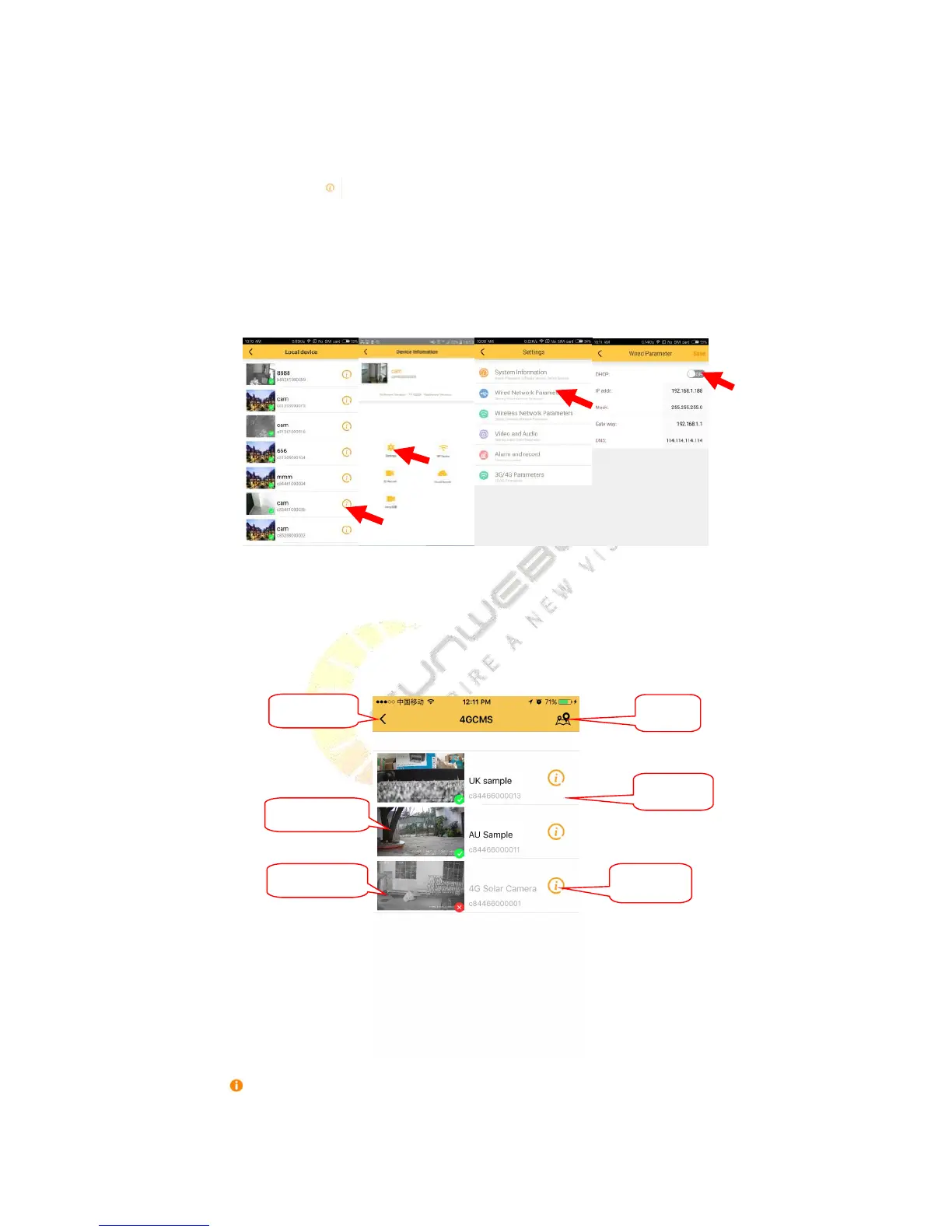
Plug in cable, After waiting for the camera in full swing,
(
about 1 minute, please wait
)
, you should find the
camera in local device list, click , click ‘setting’, click ‘wired Network Parameters’, open the DHCP or input right
IP, finally click save button , then click ‘add camera’, choose ‘add devices by ID’, select the camera you want to bind,
click button next. Do not operate cell phone at this moment, until the camera add successfully. back to sliding
menu, click ‘Remote device’, refresh the list, you can see the camera you add.
If the add failed, the camera can’t connect the internet, you should reset the camera and try again!
When you login successfully ,you will see the management interface of device , as shown in picture
:
click the button , you will enter the device Info interface, you can delete device, modify the name of device,
update the location, search the parameter and settings there. Click the device's thumbnail or device name, you


 To Next Page