ON
OFF
Comparative
output
Forced output mode operation
Sensing
mode
Sensing
mode
UP UP UP
Press Mode key
MODE
Press Mode key
MODE
⁄1
OUTPUT MODES & THEIR CHARACTERISTICS
⁄2 SETTING
䢇 [NO/NC], [Display cycle], [Response time] and [Pressure range] can be
set by the following procedure.
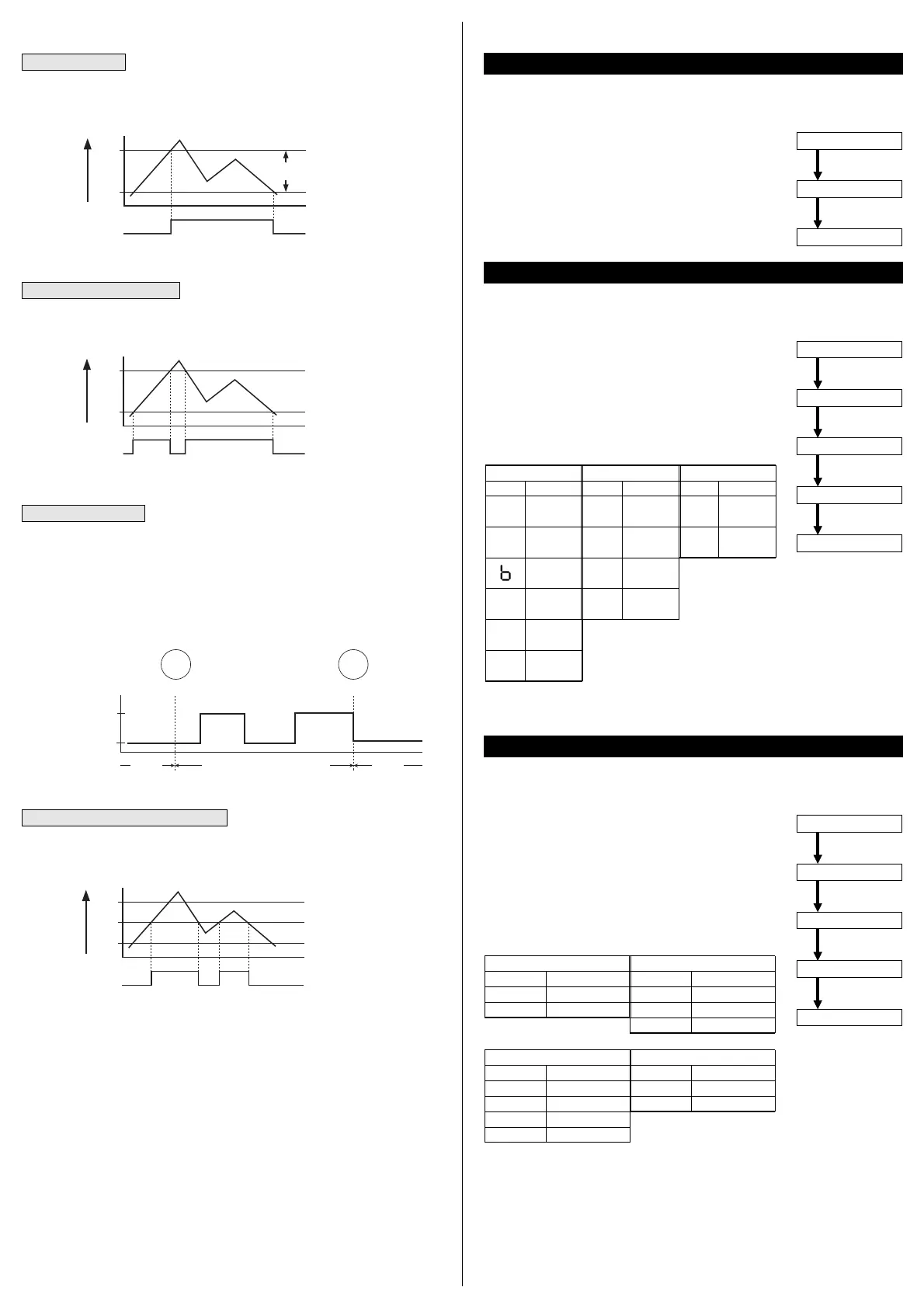
Hysteresis mode
䢇 The hysteresis of the comparative outputs can be set arbitrarily by the set
values for ON/OFF control.
Window comparator mode
䢇 The comparative output can be turned ON or OFF by a pressure which is
within the set pressure range.
Forced output mode
䢇 The comparative output is forcibly maintained at OFF level in the sensing
mode, irrespective of the set values. Hence, it is convenient for only display-
ing the pressure value without using the comparative outputs.
Further, since the comparative outputs can be forcibly switched ON or OFF
with key operation, without actually applying pressure, this mode is suitable
for an operation check or a start-up check.
<Operation example>
䢇 The displayed pressure when the pressure port is left open is adjusted
to zero.
䢇 [Display mode], [Output mode] and [Unit] are set by the following pro-
cedure.
q In the sensing mode, press both UP key and MODE
key, simultaneously, to change the mode to the initial
setting mode.
w The settable digit blinks.
e Setting item changes when UP key is pressed.
r Setting condition of each item changes when DOWN
key is pressed.
q In the sensing mode, press both DOWN key and MODE
key simultaneously to change to the supplementary set-
ting mode.
w The setting item and the setting condition are displayed
alternately.
e The setting item changes when UP key is pressed.
r The set condition of each item changes when DOWN
key is pressed.
<
Setting procedure
>
Sensing mode
Zero-point adjustment
Sensing mode
UP key
+
DOWN key
Release the keys
<
Setting procedure
>
Sensing mode
Initial setting mode
Setting item selection
UP key
+
MODE key
UP key
Setting condition selection
DOWN key
Sensing mode
MODE key
<
Setting procedure
>
Sensing mode
Setting item selection
DOWN key
+
MODE key
UP key
Setting condition selection
DOWN key
Sensing mode
MODE key
Note: Selectable only for vacuum pressure type [DP4-50(P)].
t Press MODE key. Sensor returns to sensing mode.
Note: Displayable only for positive pressure type
[DP4-52(P)].
t Press MODE key. Sensor returns to sensing mode.
Display
P
J
H
S
I
Description
kPa or MPa
kgf/cm
2
bar
psi
mmHg
inHg
Output mode
Display
H
C
O
A
Description
Hysteresis
mode
Window com-
parator mode
Forced
output mode
Automatic sensi-
tivity setting mode
Display mode
Display
d
A
Description
Digital
display
Analog
display
Unit
(Note)
(Note)
Display
no
nc
Description
Normal open
Normal close
Display cycle selection
(
U-2
)
Display
256
512
1024
Description
256ms
512ms
1,024ms
NO/NC Selection
(
U-1
)
Display
2
16
128
512
Description
2ms
16ms
128ms
512ms
Pressure range selection
(
U-4
)
(
Note
)
Display
1
1000
Description
1MPa
1,000kPa
Response time selection
(
U-3
)
q In the sensing mode, simultaneously press both UP key
and DOWN key continuously to display
000
and then,
when the keys are released, the zero-point adjustment
is completed and the sensor returns to the sensing
mode.
Automatic sensitivity setting mode
䢇 After [Set Value 1 (P-1)] and [Set Value 2 (P-2)] of the comparative output are
set, [Set Value 3 (P-3)] is automatically set.
Zero-point adjustment
Initial setting mode
Supplementary setting mode
Supplementary setting mode
P-1
P-2
0
ON
OFF
H
Pressure
H: 1 digit or more
2 digits or more
when using psi
unit
()
Comparative
Output
P-1
P-2
0
ON
OFF
Pressure
Comparative
Output
P-1
P-2
0
ON
OFF
P-3
Comparative
Output
Pressure
Ramco Innovations (800) 280-6933 www.sunxsensors.com



 To Next Page